Hi!
I am working to have the amortization table also auto supply the due dates for each payment if a defined cell shows Annual, semiannual, quarterly, or monthly. Currently I am using a nested If function.
Here is the formula that I have added:
=IF(ISBLANK(Period3), "", IF(Value16 = "monthly", DATE(YEAR(Date2), MONTH(Date2) + 1, DAY(Date2)), IF(Value16 = "annual", DATE(YEAR(Date2) + 1, MONTH(Date2), DAY(Date2)), IF(Value16 = "Quarterly", DATE(YEAR(Date2), MONTH(Date2) + 4, DAY(Date2)), IF(Value16 = "Semiannual", DATE(YEAR(Date2), MONTH(Date2) + 6, DAY(Date2)))))))
When selecting Annual I have no issues with it counting each year, monthly populates the first year but will not continue to the next year. When Quarterly or Semi-Annually is chosen it shows #Invaild
I believe the error is due to not counting through to the next year, but I am not sure of an alternative way to create this formula. For example, there are only 12 months in a year so once the formula is at 12/1/2028 it will not go to 13/1/2028 since there are not 13 months in a year, but it will not transition to 1/1/2029 either.
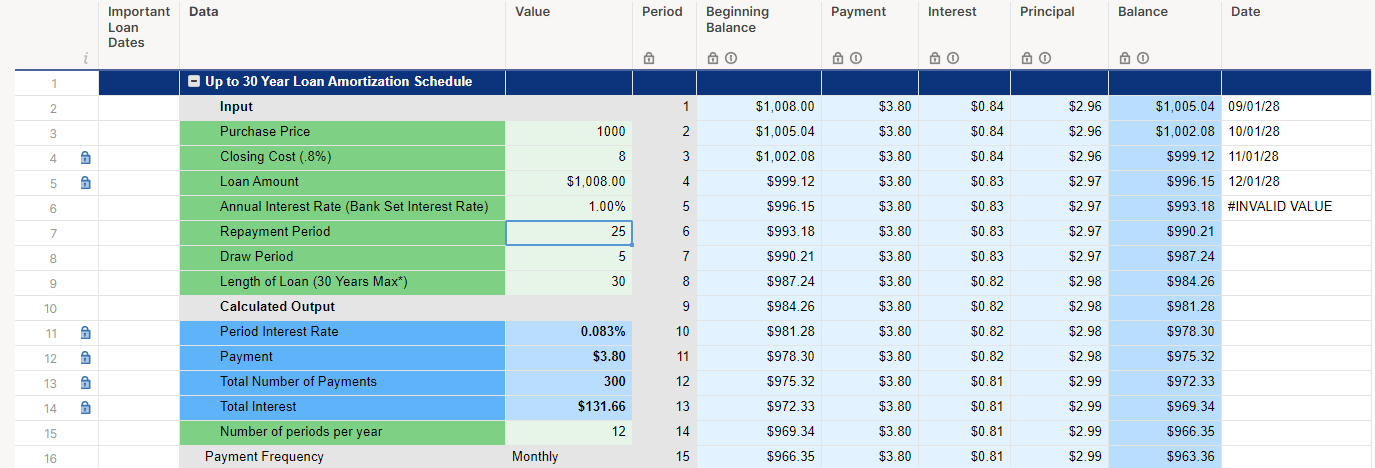
Is there a way that I can fix this?
A smaller issue, how do I get the formula to always use the same cell (in this case Value16) when I drag the formula down the column?
Any help is appreciated!

