I’m hoping someone can help me understand a strange issue I’ve run into.
I have a workflow that sends a single Update Request when the date in a row matches today’s date. This automation has been working correctly for a long time—each contact would receive one email on the day it triggers.
However, recently the workflow has started sending two identical emails at the exact same time to the same contact, even though:
- Nothing has changed in my workflow
- The contact cell contains only one contact
- The conditions still evaluate the same
- The trigger is still set to run once daily at 5:00 AM
I’m including screenshots of my trigger, conditions, and message settings (images attached in my post).
Here’s what the workflow does:
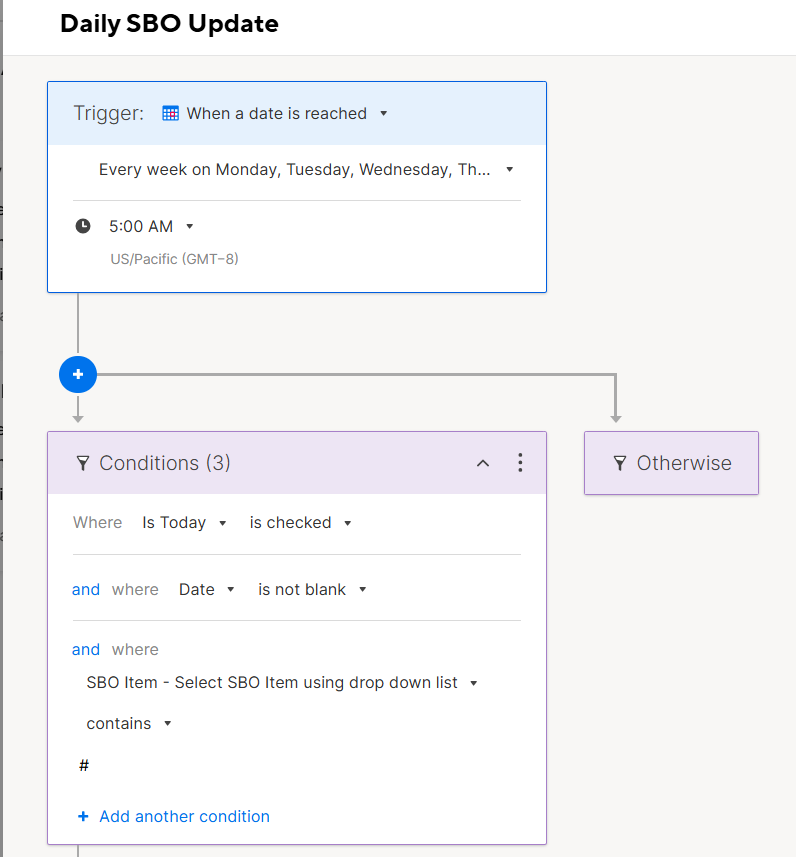
Trigger:
- When a date is reached
- Runs daily Monday–Thursday at 5:00 AM
Conditions:
- “Is Today” is checked
- “Date” is not blank
- “SBO Item” contains “#”
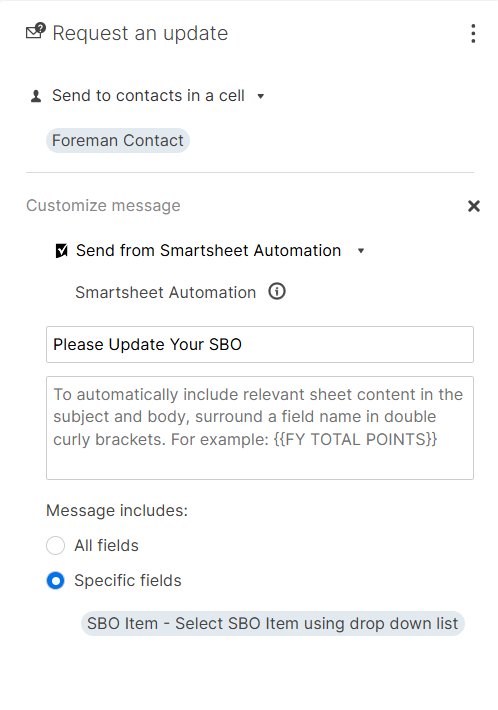
Action:
- Send Update Request to the contact in the “Foreman Contact” column
- Only one contact is stored in that cell
- Message is customized, using specific fields only
Despite all this, each row that qualifies is now sending two identical Update Requests instead of one.
Has anyone seen this behavior before, or know what might cause a workflow to start sending duplicates?
Is this possibly a bug, or is there something I should double‑check in my sheet or automation settings?
Thanks in advance for any help—really appreciate it!