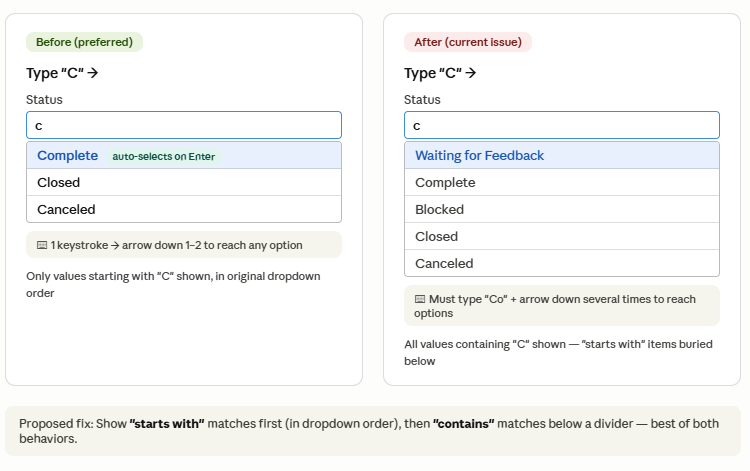
The recent change to Grid View dropdown filtering now shows all values containing a typed letter, rather than prioritizing values that start with that letter. This breaks a fast keyboard-driven data entry workflow many users rely on.
Requested behavior:
- Show "starts with" matches first (in original dropdown order)
- Then show remaining "contains" matches below
- Keep auto-select behavior when only one "starts with" match exists
Why it matters:
- Before: type "C" → Complete auto-selects (1 keystroke)
- Now: type "C" → must type "Co" then arrow down multiple times
- Heavy dropdown users (sprint tracking, status logging) repeat this dozens of times daily
- Directly impacts users with repetitive strain / tendinitis — more keystrokes = real pain
Use case: Status columns with values like: Not Started, In Progress, Waiting for Feedback, Complete, On Hold, UAT, Follow up, Blocked, Closed, Canceled
I reported this to Smartsheet Support but I was told this is now new expected behavior. I'd like the old function back or at least sort with Start with then Match on dropdown value.


