Summary
Introduce a new roadmap visualisation within Smartsheet that allows multiple tasks or phases belonging to the same project to be displayed on a single row. This would provide a true portfolio-level roadmap view similar to those available in dedicated roadmap products, whilst retaining Smartsheet as the system of record.
Current challenge
Smartsheet's existing Gantt and Timeline views are task-centric. Whilst excellent for project execution and detailed planning, they are less effective for portfolio-level communication where stakeholders need to understand how projects progress through key phases over time.
Today, projects are commonly structured as:
- Project A
- Design
- Development
- Testing
- Launch
In Gantt View, each phase appears on a separate row. In Timeline View, tasks are also displayed independently. This makes it difficult to create executive-level roadmaps where projects occupy a single visual lane and multiple phases are displayed sequentially across a timeline.
As a result, many customers export Smartsheet data into Power BI or similar tools purely to create roadmap visualisations.
Proposed Solution
Introduce a new Roadmap View that:
- Displays one row per project.
- Allows multiple date ranges to be rendered on the same row.
- Supports colour-coded project phases.
- Supports milestone markers.
- Supports grouping and filtering.
- Supports programme and portfolio roll-ups.
- Maintains a live link to underlying task data.
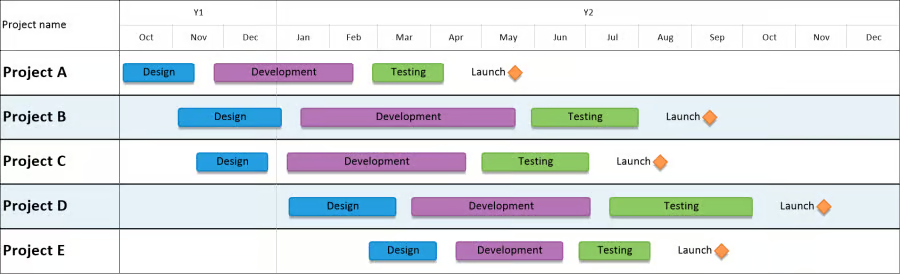
Key Capabilities
Multi-Bar Rows
Allow multiple bars to be displayed on a single project row, each mapped to different date fields.
Milestone Support
Display milestone icons alongside phase bars.
Dynamic Phase Mapping
Allow users to select:
- Start date column
- End date column
- Colour
- Label
for each roadmap phase.
Portfolio Filtering
Support filtering by:
- Client
- Programme
- Project Manager
- Region
- Status
- Custom fields
Dashboard Integration
Allow Roadmap Views to be embedded directly within Smartsheet Dashboards.
Hierarchy Grouping
Allow projects to be grouped under programmes, portfolios or business units whilst maintaining a concise roadmap view.
Why This Is a Strong Candidate for Enhancement
Timeline View already contains much of the underlying functionality required.
The enhancement is not the creation of an entirely new module, but rather the ability to render multiple date ranges against a single record or row.
From a user perspective, this feels like a natural evolution of Timeline View rather than a completely new product area. The underlying project data already exists within Smartsheet; customers simply need an alternative visualisation optimised for portfolio reporting.
Business Value
Executive Reporting
Provides an executive-friendly portfolio roadmap without requiring external tools.
Reduced Tool Sprawl
Many customers currently export Smartsheet data into Power BI or roadmap-specific products purely for visualisation. This feature would eliminate a common reason for leaving the platform.
Increased Stakeholder Adoption
Executives, PMOs and clients typically want roadmap views rather than detailed task schedules. Providing both within Smartsheet would improve adoption across a wider audience.
Improved Dashboards
Roadmaps are one of the most common artefacts presented in steering groups, governance forums and client reviews. Native support would significantly strengthen Smartsheet Dashboard use.
Competitive Positioning
Brings Smartsheet closer to roadmap capabilities offered by competitors e.g.
- Monday.com Portfolio Views
- Microsoft Project Roadmap
whilst retaining Smartsheet's flexibility and work management strengths.
Example Use Cases
- Programme roadmaps
- Product launch planning
- Construction project portfolios
- PMO reporting
- Agency campaign planning
- Transformation programme governance
- Client-facing delivery roadmaps
Success Criteria
- Projects displayed as a single lane with multiple phases.
- Multiple date ranges displayed on the same row.
- Milestone support.
- Dashboard embeddable.
- Fully filterable and reportable.
- No requirement for duplicate project data.
- Live connection to underlying schedules and task updates.

