Sign in to join the conversation:
I have searched all the forums for the formula for the checkbox sum & none of them have worked for me. I need to total the sum of the checkboxes that are checked within a column.
I just needed to do this today.
enter '=COUNTIF', then select the entire column, and put '1' for checked.
=COUNTIF({On Track}, 1)
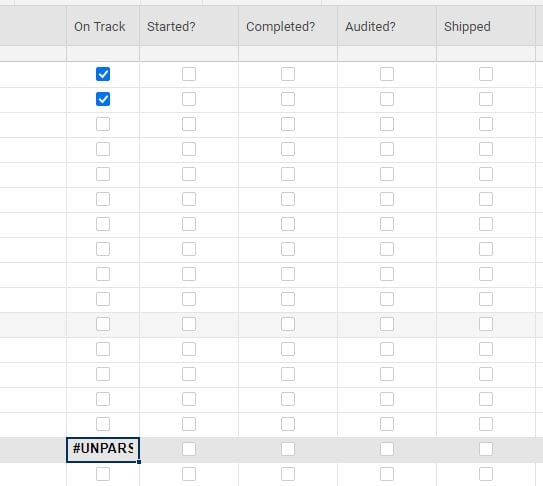
I don't know why, but its not working for me. I've tried this several times. I either get "unparseable" or Boolean Exp message.
It worked if it is not in the same column as the checkboxes! Is there a way to make it part of the same column so the totals are below the boxes?
If you make all of the lower rows Child rows (indent them) below the summary row, you could use...
=COUNTIFS(CHILDREN(), 1) + ""
@Paul Newcome this formula helped me tremendously! Now I am facing another challenging. I am now trying to SUM the COUNTIFS totals using a CHILDREN formula to show the overarching total. I have attached an image. When I just try a general =SUM(CHILDREN( formula, nothing populates in the cell and I still see the checkbox. When I tried totaling manually at one point, instead of a SUM I somehow merged the numbers into a string (i.e. instead of 5 + 4 + 1 creating 10, I got 541).
Any suggestions on how I can total up the 23 + 17 + 1 + 0 + 0 + 0 appropriately in the North America row?
@Jen V I am at a similar situation. Did you find a way to sum in the checkbox column?
Thanks in advance.
Hey, I am using the below formula→ =INDEX({Source_Sheet_Entire_Table}, MATCH([Unique ID]@row , {Source_Sheet_ID_Column}, 0), 1) Although the answer should be "Project details" mentioned in Column 1, it says #No Match. What am I doing wrong?
How can I delete old sheets I no longer use from my account?
I'm trying to display a task progress chart showing "complete", "late", and "not complete" in my dashboard and for some reason the chart will display as a column chart but it won't display as a donut chart even though I'm referencing the same report. I'd prefer to display as a donut chart as I think it looks better and is…