Sign in to join the conversation:
I am trying to automate the ryg ball if i go:
15 days past start date and my complete is blank, red ball
10 days past start date and complete is blank, yellow ball
otherwise green ball.
Any help is appreciated
You can use the symbols as a dropdown and then the IF statement where the result will be "Red", "Green" or "Yellow". That text as the output of the function will form the colors.
Another thing to think of is that only updates when the sheet is opened and saved again. I've had to integrate with MS Flow to add blank rows just to force a re-calculation for countdown timers and such.
nested if statments, and(), isblank()
something like
=if(AND(TODAY()-StartDate1>15, isblank(CompleteDate1)),"Red",if(and(Today()-StartDate1>10, isblank(CompleteDate1)), "Yellow","Green"))
I only get green balls, including in the blanks.
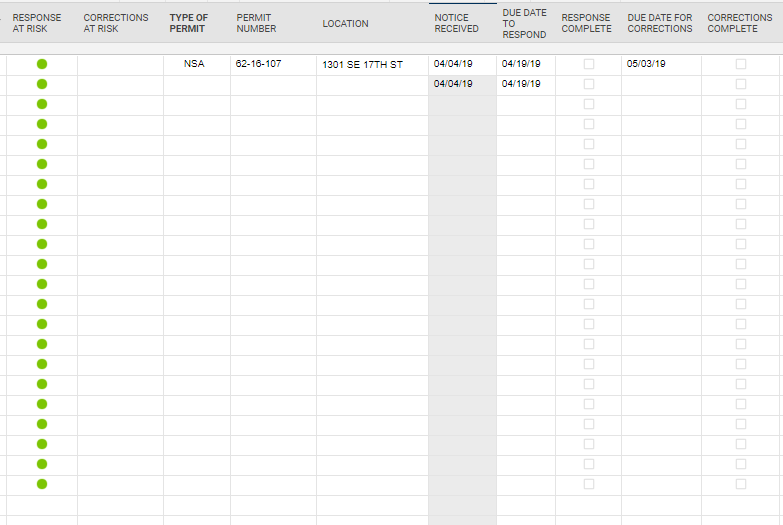
I have attached an example of my sheet
Try this modification which is looking at whether Corrections complete is blank,
=if(AND(TODAY()-[Due Date to respond]@row >15, isblank([Corrections Complete]@row)),"Red", IF(and(Today()-[Due Date to respond]@row>10, isblank([Corrections Complete]@row)), "Yellow","Green"))
Or this modification that is looking for a 0 in the corrections complete.
=if(AND(TODAY()-[Due Date to respond]@row >15, [Corrections Complete]@row = 0),"Red", IF(and(Today()-[Due Date to respond]@row>10, [Corrections Complete]@row=0), "Yellow","Green"))
=IF(AND(ISTEXT(Location@row), ISBLANK([Completed Column]@row)), IF([Start Date]@row <= TODAY(-15), "Red", IF([Start Date]@row <= TODAY(-10), "Yellow", "Green")))
Give this a whirl...
Mike's looks like it should work as well.
I have worked the formula a little differently.
Red ball if past due date, Yellow if within 5 days of due date, Green if marked complete.
However I want the RYG column to stay blank if the date received column is blank. How do I write that?
Here is my formula so far.
=IF([RESPONSE COMPLETE]1 <> 1, IF(TODAY() - [DUE DATE TO RESPOND]1 > 0, "Red", IF(TODAY() - [DUE DATE TO RESPOND]1 > -5, "Yellow")), IF([RESPONSE COMPLETE]1 = 1, "Green"))
=IF([RESPONSE COMPLETE]@row= 1, "Green", IF(ISDATE([NOTICE RECEIVED]@row), IF([RESPONSE COMPLETE]@row= 0, IF([DUE DATE TO RESPOND]@row < TODAY(), "Red", IF([DUE DATE TO RESPOND]@row> TODAY(-5), "Yellow")))))
Give this a try.
Perfect!!
Thank you
Happy to help!
We want to implement single-sign-on at work and have received approval. However, our IT department wants all external partners to have/use Mayo credentials to log into Smartsheet. Not all of our external partners ever set foot on our campus and don't have our company credentials. I have a couple of questions. Has any other…
I can create a Chart in Dashboard from sheet well but from Report is not working now. I just try with simple Report (just contain 2 column Primary and Number) but cannot make the chart. Is there any changes recently right, because I haven't worked with Smartsheet dashboard for a long time and I remembered that I could do…
Cant find this anywhere