I currently have a formula to Join and Collect Date from multiple rows in Smartsheet but it is displaying the data multiple times in the single cell, I need the formula to only show each unique ID once but can't seem to get the results to work. Every time, I adjust the formula below, to try and incorporate a new function to show each ID once, it returns various errors.
Current Formula: =JOIN(COLLECT([Transfer ID]:[Transfer ID], [Transfer Month and Year (Flow)]:[Transfer Month and Year (Flow)], [Transfer Month and Year (Flow)]@row), ", ")
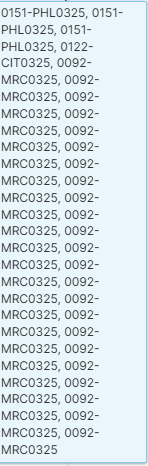
Ex: 0000-MRCxxx (23 rows), 0000-CITxxx (1 row), and 0000-PHLxxx (3 rows) but I need the formula to return each ID 1 time each in a single cell)
Does anyone know how I can get the above formula to display each ID once in a single cell? The below screenshot is how it is currently displaying the IDs in a single cell.