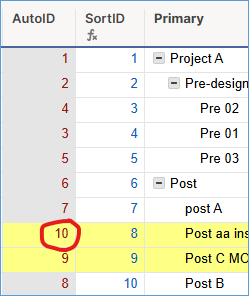
Hi -
I'm looking for a formula that auto-assigns a number based on it's position in the sheet and can ideally be turned into a column formula.
Our project format has the "Project Name" as the parent row and tasks underneath as child rows. I house multiple projects within one sheet, and i need to be able to sort by the project name; however, when i sort by project name, the tasks then sort alphabetically.
I know there is a column setting to auto-assign a number to a row; however, we often have to add in new rows throughout the course of a project (for tasks that do not go at the end, but belong in the middle of a project) and the newly added rows are assigned numbers that do not correlate with the correct position on the sheet and cannot be edited.
I set up a "Sort" column that lists "1" in the parent row and has +1 in each subsequent row (each row is 1 greater than the row above it), and this can work but because we often add new rows, we will also have to remember to update the "Sort" row every time. It seems cumbersome, so just looking for a more intuitive way to sort my rows.
Anyone have a solve to this issue?
Thanks!