Sign in to join the conversation:
Hi all,
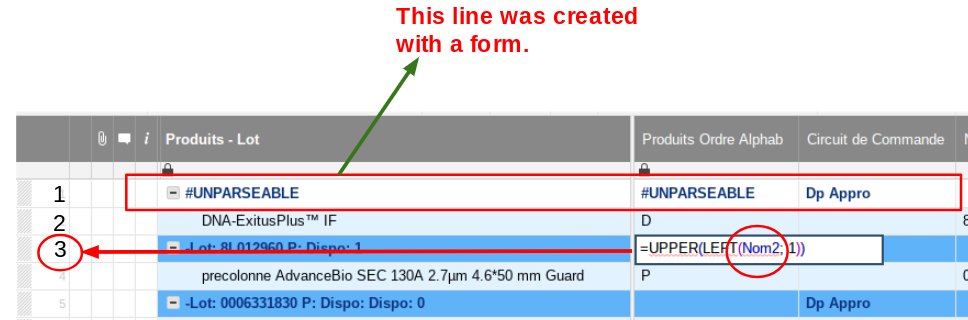
Since a few days, there are some issues inserting ROWS with a FORM.
see image below, for instance when you insert a row at the top of a sheet, it SHIFTS all the formulas in the entire Sheet !
Any Help is Welcome...
Thanks
up.
anyone is getting this issue ?
Hi
To complete, see below a video that shows the issue :
https://drive.google.com/file/d/1QXcIGVqUyq6-0U2YpZQJFReK9WkuPzAi/view?usp=sharing
How strange !
Hi Fabrice,
Please contact Support to troubleshoot this further.
Cheers
Hi Shaine,
The issue has been fixed last night.
It was a problem about french language and formulas, that's why only some customers where impacted.
Fabrice
Hey, I am using the below formula→ =INDEX({Source_Sheet_Entire_Table}, MATCH([Unique ID]@row , {Source_Sheet_ID_Column}, 0), 1) Although the answer should be "Project details" mentioned in Column 1, it says #No Match. What am I doing wrong?
How can I delete old sheets I no longer use from my account?
I'm trying to display a task progress chart showing "complete", "late", and "not complete" in my dashboard and for some reason the chart will display as a column chart but it won't display as a donut chart even though I'm referencing the same report. I'd prefer to display as a donut chart as I think it looks better and is…