Connect with peers, share your expertise, and inspire what’s next in Smartsheet — from proven practices to practical how-to insights from fellow users and product experts.
Sign in to see the current vote count, add your own vote, or leave a comment.
I really miss allowing the user to actively filter information from their dashboard view. I wish I could have a filter button that could be positioned on the dashboard. Then the user could choose to see the data of a period or a project, for example.
@Satishwar Raju Somalraju @geocull pop me an email and I can point you at an app we've developed that uses Smartsheet data backend and gives you powerful Dashboards (similar to Power BI). Drill down on Charts and extensive filtering available.
Alex,
How did you do the automation to move the previous row when a new one is added?
Wouldn't it be great to have one single dynamic filter for the dashboard feature!!!! This idea includes having one filter at the top of the dashboard that updates all related data. For example, in university recruitment, I want to view metrics for one university at a time. Ideally, I’d select the university from a top-level filter, and all charts below would update accordingly. Currently, I have to create a separate dashboard per university and manually filter each report/chart—so many clicks! A single dynamic filter would make this process much more efficient.
@Caroline L. have you checked out our Smarter Dashboards tool - it does what you want with all your data still in Smartsheet.
Feel free to email me for more details.
Kind regards
Debbie
I haven't heard of this app/tool yet, but will take a look. Thank you!
@Caroline L. Link for ease
I want to be able to input variables in a set of "filters" that checks against the report and returns the correct row of data that matches the filter conditions. Without filtering. Basically an AI or query.
Caroline, I couldn’t agree more with your suggestion. A top-level, single dynamic filter that controls all widgets and reports within a dashboard would be a game-changer.
The ability to switch views—like selecting a specific university or department—and have all charts, metrics, and visuals instantly update would dramatically streamline workflows. As it stands, maintaining multiple dashboards or manually updating filters for each chart/report is both time-consuming and error-prone.
This kind of centralized filtering is standard in many BI tools and would make Smartsheet dashboards far more powerful and user-friendly. Huge +1 from me!
@bs786 We already have this product on the market, a Dashboard that can give you multiple views and update ALL widgets on one dashboard with filters - multiple ones! You can also edit data in the tables in the dashboard too if you like! Self configurable too, so no need to pay loads for someone to set it up nor do you need to learn anything difficult. Just drag and drop and entering properties into a dialog box. My email address is in my profile, please do contact me if you are after the features described on this thread. There's a free trial too, so nothing to loose!
I agree with this, not just me, but many of the customers I work with!
We know the logic should be there, as the filter exists on Chart Legends.
Imagine the use cases that this would open up. It would help in terms of less clicks, less navigating and just less to maintain.
I need to be able to present information to my directors and for them to do some headline interrogation (breakdown by gender, postcode etc). To save me having to shift to Power BI, this function would help my team to continue using smartsheet
This template "Dynamic Dashboard with form filter" got a dynamic filter on a dashboard:
https://app.smartsheet.com/r/template-gallery/templates/3c06021d-a78a-4203-a8ae-1282c8dc1555/Dynamic-Dashboard-with-Form-Filter?tg-locale=en_US
Yes, it's a great addition, but it is sad that yet again it's another fee…
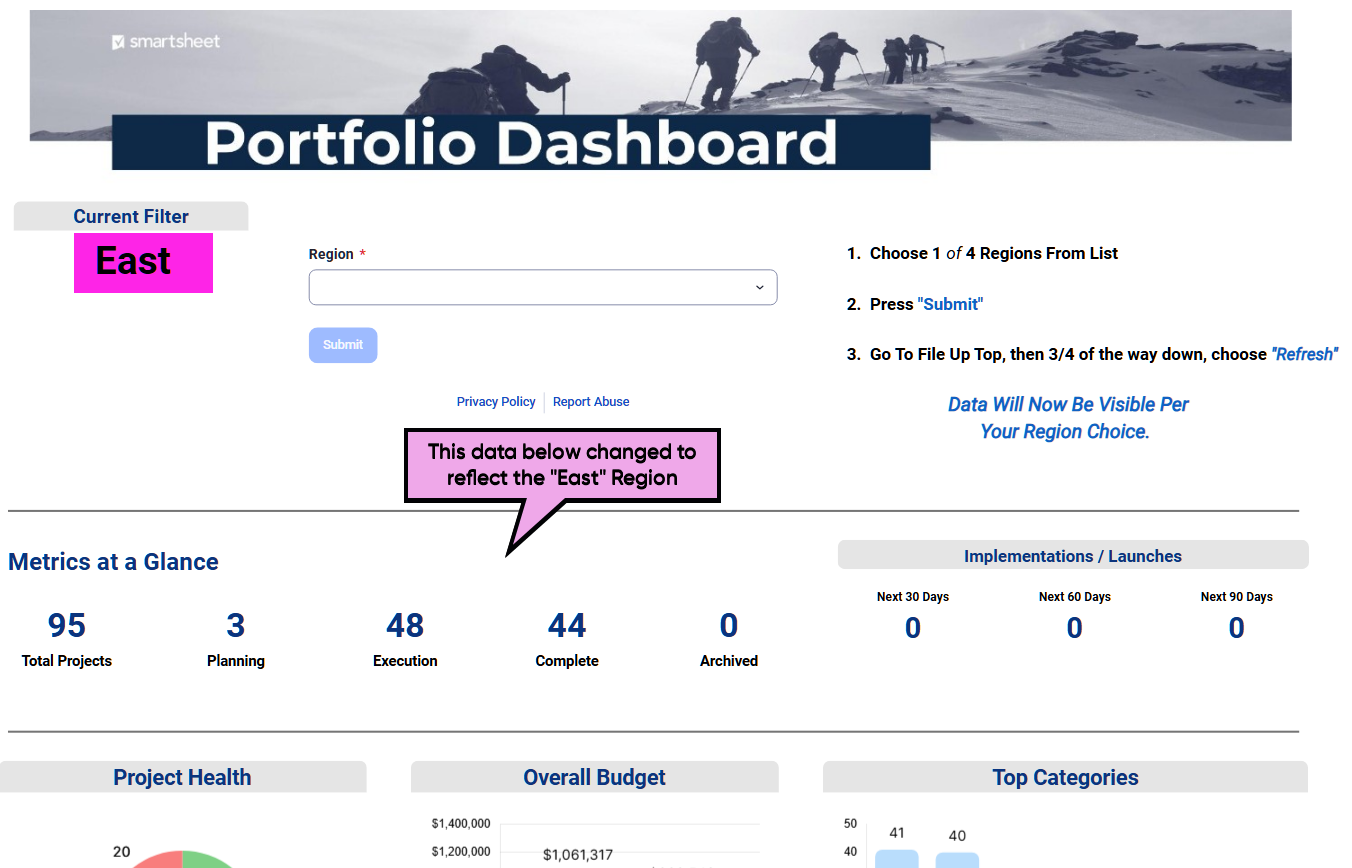
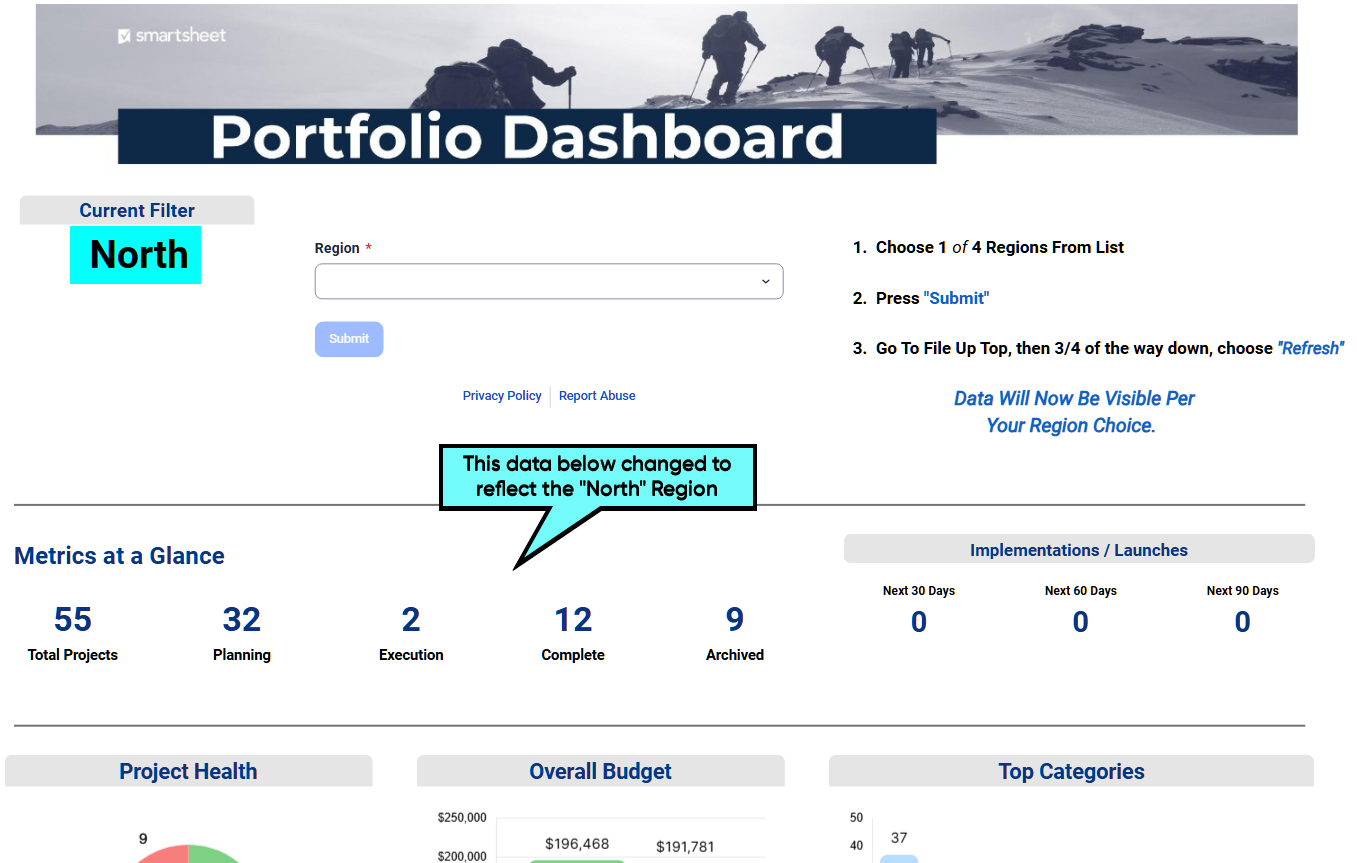
@Naeem Ejaz - So i tested that dashboard template, and although its a neat approach, there are a few steps that many unexperienced users would have to be educated on before someone can check out the data based upon the filter they choose.1. Most people know when using Excel or PowerBI what to do when they see a filter option in the upper part of the dashboards (what they have to do / how to use it), but with Smartsheets, its not laid out the same (at least for this Dynamic Dashboard Template). There are other ways to make this template work & have it look like the other software's mentioned, but it takes some experience with website coding and understanding how to tie it all together.2. Once you pick 1 of the 4 choices (in the template), the page WONT show the new data unless the end user knows to refresh the page.. This is where you loose credibility. Having this feature shouldn't require someone refreshing pages each time they want to see the data changed. Refer to the two images below showing East and North for Reference..
If/when Smartsheets can remove that necessary requirement of refreshing pages just to force the servers to talk and update the data for features like this, then that's when users can truly say Smartsheets is finally playing in the same league as their competitors. I for one need several dynamic dashboards (i have dozens that could be replaced with a dynamic version), but i am not about to have a "Navigation Guide" taking up valuable space up top just to remind anyone that they MUST refresh the page each time they want to see their new filter choice (as you see in the two images above). This is a great start, but no where near where it needs to be, as you can see with Airtable's Interface Dashboard Setup and Smartsheets knows this. As for the 3rd party add ons that we can purchase, this is great and extremely valuable, but you have to keep in mind, many companies cannot and will not purchase additional features that SHOULD be included in the already ridiculous cost were sucked into. There are many other software's (online/offline) that can do such basic/advance things that are already included in their pricing models, why should we convince our Directors/Executives to pull out their checkbooks for more money? So, ask yourself this, how can I/you convince my company, who is already paying all this money, to purchase another add-on, when i can just convince them to pack it up and move on to the next software (as shown in links above)? Smartsheets needs to include all these add-ons in their pricing structures, not offer ways for us to pay for dozens of Third Party Memberships on top of theirs, just to operate a software with features that their competitors already include!!! 😉Again, not saying any of these suggestions are bad, they are at least an option for now (more than what we had years ago), but before anyone makes the decisions necessary to move forward with the choices available here in Smartsheets, i wanted to share my view on this so that everyone here can rethink their approach knowing what is available to them, to make the necessary decisions that is best for their situation and company. 😊
Hi All, I hope you're well and safe! To add to Naeem's excellent advice/answer.
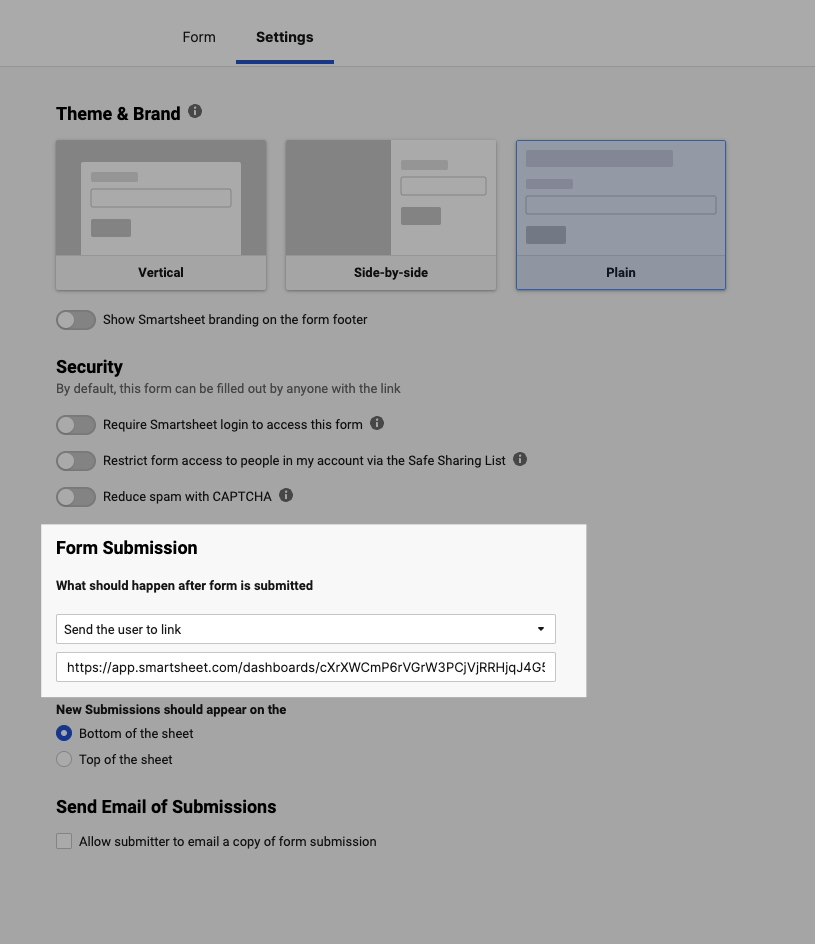
When I develop client solutions similar to this one, I modify the form settings so that it loads the Dashboard automatically after the form has been submitted, updating the displayed data based on the selections made.
I hope that helps! Be safe, and have a fantastic day! Best,Andrée Starå | Smartsheet Expert Consultant & Partner / CEO @ WORK BOLD ✅ Did I help answer your question/solve the problem? Please support with💡 ⬆️ ❤️, and/or ✅ Answer. This will make it easier for others to find a solution or help answer. I appreciate it, thank you! 🙏
Sign in to comment or add your vote.