Connect with peers, share your expertise, and inspire what’s next in Smartsheet — from proven practices to practical how-to insights from fellow users and product experts.
Sign in to join the conversation:
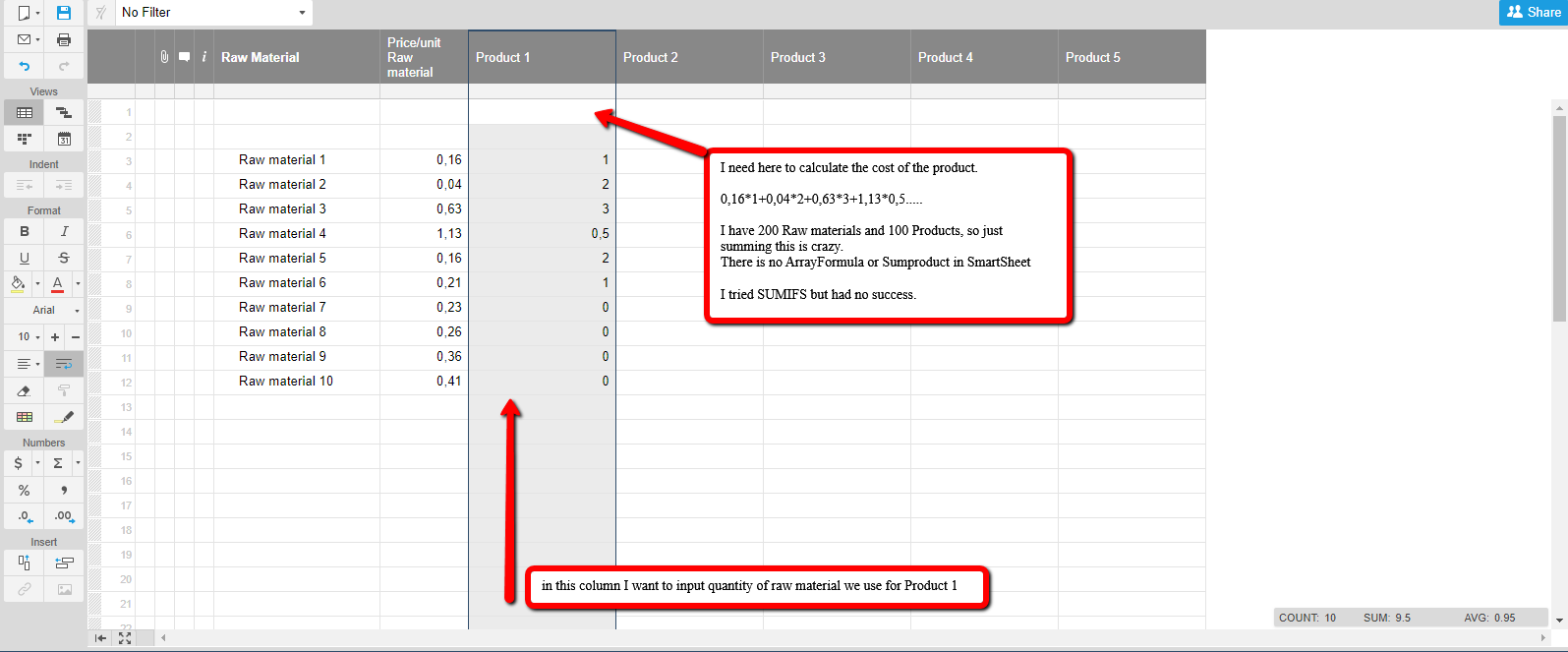
I have been trying to create a product cost calculator where every column is a finished product and every row is a raw material. I am really bad with formulas but I had success with both Arrayformula and Sumproduct in Google Spreadsheets. But I need my data in Smartsheet and I can not calculate the cost of one product. Do you have any ideea on what should I use? Maby an example? Thanks
Hi Sorin,
You don't have access to arrays or sumproducts in Smartsheet, but there are workarounds.
Looking at your sheet, the big issue you will have is the placement of your total product cost in the first row of each [Product #] column. Smartsheet only adds new rows (beyond the initial 50 when a sheet is created) when you populate all the existing rows. As an example, you cannot create a formula that looks at [Product 1]$2 through to [Product 1]$5000 without first creating those additional 4950 rows (which is a pain).
It won't be so bad if you are only creating 200 rows but bear in mind that you'd need to update all your formulas (e.g. [Product 1]$2:[Product 1]$250) if you add extra rows beyond the 200.
Normally you would get around this by using a [Product 1]:[Product 1] range (as your image suggests). But here is where it's getting tricky, as your SUM at the top is part of the range and it will throw a circular reference error as it is including itself in the calculation (confusing huh?)
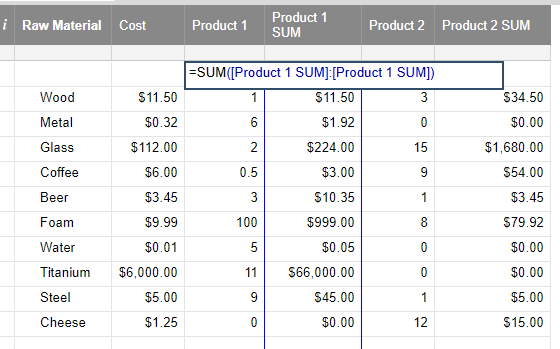
You'll need to think about how you want to structure your sheet(s) to address this. Enough of the waffling though. As you don't have the same formulas you did in Google Sheets, I'd suggest creating an additional column (that can be hidden) summing each product row (see image below).
The [Product 1]1 cell with ~$67K has the following formula:
=SUM([Product 1 SUM]:[Product 1 SUM])
From row 2 down, the [Product 1 SUM] column has the following formula:
=$Cost2 * [Product 1]2
The $ sign represents an absolute value so when the formula is copied elsewhere (i.e. other columns) it still keeps looking at the Cost column.
The below formula should give me the total price of a project filtering it by the panel name and the area. I do not want to include a certain supplier. Also Level 1 is totalling the child rows, so I want to filter that out as it give an inaccurate overall total of the price allocated to the panel and area. I can't figure…
I've created a dashboard with multiple graphs using data from the same report. I have added the report to the dashboard as well and set up the filter for use in the dashboard. Is this filter transferable to the graphs as well, given i can filter the report in the dashboard?
I have an automation that runs every morning at 5:00 am ET that copies a row from one sheet to another sheet. I received this error in the Action block in the source sheet: Rows can't be added to the destination sheet because a column has the same name as a system column on the source sheet. Originally, I had a system Auto…