I came across some weird COUNTIF functionality recently in one of my duplicate check column formulas. I wrote some exploratory formulas and wanted to share!
Key Takeaways
- Numbers with leading 0s requires both = and ""
- Regular text requires "", but = is optional
- Regular numbers do not require = or "", but work with one or the other. Do not use both at the same time.
Examples
Below is an example dataset:
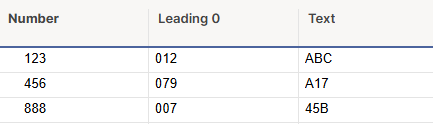
Here are the variations of COUNTIF formulas we can write for these:
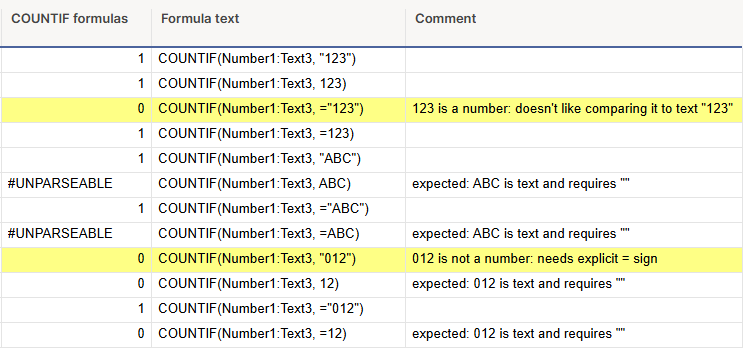
What we can learn from this:
- Numbers- which include only regular numbers with no leading 0s
- Works: "123", 123, or =123
- Does NOT work: ="123". Smartsheet thinks ="" means text and can't find the number 123.
- Leading 0s Numbers- all number digits with a 0 in front
- Works: ="012"
- Everything else does NOT work.
- Text- which includes letters, characters, and numbers with leading 0s
- Works: "ABC", ="ABC"
- Does NOT work: ABC, =ABC. Text requires ""
If you ever have a COUNTIF formula for a number column with a sneaky leading 0 in there, you'll end up with a miss count or no match. Make sure your columns contain all numbers or all text/leading 0s!
Hope this was helpful! It's a bit of a niche topic but I always love to understand as much as possible about formula functionality. 😉