Hello -
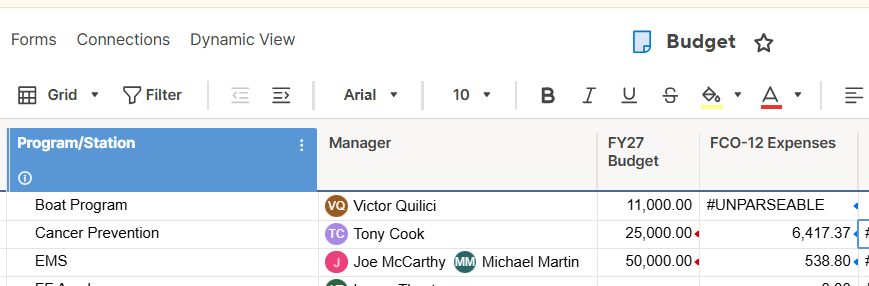
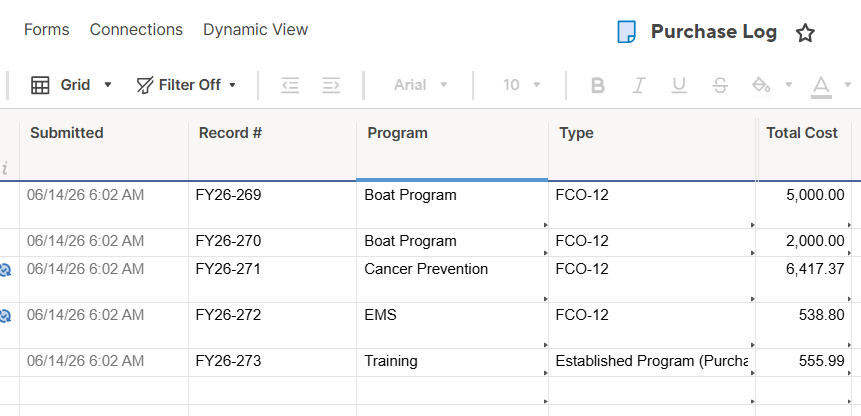
I am trying to use the SUMIFS formula on a sheet titled "Budget" to return all values if two conditions on another sheet titled "Purchase Log" sheet are true. 1st condition on the sheet "Purchase Log" that is in the column titled "Program" and 2nd condition is in the column titled "Type". I want the value in "Program" to change by row and the value in "Type" will always be "FCO-12". I want to make this a column formula, but the one i am using (below) is returning #UNPARSABLE and i can't figure out what is wrong.
It works if i make the reference for {PRGRM} absolute, for instance in this row it is "ems":
=SUMIFS({Approved Range 2}, {PRGRM}, "ems", {Purchase Log Range 1}, "FCO-12")
But when i try and convert it to change by row, then it returns #UNPARSABLE:
=SUMIFS({Approved Range 2}, {PRGRM}, Program@row, {Purchase Log Range 1}, "FCO-12")
Finally, i
Thank you!