Connect with peers, share your expertise, and inspire what’s next in Smartsheet — from proven practices to practical how-to insights from fellow users and product experts.
Sign in to join the conversation:
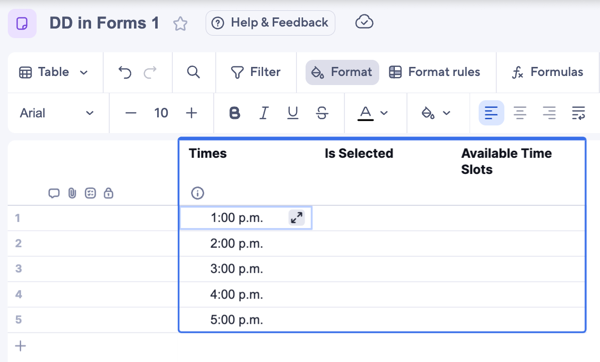
Hey Community! Your forms just got smarter! You can now use linked dropdown columns in your sheet to automatically hide options as they are claimed. This is a perfect solution for tracking inventory or booking slots without worrying about over-selection. If you'd like to get this setup, all the info you need is in this help article. This is the first version of this new functionality, and we can’t wait to show you what else we have planned! Cheers!
I can't wait to use this! Thanks!
@Jason DelValle , excited to try this out, however I'm struggling to see a use case for Inventory. Any chance of providing a simple example of this could be used for that.
Thanks!
Hi, @Jason DelValle… I had a group of users looking for this functionality in Smartsheet awhile back. I came up with a similar solution, however during my testing I found that there was a considerable lag from when you selected a time slot and when that was actually updated in the drop down. Maybe you found a work around for this?
@Jason DelValle We’re experiencing issues with this release.
Sheets that contain linked columns and an associated form are unable to load in Table View. When opening the sheet, the UI crashes and requires the browser to be closed. Removing the form allows the sheet to load normally.
As a Smartsheet Partner, we were able to reproduce this behavior consistently across multiple browsers and multiple client accounts, which suggests it’s not isolated to a single environment. Has this been identified as a known issue, or is there guidance on a workaround or fix timeline?
Hi @earl_bennett currently there is an up to 1 min (usually shorter) lag, but the team is working to reduce this.
Hi @A. Marcus thank you for bringing this to our attention! Can you please file an escalation so we can assign it to the appropriate team.
Hi @jedelman, we are excited for you to try it out and let us know what you think. Note this is the first iteration so more updates are coming!
A couple examples would be…
Scheduling time slots: Professor office hour time slots that students can sign up for
Inventory: Track common supplies (keyboards, monitors, laptops, cables). Using a Smartsheet form, anyone can report when an item is requested. You can then add automations to your sheets to alert if the stock is running low and more need to be ordered.
Thanks for the confirmation. I didn't go with this solution due to this behavior. If we would have released the form multiple people could have tried to select the same time slot.
wow! you came up with a great idea to make it work!
UPDATE: Hi everyone, Thank you for your feedback. These kinds of changes are never easy. We’ve been reading every comment here and want you to know that we’re listening and that you deserve more clarity and answers. What you told us It’s your preferred experience. For some of you, the desktop app is not just another way to…
Home has been rebuilt from the ground up to help you find your work faster and see what to do next. Instead of one long list of recently opened items, your work is organized into rails you can scan at a glance: Quick links to all your most used items, with the ability to pin them for easy access At Mentions to help you…
September 10, 2026 There's a new way to build workflows in Smartsheet: just ask. Open Smart Assist or a connected AI tool using our MCP connectors (such as Claude or ChatGPT) and describe what you want in plain language, like "Send my team an approval request whenever a new row is added." AI now builds the automation for…