Connect with peers, share your expertise, and inspire what’s next in Smartsheet — from proven practices to practical how-to insights from fellow users and product experts.
Sign in to join the conversation:
Good Afternoon,
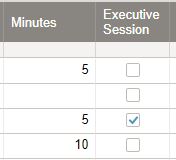
We are looking to figure out if it is possible to caculate time in Smart sheets. But we need to be able to figure out times for those items checked vs not checked. Is there a way to do this without sorting the sheet out?
Thanks.
Hi Ann,
=SUMIF(range, criterion, [sum_range]) will do what you need. Based on your example, this would look like:
=SUMIF([Executive Session]:[Executive Session], 1, Minutes:Minutes). So the result based on the above would be 5.
Chris,
Thank You!Follow up question. So I set that as a new row in my sheet and I made a second row to divide by 60 to figure out how many hours.
I put your formula in for Executive Session Meeting and it gave me the total, 435 minutes.
Then in the next row I put in =SUM(Minutes55) / 60Then this screens shot is the answer I got. How do I turn that into a number of hours?
You are more than welcome.
The reason you're getting an error is that we've previously set a range and sum_range that includes the entire columns. That means your new row will also be included.
Essentially you're creating a loop (circular reference) as the =SUMIF([Executive Session]:[Executive Session], 1, Minutes:Minutes) formula is trying to read the value in Executive Session and Minutes for Row 55, while row 55 is simultaneously trying to calculate a value (from row 54) that actually includes its own value.
It's all very confusing and Smartsheet is throwing out an error.
To get around this, I'd suggest moving your total formulas to the first two rows in another column (call it Totals) or even a new summary sheet. Your hours formula can also be simplified by removing SUM (i.e. =Totals2 / 60), as you're not really summing anything.
Is there a way to revert to the old dashboard look and feel. The new dashboards do not look good at all. There is no way of knowing if there are additional items in the widgets until you scroll over one to learn there is more to it since the vertical bar doesn't show. We have hundreds of dashboards and they will all need…
When i try to send or print the timeline view instead of showing the progression bars like they do on the screen it only send the data entered and not a graph type view to print. Is there a way to do this. I am using a mac platform if that helps.
Please assist me, I am having trouble with my smartsheet, I am on a paid pro plan, with 5 paid members, but neither I or my members can access or edit sheets. When I try to share the sheet, it says that I only have viewer access. My team members cant access the sheets at all. I renewed my subscription recently and it seems…