Connect with peers, share your expertise, and inspire what’s next in Smartsheet — from proven practices to practical how-to insights from fellow users and product experts.
Sign in to join the conversation:
I have used the same template to create a tracking system throughout our company and now have 25 sheets. I have been asked to add a column to the template and all existing workbooks. Does this need to be done manually one at a time?
Yes, unfortunately, it does.
a way to automate adding columns across multiple sheets is through the API, if you are comfortable writing code - http://smartsheet-platform.github.io/api-docs/?python#add-columns
Weighing up the practical considerations, if the extra column does not have formulas (i.e. they are just manually entered values), is not being referenced via cell links (that you have to set up for each sheet) and we're only talking about 25 sheets, then you're probably better off just creating the columns manually and moving on.
An easier way to add a single or multiple columns is to create a new sheet with the new column(s). Then you can copy the blank row to the desired sheets. If the target sheet does not already contain the new column(s) they will be added.
Advantages: the column data type is maintained. Saves lots of time if you are adding multiple columns. Doesn't affect the data since you are adding a blank row.
Disadvantages: formulas can't be copied into a sheet. There could be a better way but I haven't found it yet.
Hope this helps!
Hi Mike,
Great, advise! I also do that, and I also put a unique character before the formula so it's just text and after I copy the row to another sheet I search and replace that character and that will activate the formulas in the new sheet.
Hope that helps!
Have a fantastic weekend!
Best,
Andrée Starå
Workflow Consultant @ Get Done Consulting
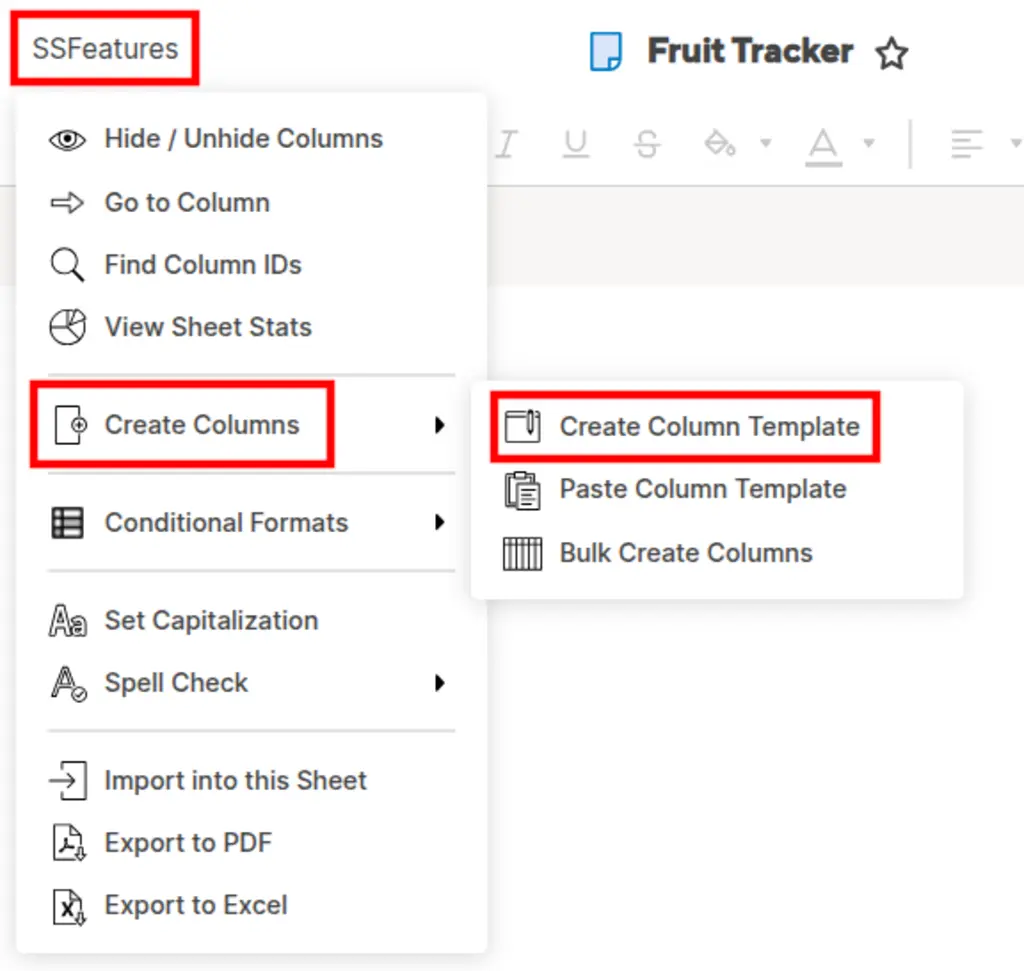
SSFeatures has a Column Templates feature that could help here. You could save the columns as a template once, then paste them into each of your 25 sheets. It keeps column types and properties intact.
Another option with SSFeatures - You can set up the column once, and then copy and paste it into your other 25 sheets.
Best!
Disclosure: I'm the creator of SSFeatures.
Is there a way to revert to the old dashboard look and feel. The new dashboards do not look good at all. There is no way of knowing if there are additional items in the widgets until you scroll over one to learn there is more to it since the vertical bar doesn't show. We have hundreds of dashboards and they will all need…
When i try to send or print the timeline view instead of showing the progression bars like they do on the screen it only send the data entered and not a graph type view to print. Is there a way to do this. I am using a mac platform if that helps.
Hello all, I'm having an urgent issue with a notification workflow. It worked at first, but didn't trigger on all the rows that it should have — and now, instead of the message it should be sending, I'm only getting a weird batched summary email that shows the changes that were made to the sheet. (See screenshot) The…