Connect with peers, share your expertise, and inspire what’s next in Smartsheet — from proven practices to practical how-to insights from fellow users and product experts.
Sign in to join the conversation:
I have searched all the forums for the formula for the checkbox sum & none of them have worked for me. I need to total the sum of the checkboxes that are checked within a column.
I just needed to do this today.
enter '=COUNTIF', then select the entire column, and put '1' for checked.
=COUNTIF({On Track}, 1)
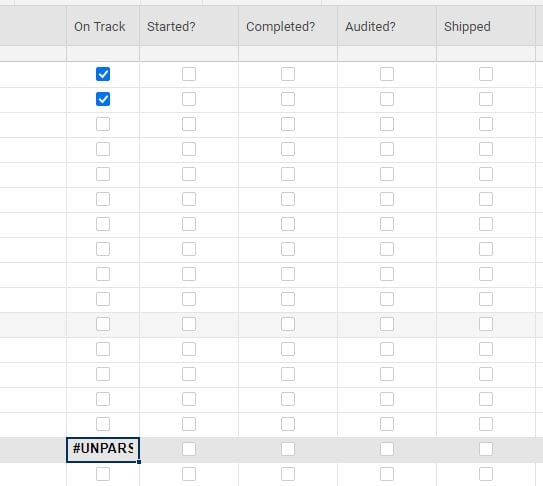
I don't know why, but its not working for me. I've tried this several times. I either get "unparseable" or Boolean Exp message.
It worked if it is not in the same column as the checkboxes! Is there a way to make it part of the same column so the totals are below the boxes?
If you make all of the lower rows Child rows (indent them) below the summary row, you could use...
=COUNTIFS(CHILDREN(), 1) + ""
@Paul Newcome this formula helped me tremendously! Now I am facing another challenging. I am now trying to SUM the COUNTIFS totals using a CHILDREN formula to show the overarching total. I have attached an image. When I just try a general =SUM(CHILDREN( formula, nothing populates in the cell and I still see the checkbox. When I tried totaling manually at one point, instead of a SUM I somehow merged the numbers into a string (i.e. instead of 5 + 4 + 1 creating 10, I got 541).
Any suggestions on how I can total up the 23 + 17 + 1 + 0 + 0 + 0 appropriately in the North America row?
@Jen V I am at a similar situation. Did you find a way to sum in the checkbox column?
Thanks in advance.
I was archiving critical accounting data from one sheet to another by moving the rows. This is something I've done countless times in the past decade of using Smartsheet. This time, after moving nearly 3500 rows of data, I realized none of the attachments moved with the rest of the data. I've opened a case but have had…
Hi Team Is there an update on this Community post from a year go? Issues with copying in the Windows App - Table View - Smartsheet Community I have confirmed in both Desktop and Web Applications, and on multiple browsers where the Clipboard setting in "ALLOWED", but the copy/paste CTRL-C/CTRL-V is not working. It doesn't…
I have a user that has accepted their invite. They do not show up in the roles section for me to assign the user roles.