Connect with peers, share your expertise, and inspire what’s next in Smartsheet — from proven practices to practical how-to insights from fellow users and product experts.
Sign in to join the conversation:
I am trying to automate the ryg ball if i go:
15 days past start date and my complete is blank, red ball
10 days past start date and complete is blank, yellow ball
otherwise green ball.
Any help is appreciated
You can use the symbols as a dropdown and then the IF statement where the result will be "Red", "Green" or "Yellow". That text as the output of the function will form the colors.
Another thing to think of is that only updates when the sheet is opened and saved again. I've had to integrate with MS Flow to add blank rows just to force a re-calculation for countdown timers and such.
nested if statments, and(), isblank()
something like
=if(AND(TODAY()-StartDate1>15, isblank(CompleteDate1)),"Red",if(and(Today()-StartDate1>10, isblank(CompleteDate1)), "Yellow","Green"))
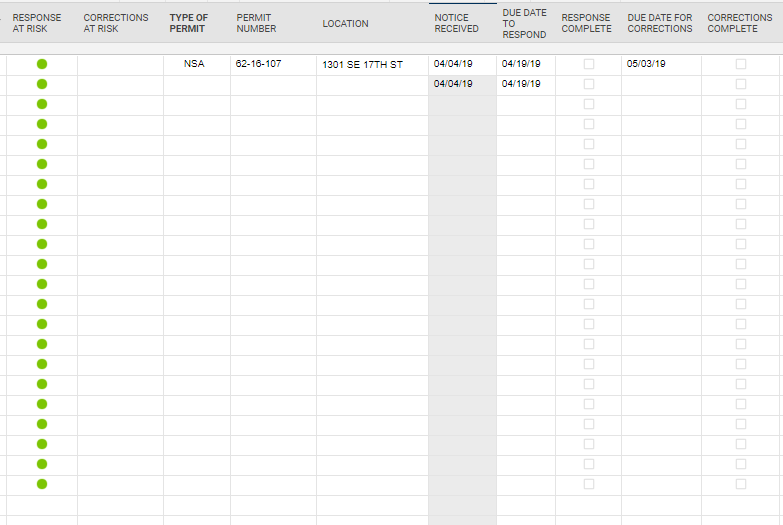
I only get green balls, including in the blanks.
I have attached an example of my sheet
Try this modification which is looking at whether Corrections complete is blank,
=if(AND(TODAY()-[Due Date to respond]@row >15, isblank([Corrections Complete]@row)),"Red", IF(and(Today()-[Due Date to respond]@row>10, isblank([Corrections Complete]@row)), "Yellow","Green"))
Or this modification that is looking for a 0 in the corrections complete.
=if(AND(TODAY()-[Due Date to respond]@row >15, [Corrections Complete]@row = 0),"Red", IF(and(Today()-[Due Date to respond]@row>10, [Corrections Complete]@row=0), "Yellow","Green"))
=IF(AND(ISTEXT(Location@row), ISBLANK([Completed Column]@row)), IF([Start Date]@row <= TODAY(-15), "Red", IF([Start Date]@row <= TODAY(-10), "Yellow", "Green")))
Give this a whirl...
Mike's looks like it should work as well.
I have worked the formula a little differently.
Red ball if past due date, Yellow if within 5 days of due date, Green if marked complete.
However I want the RYG column to stay blank if the date received column is blank. How do I write that?
Here is my formula so far.
=IF([RESPONSE COMPLETE]1 <> 1, IF(TODAY() - [DUE DATE TO RESPOND]1 > 0, "Red", IF(TODAY() - [DUE DATE TO RESPOND]1 > -5, "Yellow")), IF([RESPONSE COMPLETE]1 = 1, "Green"))
=IF([RESPONSE COMPLETE]@row= 1, "Green", IF(ISDATE([NOTICE RECEIVED]@row), IF([RESPONSE COMPLETE]@row= 0, IF([DUE DATE TO RESPOND]@row < TODAY(), "Red", IF([DUE DATE TO RESPOND]@row> TODAY(-5), "Yellow")))))
Give this a try.
Perfect!!
Thank you
Happy to help!
Is there a way to revert to the old dashboard look and feel. The new dashboards do not look good at all. There is no way of knowing if there are additional items in the widgets until you scroll over one to learn there is more to it since the vertical bar doesn't show. We have hundreds of dashboards and they will all need…
When i try to send or print the timeline view instead of showing the progression bars like they do on the screen it only send the data entered and not a graph type view to print. Is there a way to do this. I am using a mac platform if that helps.
Please assist me, I am having trouble with my smartsheet, I am on a paid pro plan, with 5 paid members, but neither I or my members can access or edit sheets. When I try to share the sheet, it says that I only have viewer access. My team members cant access the sheets at all. I renewed my subscription recently and it seems…