Connect with peers, share your expertise, and inspire what’s next in Smartsheet — from proven practices to practical how-to insights from fellow users and product experts.
Sign in to join the conversation:
The posts in this section are historical and no longer monitored for accuracy. If this discussion interests you and you'd like to join in, please visit the active Community to post and engage.
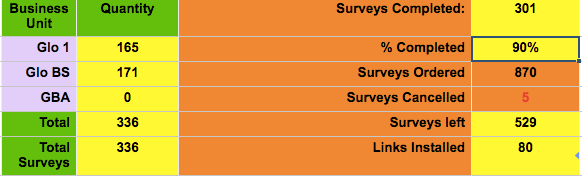
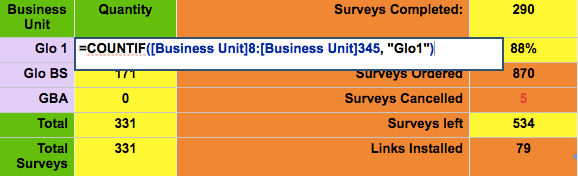
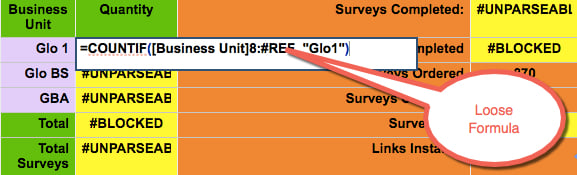
I'm using the system to monitor and report progress to our client. We do surveys on their sites and perform installations. On top of the sheet, I have locked 6 lines that I use for summaries of the totals with simple countif statements.
Any ideas on why?
Hi Dick-- I'd be happy to take a closer look at this sheet, can you please share it (or a copy) with me at Kennedy.Stomps@Smartsheet.com offering Admin permissions? I suspect there is an issue with the reference getting wiped when new rows are added, but I'd like to do some more troubleshooting on this.
Hi Kennedy
I've shared it with you. Thanks for the assistance.
Was this issue resolved?
This doesn't look like a new row issue but rather a deleted one.
I'm curious to know the cause and solution.
Craig
Thanks for the update.
I try to avoid hard-coded references when I can. Maybe that is the reason I haven't seen this error yet.
I am getting the same error. I am using a simple command =100-SUM() and getting the #unparseable. Once the cell says that I can not input any working formula into that cell again. Even after clearing the cell. I believe this began when someone tried updating the Smart Sheet with the SS App on their phone.
=100 - SUM()
is not a valid formula.
SUM requires arguments, typically a range.
https://help.smartsheet.com/articles/775363-using-formulas#sum
I have a similar issue or it looks like someone had the error im getting im trying to get a sheet i have to assign what quarter a request was made. This is being fed by a form my customers fill out. The form works great and i'm trying to add this formula to it to assign the quoter in a new column.
=if([Requested Date]1=" "," ",roundup(Month([Requested Date]1)/3,0))
am i missing somthing or doing something wrong i dont recognize this errorand cant figure out what i should change.
roundup is not a function in Smartsheet.
Try ROUND() instead. That will however give you incorrect results
Here's my formula for the Quarter determination:
=IFERROR(INT((MONTH(Date23) - 1) / 3) + 1, "")
for [Date] column row 23.
I am getting the same error. I am using a simple command =SUM(Total Billable820:Total Billable828) and getting the #unparseable error.
Can anyone tell me if you can =SUM() from multiple sheets? I am trying to do a very simple SUM command for ranges across two sheets to link to the "master" sheet and continue to get the #UNPARSEABLE response.
Yes, it is possible.
SUM just takes a set of arguments. The arguments can be ranges. The ranges can be x-sheet references.
If you use SUMIF or SUMIFS, then you need to make sure you do them individually and add them together because the ranges may not be the same size.
Thanks so much!
Same error. I have three sheets imported with budgets for three categories. The sum function continues to reference the imported data's original sheet name. Removed this in the formula and it works.