Best Of
Re: Update requests to non users
For #2, this is due to privacy settings.
If these users don't have a Smartsheet account, your workflow settings need to be set to Unrestricted to allow emails to come from the sheet and go to any email address. Here's an article with more information: Recipient doesn't receive workflow notifications
As Paul noted, "Users in the same account as the sheet owner" mean that they need to be Members of your Smartsheet plan (unlicensed or licensed - either or). This means they would need a Smartsheet account and to be added to your plan (see here). If they don't have an account at all, then Unrestricted is the level of permission needed. Does that make sense?
Cheers,
Genevieve
 Genevieve P.
Re: Conditional Formatting - One rule on multiple columns
Hi,
I hope you're well and safe!
I agree, and in the meantime, here's a possible workaround.
I'd recommend the fantastic add-on, which makes this possible/easier (+ many other features).
SSFeatures from the brilliant Nathan. @SSFeatures
Would that work/help?
I hope that helps!
Be safe, and have a fantastic day!
Best,
Andrée Starå | Smartsheet Expert Consultant & Partner / CEO @ WORK BOLD
✅ Did I help answer your question/solve the problem? Please support with💡 ⬆️ ❤️, and/or ✅ Answer. This will make it easier for others to find a solution or help answer. I appreciate it, thank you! 🙏
 Andrée Starå
Re: Formulas that were working are now not pulling in data after connecting source sheet to a DataTable
@Georgie I was actually able to figure out this issue by looking through Smartsheet documentation. The source data sheet included a currency value ($) in the "billable amount" column, which the Datatable recognized as text rather than a numerical value. Removing the $ from the data source was able to correct the issue and now formulas are working again as expected.
 sarahm6
Re: Issues with 'Show Fields' in Timeline view
Thanks Georgie - I had followed all of the guidance in the article previously and it worked fine, but then the toggles weren't even appearing.
I did raise a ticket and all seems to be working fine now so was hopefully just a glitch.
Thanks for your response :)
heather2512
Re: Smartsheet - Down to the Basics Cheat Sheet
Hello! So glad you like it! Feel free to share with anyone you feel may benefit. :)
 mcullen
Re: Automate Update request gives access to view entire sheet
Hi @Gemma P,
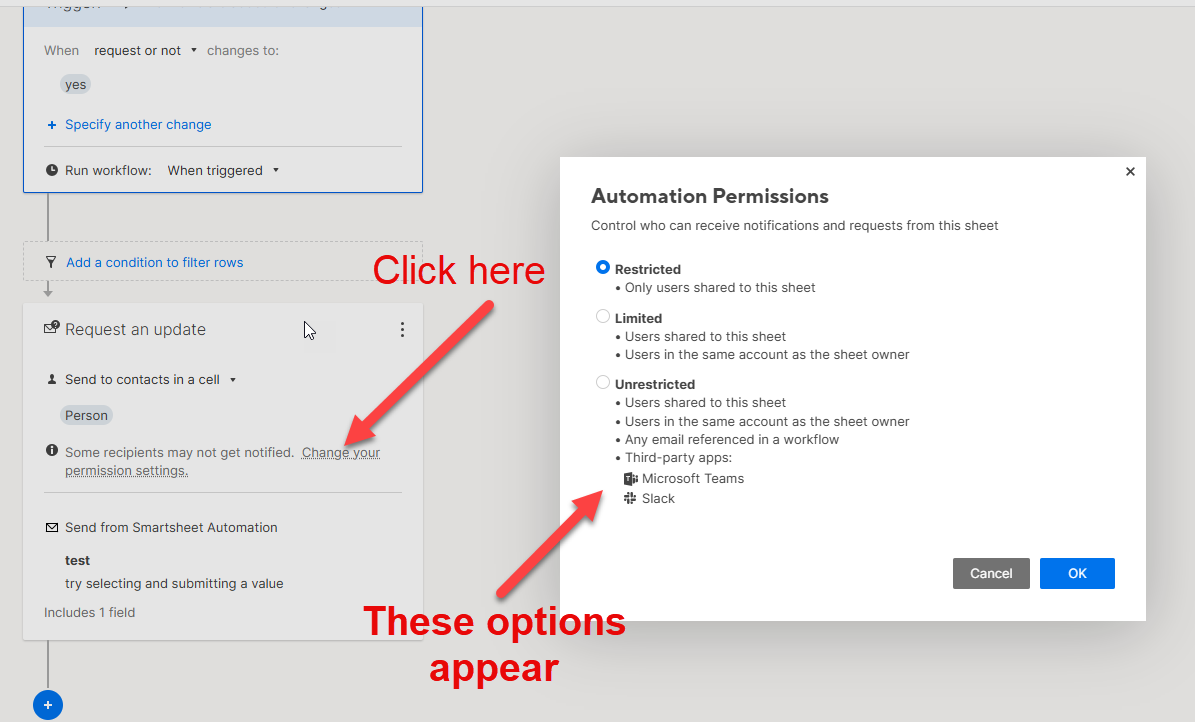
Your user does not need viewer permissions for that automation to be setup. You just need to adjust the permissions for the automation. Your selection should be either "Limited" because it includes users in the same account as the sheet owner, or "Unrestricted" because it includes any user shared to the sheet.
However, the link to the sheet will always appear on the email. If they don't have access to the sheet, they won't be able to view it. They can click to request access, but you don't have to grant it.
All the best,
-Ray
 Ray Lindstrom
Re: Community Corner Newsletter [August 2025]
Happy August birthday @Georgie! 🌈☀️ 🎈
Re: Safari and iOS Load Issues with Published Portals - Not Currently Listed as Outage
Thanks, are you able to get an update on this, see if it's something that's still being investigated and want the plans/timeline are for it to be fixed.
 B.Wats
Re: Work around for Data mesh or Data shuffle if not available in my current account using Business Plan
Excellent!
You're more than welcome!
✅ Remember! Did I help answer your questions or solve the problem? Please support with💡 ⬆️ ❤️, and/or ✅ Answer. It will make it easier for others to find a solution or help answer. I appreciate it, thank you! 🙏
Andrée Starå
Re: Increase Bridge Run Log Entry Limit / Update Error Prompt
Hi all, another update here!
Bridge's run log size limit has increased again, this time to 35MB.
Cheers,
Genevieve
Genevieve P.