Best Of
Re: July Question of the Month - Join the conversation and receive a badge
To learn Spanish, and it is going badly, because I have not done anything about it!
But this is a good prompt for me to start.
 AnthonyxXx
Re: Work with Flow - A Space Story
I've built multiple projects leveraging nearly every aspect of Smartsheet’s capabilities — projects that previously required custom systems built by our App Services development team. With Smartsheet, I’ve been empowered to deliver solutions that were once unimaginable or would have taken months to develop.
Some of these projects started as simple Excel files. Now, they’ve evolved into dynamic, organic, near self-sufficient workflows that connect and communicate across every branch of the organization. Collaboration has increased exponentially, and the user-friendly nature of the platform has driven higher engagement across teams.
Smartsheet feels like a blank canvas of possibility. When it comes to building solutions, the question is no longer “Can it be done?” but “How do I want to do it?” It's both challenging and rewarding — because you see real results. Watching a project evolve from idea to development to deployment, and hearing users say it’s improved their daily work, is incredibly fulfilling.
 Wilen FL
Re: How can I calculate and display a percentage ratio between two numeric columns in Smartsheet formula
You can do the basic division and then format the column to show as percentages.
=[Credit Consolidated]@row / [Credit Required by Proposal]@row

 Paul Newcome
Re: Formula question
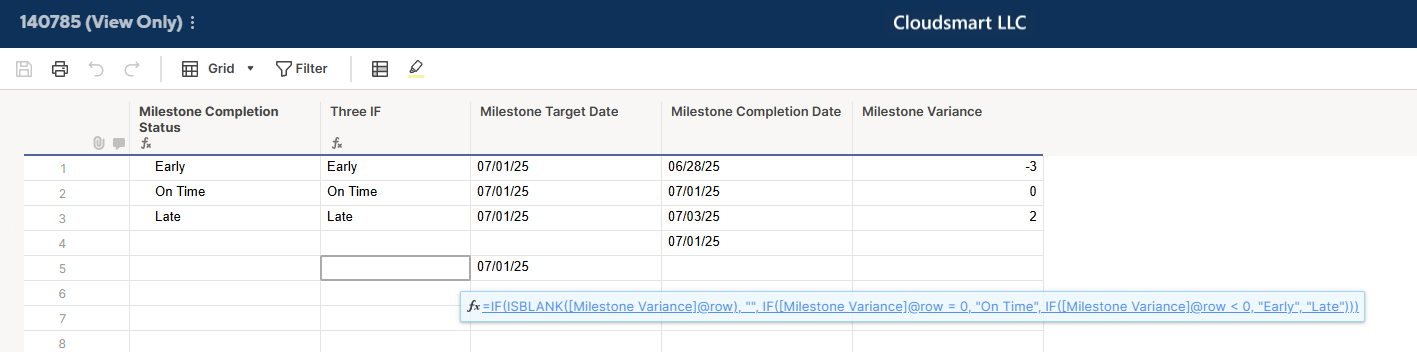
Hi @DYou
Your formula had a syntax error in ISBLANK[Milestone Variance]@row — square brackets must be used inside the function like ISBLANK([Column Name]@row ).
Second, there are four IF statements, so you must have four closing parentheses ). If even one is missing, Smartsheet will throw a syntax error.
However, we can simplify the logic slightly since the final case (greater than 0) is the only remaining possibility. Here’s the simplified and clean version (with only 3 IFs and 3 closing )): ( →My second formula)
Yours
=IF(ISBLANK[Milestone Variance]@row ), "", IF([Milestone Variance]@row = 0, "On Time", IF([Milestone Variance]@row < 0, "Early", IF([Milestone Variance]@row > 0, "Late", "")))
Mine
=IF(ISBLANK([Milestone Variance]@row ), "", IF([Milestone Variance]@row = 0, "On Time", IF([Milestone Variance]@row < 0, "Early", IF([Milestone Variance]@row > 0, "Late", ""))))
or
=IF(ISBLANK([Milestone Variance]@row ), "", IF([Milestone Variance]@row = 0, "On Time", IF([Milestone Variance]@row < 0, "Early", "Late")))

Re: Introduce yourself & get to know your peers!
Hello everyone, my name is Mark and I'm a GM in a manufacturing company. I was born in Florida USA but have travelled the world and now have settled down in Singapore. I've always been a big fan a data and became a master at MS Excel. I created interactive dashboards that made people ask me what platform that is and when I said Excel they didn't believe it could do that. However, the cons to Excel is that it is not very good as a collaborative tool. Which led me to search far and wide and I landed on SS way back around 2008.
I couldn't get it to stick in the company at that time as MS Office was still king and online collaborating platforms were still in their infancy. I tried again around 2018 in my previous company. I bought it with my own money and proliferated out to a small group of managers. We ended living and breathing in SS. Creating huge data sets, workflows, links and dashboards. Eventually using SS as our source data for bigger visual platforms like MS Power BI. Once we hit that level, SS took off in my company and we ended up purchasing over 100 licenses.
Fast forward to today and I'm in a new company for about 3 months and I am surprised that no one here has even heard of SS. So again, I just purchased 3 business license and I'm looking forward to introducing this wonderful product and training this new team to use this collaborative tool in finance, manufacturing, quality and beyond. Also looking forward to collaborating with all of you and learning new tips and tricks.
 Mark D
Re: SmartU New Offerings - Smartsheet Builder Path & more!
Amazing. We will help you get there!! Since you're Core App Certified you'll be assigned the Builder Certificate of Achievement automatically.
So you don't need to take the Builder path but it's a pretty great class and a lot of fun (not even in the nerdy sense of the word ;-) I think it's genuinely a fun way to learn 😃 So if you have a little time and a LivePass or a Learning & Certification Pass so the course is free for you, I think it's worth the time and will set you up really nicely for the remainder of the program.
However, If you look at the course description and think it will be too much review for you, it's also fine to skip since your Core App Certification puts you ahead on the path.

Re: Automations not being consistent - sometimes running, sometimes not
Excellent! Yes, I hope they can sort it quickly!
Happy to help!
✅ Remember! Did I help answer your question/solve the problem? Please support with💡 ⬆️ ❤️, and/or ✅ Answer. This will make it easier for others to find a solution or help answer! I appreciate it, thank you! 🙏
 Andrée Starå
Re: Work with Flow - A Space Story
Well actually Smartsheet changed my professional life by 180 degrees.
After being IT PM for 15 years in 2019 I put my hands on Smartsheet and it made such a great impression on me of what can be done and how little cant be done that I decided to quite my work as PM and transition slowly to PM Solutions. Now 3 companies later I purely do Smartsheet solutions so it was ambitious plan but the job is so much nicer and rewarding.
 kowal
kowal
Re: Why does the Sheet Summary SUMIFs formula show a different result than my report?
Hi @Char485,
Give this a try.
=SUMIFS(Fee:Fee, [Key Deadline]:[Key Deadline], <=TODAY(), Status:Status, OR(@cell = "1-Pre FMV Info Request", @cell = "2-FMV In Process", @cell = "3-FMV Draft Delivered"), [Coker Project Status]:[Coker Project Status], AND(@cell <> "04-Waiting on Info", @cell <> "11-Exec Sum Sent", @cell <> "12-Draft Report Sent", @cell <> "12.5-Draft Uploaded to PAWS", @cell <> "14-Revised Report Issued", @cell <> "15-Final Requested", @cell <> "16-Final Delivered", @cell <> "17-Final Uploaded to PAWS", @cell <> "18-Terminated", @cell <> "19-Complete"))
Hope this helps,
Dave
 DKazatsky2
Re: SmartU New Offerings - Smartsheet Builder Path & more!
That's awesome @Isis Taylor . I direct Smartsheet University and I'd love to hear about your experience if you pursue these enhanced certifications.
And to everyone in the Smartsheet Community. Thanks for letting me hang out here 🫶. While designing all of the enhancements to the program we drew a lot of inspiration from Overachievers, Mobilizers, Spotlighted Members and other rockstars in this space as we worked to define "Smartsheet Greatness"