Best Of
Smartsheet Forward 2025 Edition 2: AI-powered, enterprise-grade work management
Back in March, we shared how Smartsheet upcoming AI and collaboration innovations are making it easier to get work done. Now, we’re back with Smartsheet Forward 2025 Edition 2, which details the Smartsheet innovations shaping the future of enterprise work.
In this issue you’ll hear about how we’re leveraging AI to build a more connected, intelligent, and impactful platform, and discover how we're supercharging teams, enhancing platform performance, and bridging the gap between strategy and execution with powerful new features. Get all the details here.

Key topics include:
- Embedding AI across Smartsheet as a proactive, intuitive partner
- Empowering teams to manage work more efficiently on a next-generation, enterprise-grade platform
- Bridging the gap between project strategy and execution to accelerate business success
And more…
Learn how we’re evolving Smartsheet — so you can focus on impact, not inefficiencies. Learn what’s new.
And please don’t forget to tell us what you think by sharing a comment below, by submitting your product feedback and ideas or voting on ideas shared by your peers.
 Arsineh
Re: IF Formula
Looks like you just needed to close your AND's:
=IF(AND([Scope Requested]@row = 1, [Scope Approved]@row = 0), "Identified", IF(AND([Scope Approved]@row = 1, [Scope Requested]@row = 1), "Committed", "Unidentified")
 Nic Larsen
Re: Capture All?
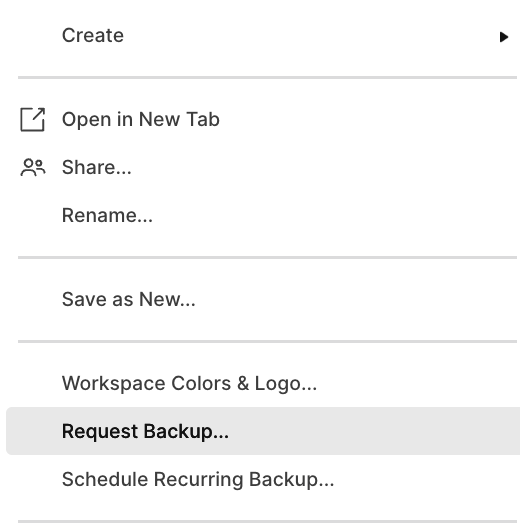
Maybe setting up a backup the workspace would work?
Select the workspace and right-click to select the option.
 Adam Murphy
Re: Indenting on Sheets - Editors
Thanks for clarifying the suggested parent row is locked!
Yes - if a row is locked by an Admin then an Editor cannot indent the row immediately below it. This is because the act of indenting the row below would turn the row above into a Parent row, which is changing the row, but the row is locked so it cannot be changed. Admins can overrule locked settings, which is why that permission level can indent the row below.
If your Admin sets up the locked parents and adds at least 1 indented row below it, then all your editors should be able to add/create more child rows below as well. 🙂 It's just the first one - the act of turning that row into a Parent row - that prevents editors from creating hierarchies. Does that make sense?
Cheers,
Genevieve
 Genevieve P.
Re: How to change column value whose property is Contact list before it is copied to another sheet
Hi Antonie,
It worked with 2 workflows. Thank You!
Tasneem
Re: I have given admin access to 2 users but they cant access locked cells. am i missing something?
Thank you Genevieve. It was a great help it makes sense now so simple… I should have realised. thanks to everyone for your help
Re: Why isn't automation working?
@Paul Newcome, thanks, I figured out my issue. I had a few items in the automation, so I took them out and started over, testing before adding another. I was successful to the end.
 Kathy PPT
Duplicate reports and dashboards from the left navigation bar now available generally!
July 9th, 2025
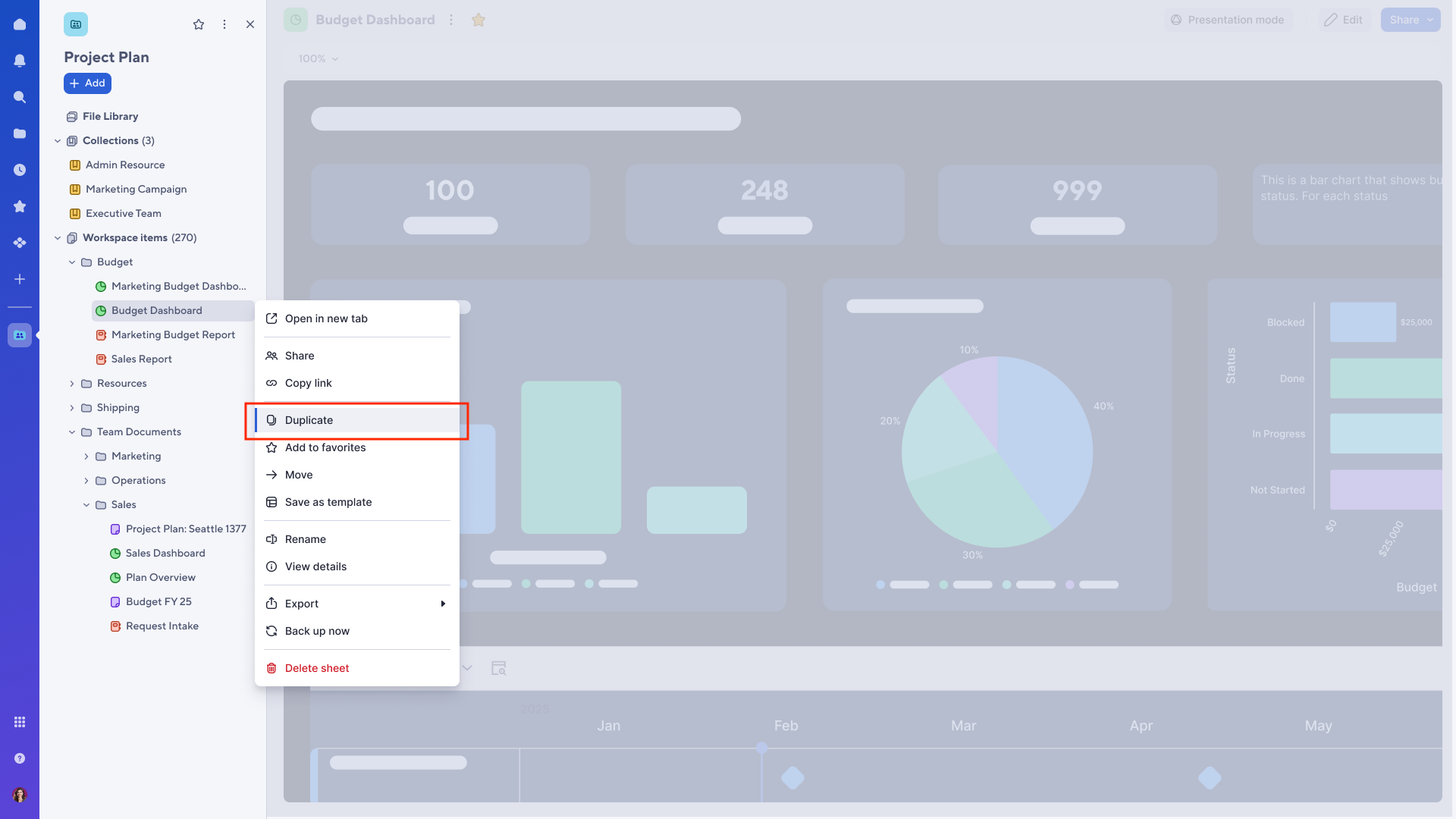
You can now duplicate any reports and dashboards directly from the left navigation bar within a workspace. To do this, open the three-dot menu next to what you want to duplicate and select Duplicate. Like our recent updates to sheets, you'll have the option to rename new items and choose a destination provided you have permission to create items in that workspace. Learn More
Note: Duplication of a report or dashboard will not duplicate any underlying source sheets. The duplicated items will reference the same source sheets as the original item.
Environments availability: Commercial US, Commercial EU
Plan availability: Pro, Business, Enterprise, Advanced Work Management
Subscription Model Availability: Legacy Collaborator Model, User Subscription Model
Stay informed by subscribing to receive product release updates for curated news of recently released product capabilities and enhancements for the platform of your choosing, delivered to your inbox. As new releases occur, you will receive a weekly email with news of what's released every Tuesday.
 Madison M
Re: July Question of the Month - Join the conversation and receive a badge
My daughter experiences a developmental disability and the closest expert clinics are Northern California and Denver, Colorado. I've been working on establishing a Rett Clinic in the Northwest for about 10 years and decided that this is the year to bring it to fruition. I'm happy to announce that, in conjunction with the NW Rett Syndrome Association, Seattle Children's Hospital will begin offering Rett clinic appointments in the Fall! 😎
 joey.w.razzano
Re: I want to automatically obtain the mapped PDF
I didn't know that you can create documents with multiple lines at once using document builder. Thank you for your reply.
Marina_123