Best Of
Re: Automations
Happy to help!
I recommend one of the following because Data Shuttle isn't an option.
1️⃣ - Use a helper sheet that would contain all the data, and copy/paste into it. (If possible)
2️⃣ - Same as above, but import the new information to a new sheet and then move it to the helper sheet.
3️⃣ - Use the fantastic add-on, which makes this possible (+ many other features). SSFeatures from the excellent Nathan.
More info.
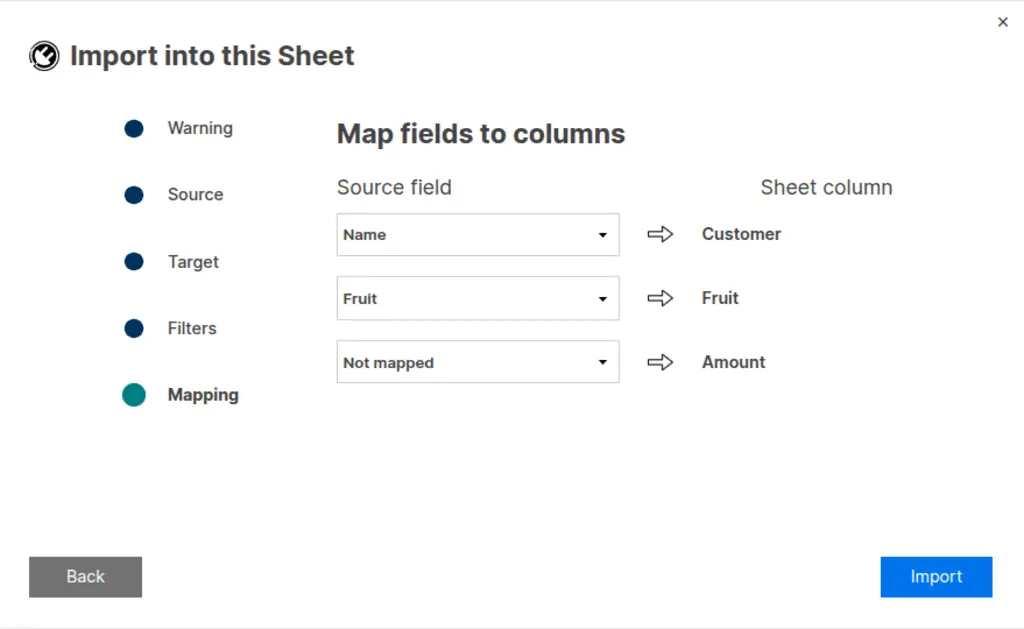
Import Data Into an Existing Sheet
✅ Allows you to import data directly into your sheet
✅ Supports Excel, OpenDocument, CSV, and TXT files
✅ Provides different import options, such as merging, replacing, appending, and filters
✅ Remember! Did I help answer your question/solve the problem? Please support with💡 ⬆️ ❤️, and/or ✅ Answer. This will make it easier for others to find a solution or help answer! I appreciate it, thank you! 🙏
 Andrée Starå
Re: duplicate entry checking 2 sheets
Hi,
I hope you're well and safe!
You can use a COUNTIFS structure to check for a match, or you can use an INDEX/MATCH combination.
Make sense?
Would that work/help?
I hope that helps!
Be safe, and have a fantastic day!
Best,
Andrée Starå | Smartsheet Expert Consultant & Partner / CEO @ WORK BOLD
✅ Did I help answer your question/solve the problem? Please support with💡 ⬆️ ❤️, and/or ✅ Answer. This will make it easier for others to find a solution or help answer! I appreciate it, thank you! 🙏
Andrée Starå
Re: NEW! Modern forms submission experience with accessibility enhancements
We are currently working on a fix for the mobile browser issue. Expect a release early next week and we'll follow up. Thank you!
 Cole Dryden
Re: Seat Type Report to show Owner Status
I agree, this needs to be changed. If the Seat Type report is the one we are being told to use, it needs to accurately reflect the highest permission of Owner. If you are able to put "Owner" in the Sheet Access report, you can put it in Seat Type as well. There is no logical reason to have it set up this way.
 cnikkih
Column Links Overwrite Warning
July 16, 2025
This release introduces a warning when data would be overwritten by a new column link configuration.
In the case data would be overwritten by a new column link configuration, users will now see a warning if a column that already has data in it. This is in response to user feedback in cases where column links wiped out previous data when this was not the desired or expected behavior.
In addition, matches will no longer be made to blank cells in the unique ID column, instead only matching when a unique ID is present.
Environments availability: Commercial US, Commercial EU
Plan availability: Pro, Business, Enterprise
Subscription Model Availability: Legacy Collaborator Model and User Subscription Model
Stay informed by Subscribing to receive product release updates for curated news of recently released product capabilities and enhancements for the platform of your choosing, delivered to your inbox. As new releases occur, you will receive a weekly email with news of what's released every Tuesday.
Danielle Wilson
Re: NEW! Modern chart styling and readability enhancements
Hello everyone, thank you for your feedback and patience! I wanted to share a few updates that we have made:
- On pie and donut charts, labels that are %s have been reset to show whole numbers.
- Legends no longer display the value. This should help with the other issue of legend items being truncated behind "+N more", but we're also thinking about a more direct solution for that issue.
- Custom font size setting now works with multi-widget editing. You can select multiple widgets at a time and set the font size (found in Series).
I hope this helps. I'll keep you all posted as more updates go out.
-Rashmi
Rashmi Shekhar
Re: Smartsheet recognized as a Customers' Choice in the Gartner® Peer Insights™ + Giveaway
One clever way I’ve used Smartsheet that I’m proud of:
I created a Smartsheet-based backup check-in, check-out, and scheduling system for our clinics to use during Epic (EHR) outages. Knowing how critical it is to maintain clinic operations during system downtimes, I designed a streamlined, user-friendly solution that allows staff to continue managing patient flow and appointments with minimal disruption.
The registration process is enhanced with several automations—including logic that auto-fills procedure durations based on the type selected and flags overlapping appointments, helping to ensure accuracy and efficiency. We're also leveraging Smartsheet Data Shuttle to automatically import patient data for a given time period, so clinic staff have a preloaded schedule to work from even if Epic is unavailable. This proactive setup has become a key part of our downtime readiness plan. Along with that also using conditions to indicate no shows patients, checked in and checked out patients in color codes.
In addition, I developed a centralized Training Homepage in Smartsheet for our employees. It features quick tips, how-to guides, embedded training videos, and best practices to support ongoing learning. It’s been a valuable resource for onboarding and empowering team members across the organization.
 AngB789
Re: Viewing Access After 30-Day Trial
Hi,
I hope you're well and safe!
They will still be able to view after the trial ends.
I hope that helps!
Be safe, and have a fantastic day!
Best,
Andrée Starå | Smartsheet Expert Consultant & Partner / CEO @ WORK BOLD
✅ Did I help answer your question/solve the problem? Please support with💡 ⬆️ ❤️, and/or ✅ Answer. This will make it easier for others to find a solution or help answer! I appreciate it, thank you! 🙏
Andrée Starå
Re: AND and HAS functions in a formula
Thanks very much! The formula for multiselect worked.
I actually had the formula working perfectly until I had to add that second criteria of federal.
Delilah
Re: Colors will not move over from Grid view to Calendar view.
That did it. Thank you heyjay.
Twitch the Itch