Best Of
Re: Dynamic Filter on Dashboards
@Naeem Ejaz - So i tested that dashboard template, and although its a neat approach, there are a few steps that many unexperienced users would have to be educated on before someone can check out the data based upon the filter they choose.
1. Most people know when using Excel or PowerBI what to do when they see a filter option in the upper part of the dashboards (what they have to do / how to use it), but with Smartsheets, its not laid out the same (at least for this Dynamic Dashboard Template). There are other ways to make this template work & have it look like the other software's mentioned, but it takes some experience with website coding and understanding how to tie it all together.
2. Once you pick 1 of the 4 choices (in the template), the page WONT show the new data unless the end user knows to refresh the page.. This is where you loose credibility. Having this feature shouldn't require someone refreshing pages each time they want to see the data changed. Refer to the two images below showing East and North for Reference..
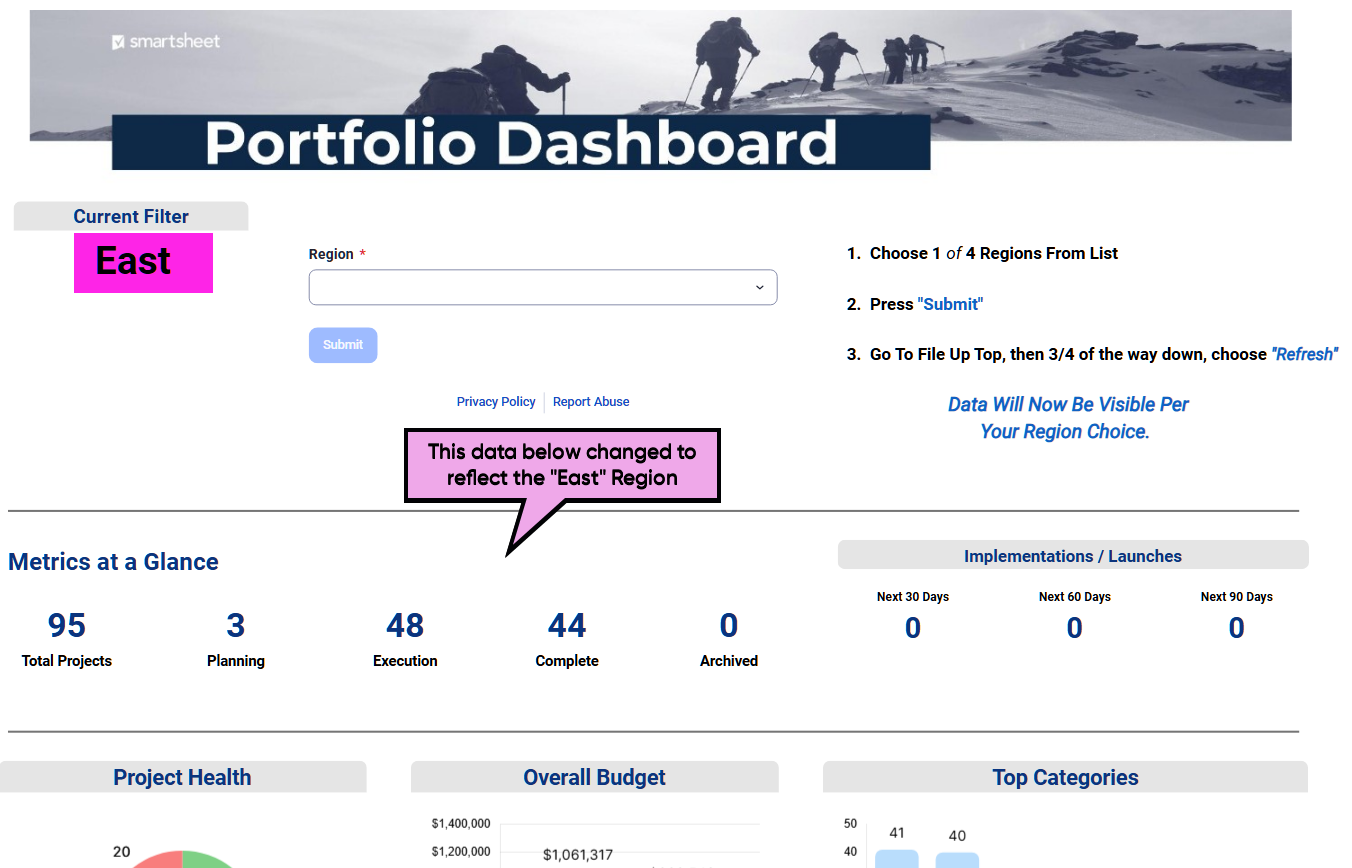
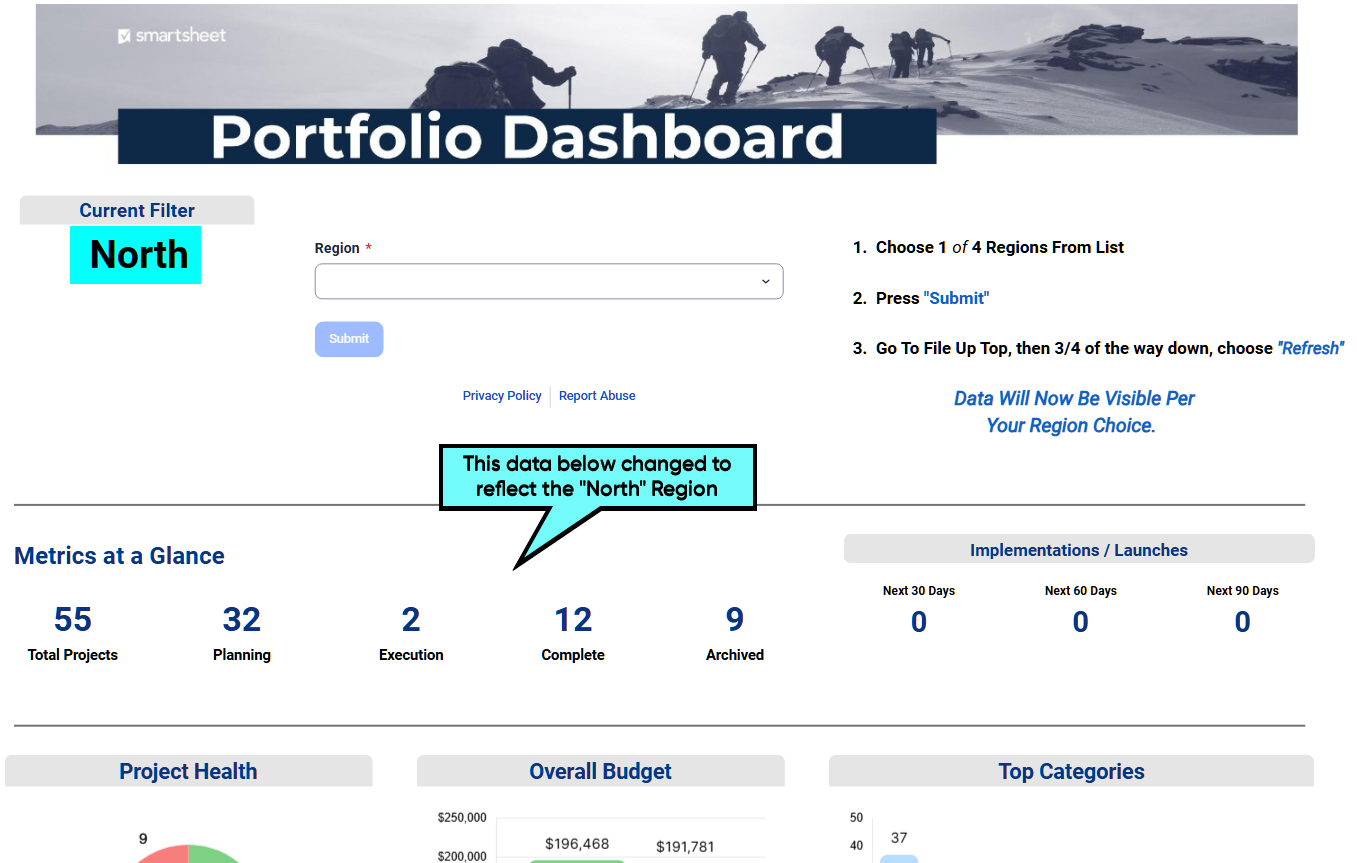
If/when Smartsheets can remove that necessary requirement of refreshing pages just to force the servers to talk and update the data for features like this, then that's when users can truly say Smartsheets is finally playing in the same league as their competitors. I for one need several dynamic dashboards (i have dozens that could be replaced with a dynamic version), but i am not about to have a "Navigation Guide" taking up valuable space up top just to remind anyone that they MUST refresh the page each time they want to see their new filter choice (as you see in the two images above).
This is a great start, but no where near where it needs to be, as you can see with Airtable's Interface Dashboard Setup and Smartsheets knows this.
As for the 3rd party add ons that we can purchase, this is great and extremely valuable, but you have to keep in mind, many companies cannot and will not purchase additional features that SHOULD be included in the already ridiculous cost were sucked into. There are many other software's (online/offline) that can do such basic/advance things that are already included in their pricing models, why should we convince our Directors/Executives to pull out their checkbooks for more money? So, ask yourself this, how can I/you convince my company, who is already paying all this money, to purchase another add-on, when i can just convince them to pack it up and move on to the next software (as shown in links above)?
Smartsheets needs to include all these add-ons in their pricing structures, not offer ways for us to pay for dozens of Third Party Memberships on top of theirs, just to operate a software with features that their competitors already include!!!
😉Again, not saying any of these suggestions are bad, they are at least an option for now (more than what we had years ago), but before anyone makes the decisions necessary to move forward with the choices available here in Smartsheets, i wanted to share my view on this so that everyone here can rethink their approach knowing what is available to them, to make the necessary decisions that is best for their situation and company. 😊
 Julie Becker
Suggested sharing contacts now available!
July, 28, 2025
We're enhancing the sharing experience to make it more personalized and efficient. Now, when you share a Smartsheet item or workspace, the sharing modal will suggest contacts you frequently collaborate with, allowing you to quickly select and share with users directly from the suggestions or by adding their name, email, or group.
Note: This feature is not available for WorkApps, and suggested contacts will be limited to internal users within your plan.

Environment Availability: Commercial US, Commercial EU
Plan Availability: Enterprise
Subscription Model Availability: Legacy Collaborator Model, User Subscription Model
Stay informed by Subscribing to receive product release updates for curated news of recently released product capabilities and enhancements for the platform of your choosing, delivered to your inbox. As new releases occur, you will receive a weekly email with news of what's released every Tuesday.
 Haley Patrone
Re: [Need Help] Lookup/Index matching for Horizontal Data
There is no limit to the number of nested IF statements. The only limit you could run into there would be that a formula cannot exceed 4,000 characters.
What you will want is a series of INDEX/MATCHes linked together with IFERRORs.
=IFERROR(IFERROR(IFERROR(INDEX({1st Type Column}, MATCH([Phone Number]@row, {1st Phone Number Column}, 0)), INDEX({2nd Type Column}, MATCH([Phone Number]@row, {2nd Phone Number Column}, 0))), INDEX({3rd Type Column}, MATCH([Phone Number]@row, {3rd Phone Number Column}, 0))), INDEX({4th Type Column}, MATCH([Phone Number]@row , {4th Phone Number Column}, 0)))
 Paul Newcome
Re: Easily open the record detail panel from a cell in table view
Ooooh @Lekshmi Unnithan - I really like this feature!!
 MCorbin
Re: What formula will pull client specific data from one sheet?
Lol, no worries. Your initial solution worked for me, so I used a combination of yours and his. You guys saved me so much time and effort.
 Malcolm Jackson
Re: Conditional formatting multiple columns at once.
Hi,
I hope you're well and safe!
I agree, and in the meantime, here's a possible workaround. I'd recommend the fantastic add-on, which makes this possible (+ many other features).
SSFeatures from the brilliant Nathan. @SSFeatures
Would that work/help?
Also, Please submit this as a Product Feedback or Idea (If it hasn't been added already) when you have a moment. Please share the link to the Idea here so that others and I can add our votes.
I hope that helps!
Be safe, and have a fantastic day!
Best,
Andrée Starå | Smartsheet Expert Consultant & Partner / CEO @ WORK BOLD
✅ Did I help answer your question/solve the problem? Please support with💡 ⬆️ ❤️, and/or ✅ Answer. This will make it easier for others to find a solution or help answer. I appreciate it, thank you! 🙏
 Andrée Starå
Re: Working with Project Management Office
Will do, I have a "pro" developer appointment next week. I got on zoom earlier this week, and the rep was helpful, but I think was stumped by the root cause. We tried to re-write the formula using the data from the Project Intake Sheet, but I don't think that's right.. Personally I think there are sheets missing from the package, like the mystery "portfolio summary data".
I'm actually going to try and download it again, just for completeness sake.
I should ask since yours seems to work:
- when did you download your package?
- can you find the portfolio summary data, or can you open the reference in the formula?

Cheers,
Pete Spin
Re: Table view initial release is now generally available for all customers!
Thanks for the feedback, AHE! We agree. Improving performance is priority #1 for table teams. There's been some good progress recently and we're excited for a smoother and faster scroll experience to come to table very soon. Please keep the feedback coming!
 tyson
tyson
Re: July Question of the Month - Join the conversation and receive a badge
My personal goal is to get healthier, too. I say too because I’ve noticed that many people here have set similar goals for themselves. So far, so good—and I hope that’s true for everyone. Wishing you all Godspeed in reaching your goals!
 lav_bratis
Re: July Question of the Month - Join the conversation and receive a badge
One thing I had been working on over the past few years when I was working from home a lot more was running a 5K each month. I'd missed Jan & Feb a couple years in a row (for good reason, due to temperatures), but I caught it this year and have verbalized it at my staff meetings at work. My colleagues are able to hold me accountable (and are welcome to join in the festivities). I am 7 for 7 in 2025 for running a 5K each month with the goal to get 12 for 12 this calendar year.
 Jake Gustafson