Best Of
Re: August Question of the Month - Join the conversation and receive a badge
Rebeca,
One of the best thing(s) I have seen on the Smartsheet Community Platform would have to be all of the celebrations of people and their achievements. There is so much going on in this world that is negative and crazy. It is so nice to come here, and feel a sense of communal and familial spirit. Like minded individuals that celebrate each other. I look forward to always seeing the questions of the month, and User Spotlights.
Thank you again for all you do, Rebeca!
Paul
 Paul.Woodward
Re: Onboarding Ideas!
Hi,
I hope you're well and safe!
Welcome to the Community and the wonderful world of Smartsheet!
I recommend joining the Mobilizer program, which gives you access to a lot of resources.
I hope that helps!
Be safe, and have a fantastic day!
Best,
Andrée Starå | Smartsheet Expert Consultant & Partner / CEO @ WORK BOLD
✅ Did I help answer your question/solve the problem? Please support with💡 ⬆️ ❤️, and/or ✅ Answer. This will make it easier for others to find a solution or help answer. I appreciate it, thank you! 🙏
 Andrée Starå
Re: Health column formula troubleshooting
Try this:
=IF([% Complete]@row = 1, "Gray", IF(TODAY() > [End Date]@row, "Red", IF(NETWORKDAYS(TODAY(), [End Date]@row) < 5, "Yellow", "Green")))
 Paul Newcome
Onboarding Ideas!
Hello there!
My name is Esme, happy to join the Smartsheet Community! In summary, our organization has been utilizing Smartsheet in various ways with department-specific functions. I would like to create a solid onboarding foundation to help our new stars get familiar with Smartsheet and continue building on what our management team has created.
With Smartsheet having such a wide range of capabilities, has anyone created something similar for their organization? I was hoping to get guidance toward video tutorials rather than articles or step-by-step breakdowns (those I'm familiar with). Thank you so much for your help!
 eruvalcaba
Re: Automation on Sheet Summary Fields
Hi @Tim Starkey
Thanks for your report of this, and your patience! We fixed the issue with yellow status bars not appearing and you should see the status for this post above.
 Genevieve P.
Auto sort
Checking if there's been any movement on having the sheets sort by data in a column as I see it's been requested since at least 2016.
We have sheets that are sorted by a date that could be 2 days from the day entered or 12 months from the day entered. We also have a filter to hide past dates. Data is being entered via form or auto moved from another spreadsheet and placed at the bottom regardless of the date.
To update we have to have a paid user go in, remove the filter, sort the column and re-enter the filter which is very frustrating and should be a very basic function for spreadsheets.
Reports are a clunky option as causing a lot more sheets in our folders.
 Chris_Lloyd
Re: How do I find the closest matching row that is above my searching row?
Perfect! Thank you so much. I thought I was a gonner since this is so complex. Thank you again for spending the time to help out.
mtuccillo
Re: Working with Project Management Office
@tracey eppes I'm suspecting you might still not have the right template set, or is it possible your account doesn't support it? I don't know if that's a thing, but I'm using an Enterprise account, which I believe is the top tier. On the Metadata sheet, that is basically the key as to whether you can use the template, either due to access or the right set being loaded. If you notice there is the "edit reference" when you open the cell formula. As I showed in my first post, if you can't open these, the template will not work.
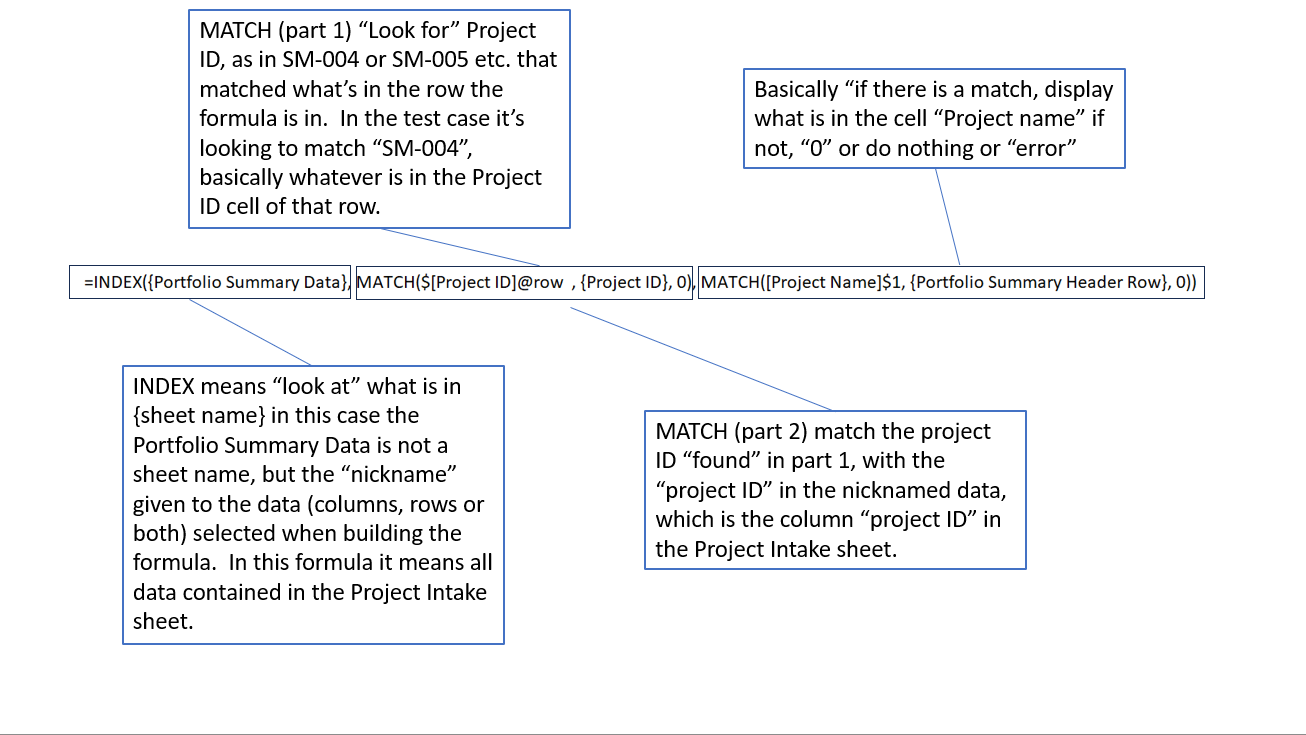
Below is sort of a (simple) breakdown of the formula, the difference between this formula and one maybe I would have written it is the "error". I mean it's good because you know why the formula isn't working (# NO MATCH = "I can't find a match where you told me to look"), but on a "customer" facing sheet, like one I would build for general users, I would include IFERROR, that would instruct Smartsheet to show nothing or a custom message, in case of error like, "your name not found". In this case it's giving you a no match, because the template cannot access the data it's trying to look for, the Project Intake sheet. This was the problem with the first set of templates I downloaded, they were "broken", they couldn't access the data source because SmartSheet somehow prevented it. Like copy protection or something. The Project Intake was there, it can be modified, a new project added with the form, but the rest of the sheets, starting with Metadata, are prevented from "seeing" it. That's why even if you change the "Project Owner" for SM-004 on the Intake sheet, it doesn't change on the Metadata sheet. In fact that's an excellent test, try changing any of the drop downs on SM-004 and see if the Metadata for SM-004 changes. :
 Pete Spin
Re: Retrieving data from identical rows
It may be easier to do this on the source sheet before you send it over to this final sheet.
Make sure new forms are populating at the top of the sheet.
Insert a text/number column called "Number". In the three rows below the bottom form entry, enter the numbers 1, 2, and 3 on separate rows.
Insert a text/number column called "ID" and use this column formula:
=IF(Number@row <> "", INDEX([ID #]:[ID #], 1))
Change the Primary Column name to "Display Name" and use this formula:
=MID("!" + SUBSTITUTE(INDEX([Employee Name]:[Employee Name], 1), CHAR(10), "!") + "!", FIND("~", SUBSTITUTE("!" + SUBSTITUTE(INDEX([Employee Name]:[Employee Name], 1), CHAR(10), "!") + "!", "!", "~", Number@row)) + 1, FIND("~", SUBSTITUTE("!" + SUBSTITUTE(INDEX([Employee Name]:[Employee Name], 1), CHAR(10), "!") + "!", "!", "~", Number@row + 1)) - (FIND("~", SUBSTITUTE("!" + SUBSTITUTE(INDEX([Employee Name]:[Employee Name], 1), CHAR(10), "!") + "!", "!", "~", Number@row)) + 1))
Then set up a copy row automation to run when the new "ID" column changes to any value with a condition of the "Number" column not being blank.
Paul Newcome
Re: Increasing Cell Limits
Happy to help!
Yes, the Smartsheet team is working on adding them all.
Stay tuned!
✅ Remember! Did I help answer your questions or solve the problem? Please support with💡 ⬆️ ❤️, and/or ✅ Answer. It will make it easier for others to find a solution or help answer. I appreciate it, thank you! 🙏
Andrée Starå