Best Of
Re: % Complete Column Isn't Showing Even with Dependencies Enabled
 katymyersinsilc
Re: Automate Date Setting
Hi @Frank_A ,
Try this (replace Today@row with whatever row you have that has the submission date (Created@row, for example).
=WORKDAY(Today@row , 3)
Hope this helps.
Adam Murphy
Re: Copy and Paste Columns
@Julie Becker @Larry T. Johnson @Felicia Nabors @EBazan @Renee F
We've got a solution for this now, does exactly what you need:
 Darren Mullen
Re: Introduce yourself & get to know your peers!
Hello all, I am Eileen from San Diego, CA and recently (Jan 2025) started a new position at Thermo Fisher Scientific where I've been introduced to Smartsheet and it has become my #1 for managing my project plans and artifacts. I also have a dashboard of all my projects that roll up into a nice view for my weekly status reports to staff. It's been fun learning a new tool and I'm always eager for new updates.
 Webb_E
Re: Introduce yourself & get to know your peers!
Hello SmartSheet Community! My name is Stacey Cloutier and I just got my Core Certification Badge 😀I've been working with SmartSheet about 2 years now for a private ambulance company in the Boston area and finally made the time to take the exam...not sure what took me so long! We are using SmartSheet for everything from meeting agendas, task tracking, incident reporting, asset management/forecasting and training! I love that it is such a versatile tool!
In my spare time, I am a wife and mother, a tap dancer and a beach lover. So glad that summer has finally arrived in New England!☀️

 Stacey C
Re: Introduce yourself & get to know your peers!
Hi,
I am Katlego from South Africa. I use Smartsheet for work and personal project, i think Smartsheet is a great tool for improving efficiency. I enjoy fitness related activities.
It's good to be here :)
 Katlego
Re: August Question of the Month - Join the conversation and receive a badge
The most impressive feature I’ve discovered on the Smartsheet Community Platform is the badge system—but what truly stands out above everything is the heartfelt, honest, and engaging communication amongst the platform.
I’ve never felt more welcomed in an online community, especially at a time when the world can often feel divided and lacking in compassion. Here, kindness and support are the norm. I love asking questions, and the generosity of the responses is genuinely overwhelming—in the best way! Sometimes, it takes days just to read through all the thoughtful answers.
I’m truly grateful to be part of such a wonderful, supportive community.
 Annette Anderson
Re: August Question of the Month - Join the conversation and receive a badge
I was trying to create a way to quickly move some details from a row in one sheet to a row in another. I was unable to do this without having to have many additional fields on the second sheet that I did not want/need and it made the secondary sheet look untidy.
So, I decided to use a form and found that I could add query parameters to it to prefill some of the information. However, I hit an issue with things like spaces and other special characters. That was when I found the post below, which whilst relatively straightforward, I had not considered. This has saved me so much time and I have now been able to use this formula in multiple other solutions that I have in place.
https://community.smartsheet.com/discussion/108748/replacing-all-special-characters-in-form-query-string-parameters-with-a-formula#latest
I have not yet thanked the OP in the original post so now also feels like a great time to do exactly that. Thanks @C Eiring, you have saved me so much time and helped improve the way we utilise Smartsheet.
 John_Foster
Re: Indexmatch (retrieving date from one smartbook to generate in main sheet) with a condition
Hi @Monika_923
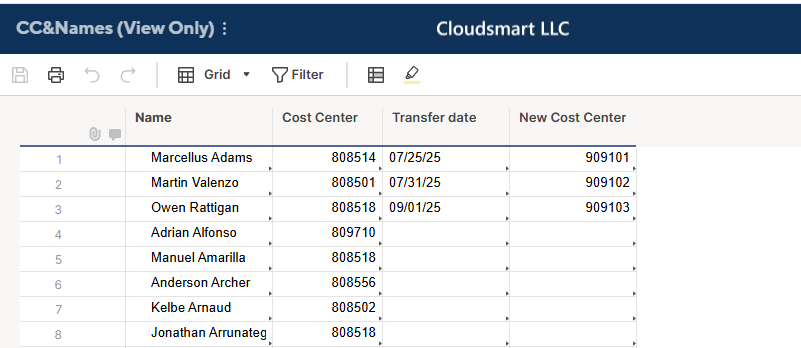
First, I obtain the Transfer date using the same INDEX(MATCH()) structure as the previous one.
[Transfer date] =IFERROR(INDEX({CC&Names : Transfer Date}, MATCH([Employee name]@row , {CC&Names Range : Name}, 0)), "")
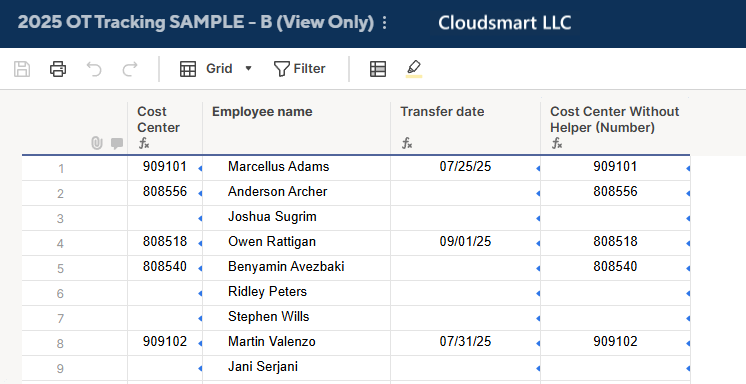
Then, using the [Transfer date] helper column, I used the following logic to get the Cost Center.
- [Transfer date] is a date?
- Yes
- [Transfer date] is on or before today?
- Yes -> Get a New Cost Center from the CC&Names sheet.
- No -> Get a current Cost Center from the CC&Names sheet.
- [Transfer date] is on or before today?
- No -> Get a current Cost Center from the CC&Names sheet.
- Yes
[Cost Center] =
IF(ISDATE([Transfer date]@row),
  IF([Transfer date]@row  <= TODAY(),
    JOIN(COLLECT({CC&Names Range : Next Cost Center}, {CC&Names Range : Name}, [Employee name]@row ), ""),
    JOIN(COLLECT({CC&Names Range : Cost Center}, {CC&Names Range : Name}, [Employee name]@row ), "")),
JOIN(COLLECT({CC&Names Range : Cost Center}, {CC&Names Range : Name}, [Employee name]@row ), ""))
I used this time the JOIN(COLLECT()) functions structure to avoid IFERRORs. So, the Cost Center is now a text value, but I hope that is not a problem.
Below is the same structure formula without using the [Transfer date] helper column. I think the former is easy to maintain, and I recommend it unless you prefer not to have an additional helper column.
[Cost Center Without Helper (Number)] =
IF(ISDATE(IFERROR(INDEX({CC&Names : Transfer Date}, MATCH([Employee name]@row , {CC&Names Range : Name}, 0)), "")), IF(IFERROR(INDEX({CC&Names : Transfer Date}, MATCH([Employee name]@row , {CC&Names Range : Name}, 0)), "") <= TODAY(), JOIN(COLLECT({CC&Names Range : Next Cost Center}, {CC&Names Range : Name}, [Employee name]@row ), ""), JOIN(COLLECT({CC&Names Range : Cost Center}, {CC&Names Range : Name}, [Employee name]@row ), "")), JOIN(COLLECT({CC&Names Range : Cost Center}, {CC&Names Range : Name}, [Employee name]@row ), ""))

Re: Smartsheet recognized as a Customers' Choice in the Gartner® Peer Insights™ + Giveaway
One unique (personal) use of Smartsheet I'm proud of is organizing my nail polish collection! I have over 350 bottles and realized many years ago that I tend to reach for the same colors while some have never been used. I started tracking what colors I'd use to determine usage as well as what season they belong to and other pertinent information.
Smartsheet unlocked so many opportunities for this spreadsheet! I created a dashboard outlining my most-used shades, colors I have not used, and ones that haven't been reached for in many years. It's been really nice to get visuals and see how my tastes have changed over time :)
 meagans