Best Of
Re: July Question of the Month - Join the conversation and receive a badge
My personal goal is to grow my side hustle this year. I fell in love with re-selling, and I am trying to grow my business. I currently use my money to do supplemental activities for my husband and I. I have purchased season tickets to our local apple orchard and pumpkin patch. I also use my funds to pay our 5k race entry fees. I am hoping to grow my business to be able to cover the air fare to fly from NEPA (yes, I live near Scranton) to Northern California to pin my son at his United States Coast Guard A-School Graduation later this year.
 JoHanna_Schultz
Re: July Question of the Month - Join the conversation and receive a badge
I'm looking to become certified in the Core App and travel internationally this year. I've completed 4 of the 9 self-paced courses so far and have been to Canada twice!
 Eric B.
New! Mute individual Post alerts in Community
Hey Community!
We are excited to announce a new feature: The ability to mute posts.
Muting posts provides you with greater control over your notification feed and overall interaction with Community content. We understand there are times when you might want to temporarily or permanently opt out of notifications for a specific post or thread, without needing to unfollow the entire topic. Now, you can mute that post directly!
How to Mute a Post:
- Navigate to the post you wish to mute.
- Click on the "..." (more options) icon located at the top right corner of the post.
- Select "Mute Post" from the dropdown menu.
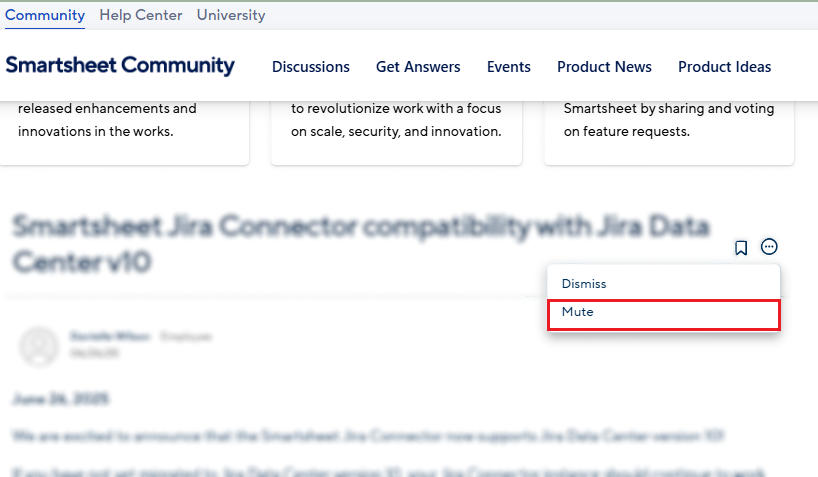
Once muted, you will no longer receive notifications for new comments on that specific post. Note: This includes if you are @mentioned as well .
You can also mute posts directly from the email notification:
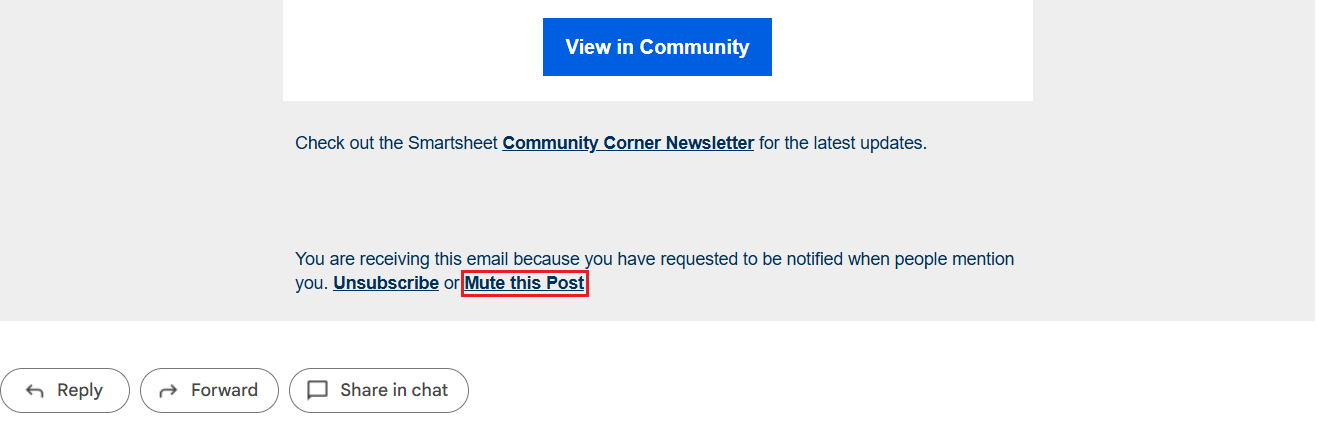
Curious? Give it a try after responding and engaging with a few of your peers' responses on July’s Question of the Month. 😉 You can unmute a post at any time by following the same steps and selecting "Unmute Post."
If you have any questions or feedback regarding this new feature, feel free to add a comment below or visit the Community Feedback topic to share your input.
 Isaac A.
ICYMI: Dashboard Charts Are Getting a Glow Up!
We've recently announced the rollout of cleaner, sleeker charts following another recent update that lets you add AI-generated charts directly to your dashboards. Check out these updates in this short video!
 Marie F.

Re: Capability to quickly grab Folder/Sheet Property Info from Workspace Panel
This would be a super valuable time saving feature!!
 Will Jeffords
Re: Capability to quickly grab Folder/Sheet Property Info from Workspace Panel
That could save a lot of time from a task that can get a little monotonous, especially if you’re needing to do a few. We can do that with a sheet, so I would hope that it would be easy to implement at a folder level.
 Deena Duran
Re: Capability to quickly grab Folder/Sheet Property Info from Workspace Panel
another great ground-level observation. having this formality in place would also significantly simplify my workflow. thanks for submitting Chizu
 Kyle Chipman
Re: How are users added to the User Management page of the Admin Center vs the user reports?
@Genevieve P. Thank you for your time and patience in clarifying all this for me. I have been trying to work with our account reps and Smartsheet support and have never come close to being able to explain this as you and Isaac have. I think I understand the concept now - for the most part at least.

Re: Capabilities of "Viewers" in new Model
@Trang Turtletraxx As long as the only access they have to edit data is through the dynamic view, they will not be added as provisional users.
 Paul Newcome