Best Of
Re: Sync Automation Edits Across Multiple Sheets
Hi,
I hope you're well and safe!
I agree, and in the meantime, here's a possible workaround.
I'd recommend the fantastic add-on, which makes this possible (+ many other features).
SSFeatures from the brilliant Nathan. @SSFeatures
Would that work/help?
I hope that helps!
Be safe, and have a fantastic day!
Best,
Andrée Starå | Smartsheet Expert Consultant & Partner / CEO @ WORK BOLD
✅ Did I help answer your question/solve the problem? Please support with💡 ⬆️ ❤️, and/or ✅ Answer. This will make it easier for others to find a solution or help answer. I appreciate it, thank you! 🙏
 Andrée Starå
Re: Meet Dan Palenchar, our July Member Spotlight! 🎉
What a great read, I echo @Isis Taylor, very inspiring!
 Protonsponge

Enhancements to the Settings panel in new views, now generally available!
July, 22, 2025
The Settings panel in the new views makes it easier for users to review, manage, and update all sheet settings in one place. With this release, users can now do the following from the new views directly:
- Set and manage Start Date, End Date, Dependencies, and % Complete for the sheet
- Set Start of Fiscal Year and Start Day of Week, and configure Working/Non-working Days
- [All new] When using a milestone-only timeline view with only one date column, users can choose which date column is mapped as the Start or End Date
To access the Settings panel, click the gear icon in the top-right corner of the toolbar in table, board, or timeline view. Learn More
Note: The ability to configure resource management settings in the Settings panel is not included in this release.
Environments availability: Commercial US, Commercial EU
Plan availability: Pro, Business, Enterprise, Advanced Work Management
Subscription Model Availability: Legacy Collaborator Model, User Subscription Model

Stay informed by subscribing to receive product release updates for curated news of recently released product capabilities and enhancements for the platform of your choosing, delivered to your inbox. As new releases occur, you will receive a weekly email with news of what's released every Tuesday.
 Lekshmi Unnithan
Re: duplicate entry checking 2 sheets
Try something like this.
1️⃣ . Add an Autonumber column (if you don't have one already). I've named mine RowID.
2️⃣ . Add a column called Duplicate and make it a Flag type column.
3️⃣ . Add the below formula and make it a Column Formula.
=IF([Invoice Number]@row <> "", IF(RowID@row <> INDEX(COLLECT(RowID:RowID, [Invoice Number]:[Invoice Number], [Invoice Number]@row ), 1), 1, 0))
This formula will flag any duplicates after the first.
Did that work/help?
✅ Remember! Did I help answer your question/solve the problem? Please support with💡 ⬆️ ❤️, and/or ✅ Answer. This will make it easier for others to find a solution or help answer. I appreciate it, thank you! 🙏
Andrée Starå
Re: July Question of the Month - Join the conversation and receive a badge
One goal this year was to study for and complete a new certification that would advance a stackable certification that is in a renewal path. It is going very well, and the updated material has been a great refresher.
 ss_innovation
Re: Populate cell with current date and time
You can look at the individual checkbox cell's history, but that doesn't really lend itself to scalability. Automations only record a DATE, which obviously won't work for your use case. The workaround I've used in the one case I had to record time is simliar to described here - it isn't pretty, but it works. I'd be delighted if anyone else can offer something that's a bit more elegant than this trashfire. 😀
1. The sheet on which this checkbox appears will need to have some kind of a unique identifier for each row. If you already have something you can use (like an order number or an employee ID or something that shouldn't be repeated on the sheet EVER), great. If not, add an Autonumber column.
2. Create a COPY ROW automation that is triggered when your box is checked. Copy that row to a new sheet whose entire purpose is to create this timestamp. On that NEW sheet, be certain a Created Date column exists. (If it already does on your main sheet, you'll need to test and possibly play with column names and/or types - you're trying to capture when the row is created on the NEW sheet and not the original sheet.)
3. On the NEW sheet, split the date and time of the Created column into separate cells with Text/Number type - use formulas like =LEFT(Created@row, FIND(" ",Created@row)-1) to accomplish this. Only column type Text/Number will retain the timestamp, so you're converting the data type by doing this split.
4. You'll then be able to look up that new "timestamp" cell using your unique identifier from #1 to pull the time over. You can use the TIME formula to do whatever calculations you need to.
 Kerry St. Thomas
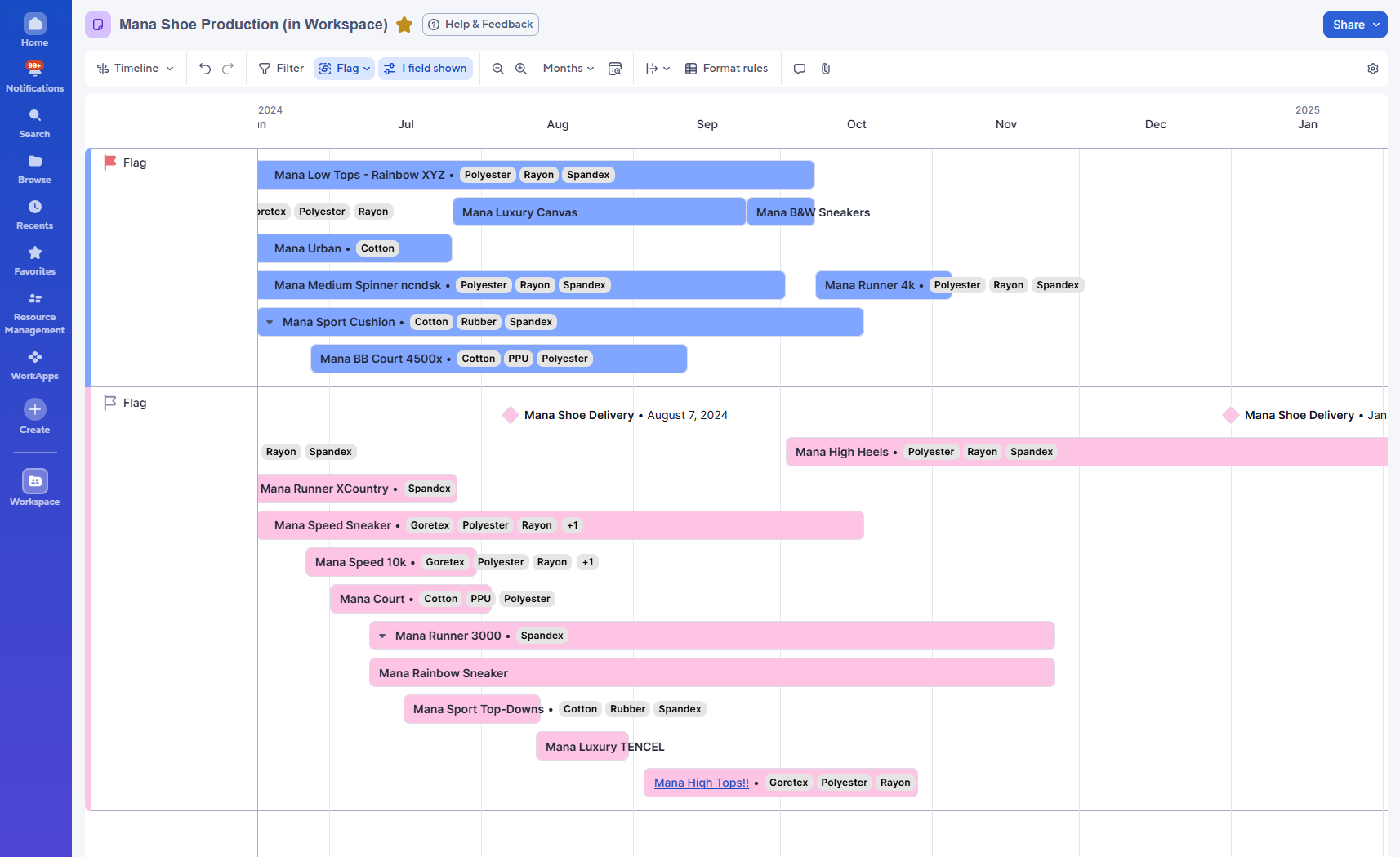
Group by more column types in timeline view, now generally available!
July, 23, 2025
We expanded the grouping options in timeline view to support even more column types. Now, in addition to single-select dropdown, single-select contact list, and symbol columns, we also support level 1 and level 2 timeline view grouping by text/number, checkbox, and date columns. This means users can now group by almost all column types in timeline; the only exceptions are duration, multi-select contact, and multi-select dropdown. Learn More
Environments availability: Commercial US, Commercial EU
Plan availability: Business, Enterprise, Advanced Work Management
Subscription Model Availability: Legacy Collaborator Model, User Subscription Model
Stay informed by subscribing to receive product release updates for curated news of recently released product capabilities and enhancements for the platform of your choosing, delivered to your inbox. As new releases occur, you will receive a weekly email with news of what's released every Tuesday.
Lekshmi Unnithan
Re: Long Forms and the ability for submitters to Save as Draft
Excellent!
You're more than welcome!
✅ Remember! Did I help answer your question/solve the problem? Please support with💡 ⬆️ ❤️, and/or ✅ Answer. This will make it easier for others to find a solution or help answer. I appreciate it, thank you! 🙏
Andrée Starå
Re: Registration is open! Come be in community at ENGAGE 2025
Hey Ray! I believe once you've completed the registration process, it will then bring you to the hotel portal which shows the ones with discounted rates.
 Alison C.