Best Of
Re: Formula to separate first and last name from Contact List
Hi @RiseUpPNW
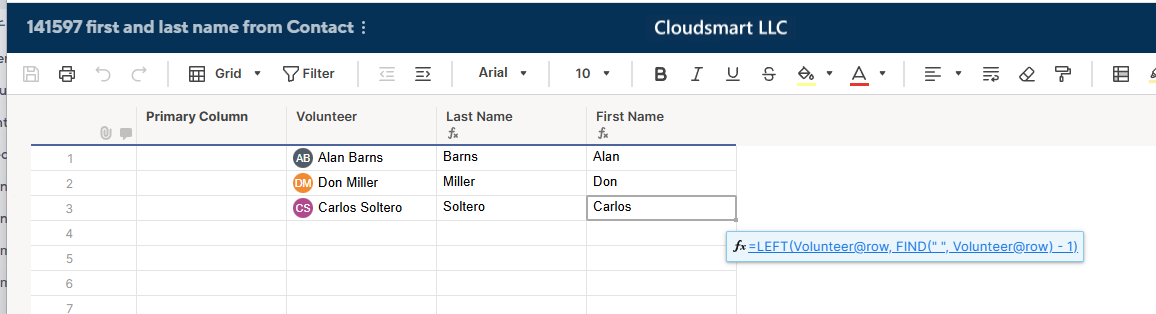
You need to change the First Name's formula to this;
=LEFT(Volunteer@row , FIND(" ", Volunteer@row ) - 1)
In English, find the space between the first name and last name. Get the string from the top up to position one before the found space position to get the first name.

Re: Referencing a specific level in a hierarchical setup
I would insert a helper column that outputs the level
=COUNT(ANCESTORS())
Then you can leverage this in whatever other formula you are using to evaluate the levels.
=COUNTIFS(………………….., Level:Level, @cell = 2)
 Paul Newcome
Re: Please to meet you
Welcome to the community I use smartsheet for a Event management company.
 Naeem Ejaz
Re: How do i use OR function within SUMIFS function?
Hey Brandon, would this do the trick?
=SUMIFS({Upcoming Jobs (High Level) Range 3}, {Upcoming Jobs (High Level) Range 1}, OR(@cell = [Job Name 1]@row , @cell = [Job Name 2]@row , @cell = [Job Name 3]@row , @cell = [Job Name 4]@row ))
 jjg279
Re: NEW! Timeline view widget in dashboards
@Paula Grahame — Thanks for sharing your feedback! We're tracking a similar request from other customers, the ability to restrict the date range for the displayed timeline on a dashboard. Stay tuned!
Zita
Re: 承認者の名前取得方法について
Webhookのところが面倒なので、定期実行にすれば少し楽になると思ます。
Cell Historyはなくなるものでないので、想定されている利用ケースは、後から承認者を確認するといった監査などの目的でないかと推察されれ、一日に一回、実行する、といった形にすればよいかと思います。
必要であればお手伝いしますので、私のプロフィールにあるメールアドれるにご連絡ください。
Re: Portfolio Level Week-to-Week Changes
Hi @Nikki G ,
We ran into this same challenge and I built a solution that works well across multiple programs. Here's how we approached it:
- Snapshot Sheet Method – I created a weekly snapshot sheet that logs key portfolio metrics (like % Complete, At-Risk Projects, Delays, etc.) every Friday using a helper workflow and a simple "snapshot row" per project.
- Automation – Smartsheet automation copies data into the snapshot sheet at a set time weekly, so it’s hands-off once built.
- Portfolio Rollup Dashboard – We pull the data into a dashboard showing week-over-week changes using chart widgets and summary reports for visual tracking.
Bonus: If you're using Control Center, you can template this process and apply it portfolio-wide easily.
HockinsonJohn
Re: Translating Formula to Smartsheet
Hello KPH,
So…. I should probably be barred from sending updates on Monday mornings. You are absolutely right and I haven't been looking at this right, till now. I'm going to go do this a little more correctly and I'll get back to you. Sorry, but thank you for sticking with me!
Mross0878
Re: Insert image to cell in batch
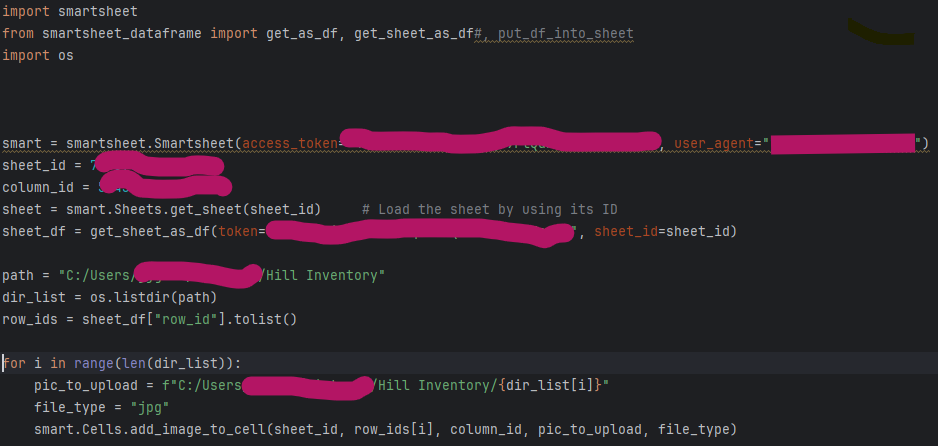
@LaurenLong Not sure if you still need to do this, but I found this post and figured I would comment. This script worked for me using python/pandas and the API - only one photo per row and all my photos in a single photo:
 jjg279
Re: August Question of the Month - Join the conversation and receive a badge
Honestly, it’s the Community itself. I used to feel like I was alone with my enthusiasm for Smartsheet, until I discovered the Community. The diversity of backgrounds, industries, and use cases is incredible. It’s inspiring to see how solutions often come from people outside my field who’ve tackled similar challenges in completely different contexts.
The collaborative spirit here is unmatched. Whether it’s a quick tip, a deep dive into a formula, or just some good old-fashioned “nerdy talk,” there’s always someone ready to help, share, and uplift. The responsiveness is remarkable too.
This platform has become part of my daily routine, and it’s comforting to know I’m not alone. I’ve found my people.
 MeganNelson