Best Of
Re: countifs
Hello @Gregw . The formula looks good but it should be COUNTIFS since you have two criteria you're matching on. I've bolded the changes below.
=COUNTIFS({Sheet B Range 1}, [client name]@row, {Sheet B Range 2}, OR(@cell = "Completed - Live", @cell = "Completed - Live - Missing Documentation"))
Hope this helps!
 Victoria_Indimar
Re: Metric Widget without Summary Sheet Report?
Hi @Rebecca BdR and @jmyzk_cloudsmart_jp, I am the Product Manager at Smartsheet for Charts and Metric Widgets and I just wanted to chime in here.
Metric widgets currently do not support data from Reports. Once you have the helper column, you will need to create a separate sheet that houses the calculations (COUNTIF) for each city and status. Then use that sheet as the data source for your metric widget.
Today's process for creating charts and metrics is heavily reliant on our customers knowing how to use formulas, and we understand that it is unintuitive and cumbersome. We are working on a new creation experience that enables the user to select the aggregations (sum, count, avg etc) they want from a dropdown and not have to write out formulas. This experience will begin with charts, and then extend to metric widgets in the future. If either of you are interested previewing these new concepts and giving us your feedback, I would love to set up a call with you. It would greatly help us shape the solution. Let me know, and thank you either way!
-Rashmi
 Rashmi Shekhar
Re: May Question of the Month - Join the conversation and receive a badge
If I had to explain it to a 5-year-old, I’d say this:
"Sup kids! My job is similar to Smokey the Bear, only you can prevent forrest fires. Like Smokey, I work with grown ups to avoid starting work fires."

 Jarom Ward
Re: How to pull the top parent to the row
Hi @S.Stone!
You can use the Ancestor function for this.
=INDEX(ANCESTORS([primary]@row),1))
Hope this helps!
Victoria_Indimar
Re: Welcome to the Project Management Office (PMO) Community!
I have been using Smartsheet for a year since i came back from maternity leave. It's been such a life changer for me, i am able to manage my direct reports, handle project timelines and plans, create beautiful dashboards for leadership. It really is a one stop shop!
 Cayla Davis
Column Links Now Generally Available!
Hi Community,
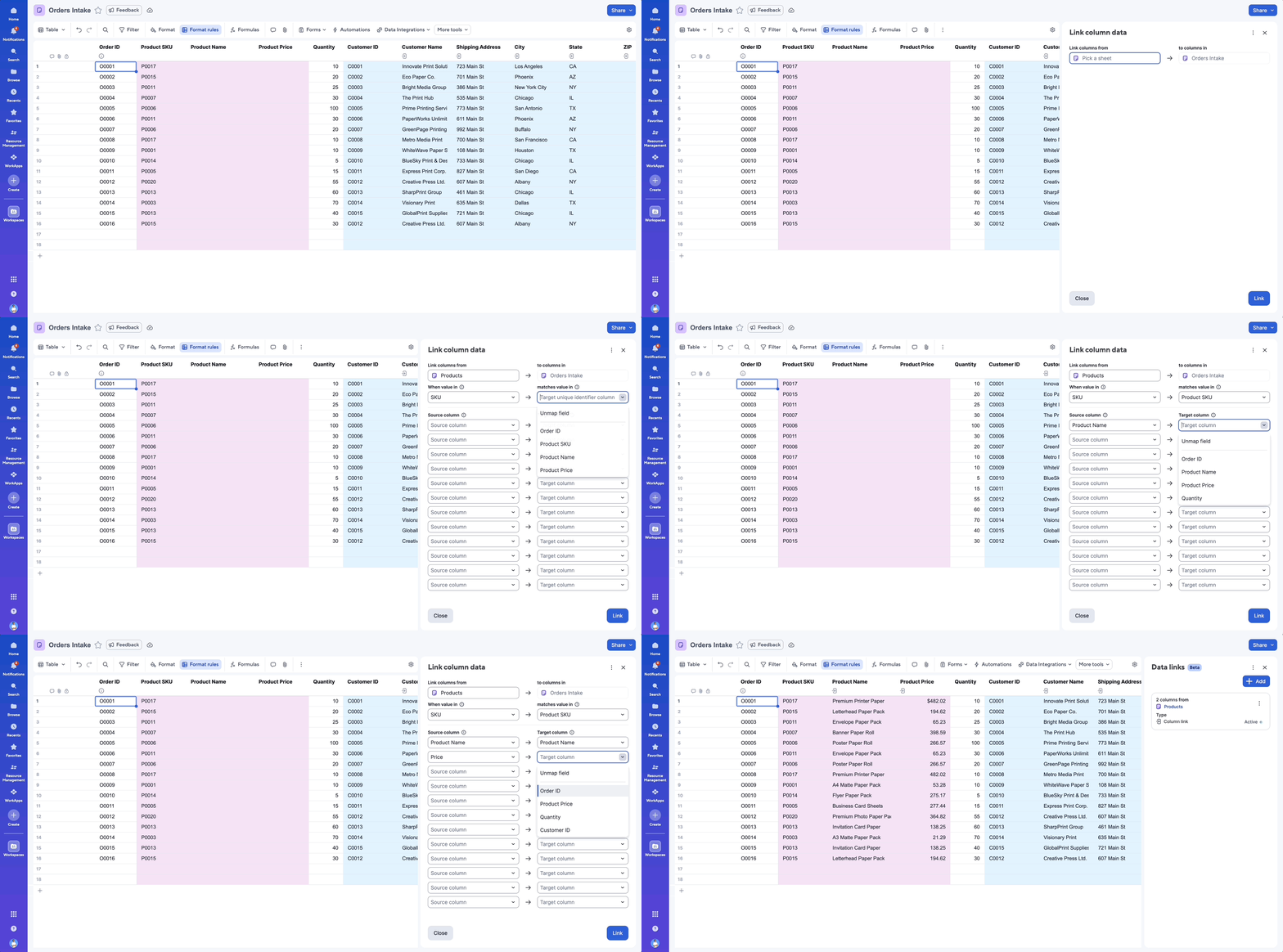
Column links, accessible through the “More Tools”->”Link column data” toolbar option in table view, allows users to reference data across sheets, without needing to write formulas.
With column links, you can reference data within columns in other sheets based on a unique identifier, to create flexible cross-sheet lookups. This is instrumental when referencing data sources like a Product Catalog, Employee Directory, or Billing Rates across other sheets to ensure your data is always up-to-date.
This release represents the first phase of column links — future releases will include advanced features to provide enterprise grade flexibility for more complex processes and solutions.
Licensed users on Pro, Business, and Enterprise plans (Legacy & User Subscription Model) are able to use this new feature. You must have admin permissions on the target sheet and viewer permissions or higher on the source sheet.
You can find some help articles to get you started with column links here:
You can also stay informed by subscribing to receive product release updates for curated news of recently released product capabilities and enhancements for the platform of your choosing, delivered to your inbox. As new releases occur, you will receive a weekly email with news of what's released every Tuesday.
Danielle Wilson
Product Marketing Manager
 Danielle Wilson
Re: Trying to add form submissions onto a Spreadsheet that has a column of unique randomized numbers
Hi @JonathanMDLG ! If I'm understanding correctly, you have existing rows with coupon codes in one column and you're wanting a form submission to populate the existing row to "assign" it a coupon code?? Is that right? If so, then that will not work. Form submission will also generate a new row, it cannot add to an existing row.
If you're wanting to assign a coupon code, you could store the coupon codes in something like a "master coupon code" sheet and then when a new form entry is submitted, it populates/pulls the coupon code from the "master coupon code" sheet. You could do something like auto number the form submissions so they match a numbering scheme assigned to the coupon code (an ID). Does that make sense? Would something like that work for you?
Victoria_Indimar
Re: grey out specific number of days in calendar booking form
ok, that's a good idea. wasn't aware of this section. thanks again!
divelocker
Re: How to transfer a user account with the same email address
Thanks Tomasz, that sounds like it should work. We'll give it a go.
NigelS