Best Of
Re: Table view initial release is now generally available for all customers!
On my gods this is AMAZING! It will make the data collectin part of my life so much easier and faster! Thank you! 😀
 KMH Spinner
Re: How to request task updates from collaborators
Happy to help!
Yes, they would still need to log in so we know who they are, but they don't need a license. And it provides many benefits. One of the most significant benefits is that they don't need to fill out everything at once, and they can have multiple updates running simultaneously.
Unfortunately, there's no built-in way to enter the updates, but if it follows the same structure, it could be set up to work with a parser and/or an AI service.
Would that work/help?
✅ Remember! Did I help answer your question/solve the problem? Please support with💡 ⬆️ ❤️, and/or ✅ Answer. This will make it easier for others to find a solution or help answer! I appreciate it, thank you! 🙏
 Andrée Starå
Re: Formula VLOOKUP or maybe an alternative solution
You would need an INDEX/COLLECT combo for this:
=INDEX(COLLECT({Column To Pull Over}, {AJ_Number}, @cell = [PI or Account #]@row, {AJ_Name}, @cell = "Travel"), 1)
 Paul Newcome
Re: July Question of the Month - Join the conversation and receive a badge
To carry on with the grief while honoring his memory by finishing and publishing his book. I’m two-thirds of the way there…
 MMcLain
Re: Formula for Metric Sheet - Dashboard Chart
Hi @ejacksonBPT,
There are 2 ways you can setup the metric sheet, but the main thing is to change the formula to =COUNTIFS to include multiple criteria and add another cross sheet reference for Project Manager.
Example 1:
Change the formula by adding in the project manager name in each formula.
=COUNTIFS({Status}, [Primary Column]@row , {Project Manager}, "Joe")
Example 2:
Instead of using the Project Manager names as column names, move everything down one row and add the names into the sheet itself, this way you can refer the project manger name inside the cell, the same war you are doing with status - this will make it easier to make changes in the future. Then use the following formula.
=COUNTIFS({Status}, $[Primary Column]@row , {Project Manager}, [Column2]$1)
Note the "$" - this will make it so you can drop the formula across or down without it changing the required cel.
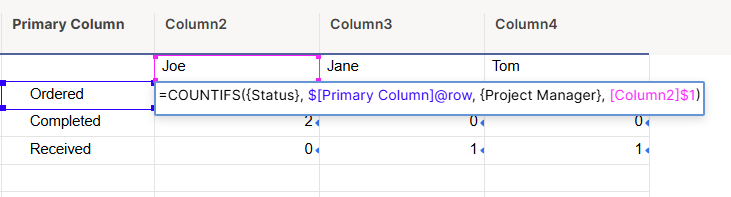
Hope this helps,
Dave
 DKazatsky2
Re: Reports based on dates
I am presuming you already have this completed date as a date field on the primary sheet. When you create your report, you would simply use the a filter based on that column. There is an option called 'In the Last' and you would specify how many days back you want.
 Matt_A
Re: Welcome to the new AI Community!
Hi Smartsheet Ai Community. I’m Gina based in the Washington DC area. I’ve been using Smartsheet for over a year and currently support a nonprofit international church. I’m excited to see AI functionality starting to emerge in Smartsheet and am looking to explore how it can enhance our business processes. I’m also interested in learning from the community—sharing tips and discovering how others are leveraging AI to better support their organizations.
 Gina T
Re: Need to remove decimals from my Dashboard pie Charts. Please help.
Hello everyone, thank you for your feedback and patience! I wanted to share a few updates that we have made:
- On pie and donut charts, labels that are %s have been reset to show whole numbers.
- Legends no longer display the value. This should help with the other issue of legend items being truncated behind "+N more", but we're also thinking about a more direct solution for that issue.
- Custom font size setting now works with multi-widget editing. You can select multiple widgets at a time and set the font size (found in Series).
I hope this helps. I'll keep you all posted as more updates go out.
-Rashmi
Rashmi Shekhar
Re: Data table/sheet connection error notification
Thank you, Georgie, for getting back to me on this post, our TAM support confirmed the same. All but one of the sheets has since refreshed with no issue, I suspect the last one will when there is updated data related to that sheet.
 Adam_C
Re: 🚨 [Feedback Requested] Would commenting directly on Dashboards help your team? 🚨
LOVE the idea of annotations on a dashboard, and I think it would go a long way to getting executives to use dashboards if they could comment directly there!
