Best Of
Re: August Question of the Month - Join the conversation and receive a badge
I was trying to create a way to quickly move some details from a row in one sheet to a row in another. I was unable to do this without having to have many additional fields on the second sheet that I did not want/need and it made the secondary sheet look untidy.
So, I decided to use a form and found that I could add query parameters to it to prefill some of the information. However, I hit an issue with things like spaces and other special characters. That was when I found the post below, which whilst relatively straightforward, I had not considered. This has saved me so much time and I have now been able to use this formula in multiple other solutions that I have in place.
https://community.smartsheet.com/discussion/108748/replacing-all-special-characters-in-form-query-string-parameters-with-a-formula#latest
I have not yet thanked the OP in the original post so now also feels like a great time to do exactly that. Thanks @C Eiring, you have saved me so much time and helped improve the way we utilise Smartsheet.
 John_Foster
Re: Indexmatch (retrieving date from one smartbook to generate in main sheet) with a condition
Hi @Monika_923
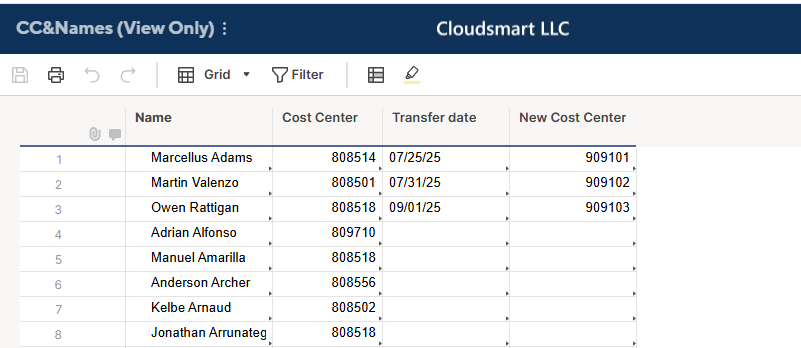
First, I obtain the Transfer date using the same INDEX(MATCH()) structure as the previous one.
[Transfer date] =IFERROR(INDEX({CC&Names : Transfer Date}, MATCH([Employee name]@row , {CC&Names Range : Name}, 0)), "")
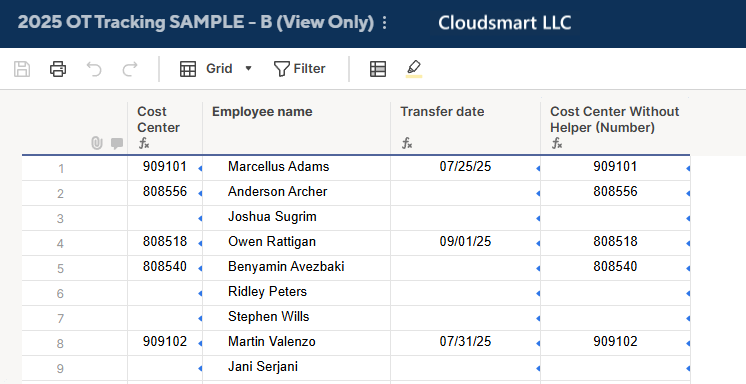
Then, using the [Transfer date] helper column, I used the following logic to get the Cost Center.
- [Transfer date] is a date?
- Yes
- [Transfer date] is on or before today?
- Yes -> Get a New Cost Center from the CC&Names sheet.
- No -> Get a current Cost Center from the CC&Names sheet.
- [Transfer date] is on or before today?
- No -> Get a current Cost Center from the CC&Names sheet.
- Yes
[Cost Center] =
IF(ISDATE([Transfer date]@row),
  IF([Transfer date]@row  <= TODAY(),
    JOIN(COLLECT({CC&Names Range : Next Cost Center}, {CC&Names Range : Name}, [Employee name]@row ), ""),
    JOIN(COLLECT({CC&Names Range : Cost Center}, {CC&Names Range : Name}, [Employee name]@row ), "")),
JOIN(COLLECT({CC&Names Range : Cost Center}, {CC&Names Range : Name}, [Employee name]@row ), ""))
I used this time the JOIN(COLLECT()) functions structure to avoid IFERRORs. So, the Cost Center is now a text value, but I hope that is not a problem.
Below is the same structure formula without using the [Transfer date] helper column. I think the former is easy to maintain, and I recommend it unless you prefer not to have an additional helper column.
[Cost Center Without Helper (Number)] =
IF(ISDATE(IFERROR(INDEX({CC&Names : Transfer Date}, MATCH([Employee name]@row , {CC&Names Range : Name}, 0)), "")), IF(IFERROR(INDEX({CC&Names : Transfer Date}, MATCH([Employee name]@row , {CC&Names Range : Name}, 0)), "") <= TODAY(), JOIN(COLLECT({CC&Names Range : Next Cost Center}, {CC&Names Range : Name}, [Employee name]@row ), ""), JOIN(COLLECT({CC&Names Range : Cost Center}, {CC&Names Range : Name}, [Employee name]@row ), "")), JOIN(COLLECT({CC&Names Range : Cost Center}, {CC&Names Range : Name}, [Employee name]@row ), ""))

Re: Smartsheet recognized as a Customers' Choice in the Gartner® Peer Insights™ + Giveaway
One unique (personal) use of Smartsheet I'm proud of is organizing my nail polish collection! I have over 350 bottles and realized many years ago that I tend to reach for the same colors while some have never been used. I started tracking what colors I'd use to determine usage as well as what season they belong to and other pertinent information.
Smartsheet unlocked so many opportunities for this spreadsheet! I created a dashboard outlining my most-used shades, colors I have not used, and ones that haven't been reached for in many years. It's been really nice to get visuals and see how my tastes have changed over time :)
 meagans
Re: Dynamic Filter on Dashboards
If the dropdown list is introduced to Smartsheet dashboard to select to desired projects to show in a dashboard will save the time for creating dashboard for multiple projects. So one dashboard can be used for Multiple projects by simply selecting desired projects using Dropdown list option.
 manjunathyr
Re: Community Corner Newsletter [August 2025]
Happy birthday @Georgie! My birthday is on the 13th!!
 LancyW
Re: Community Corner Newsletter [August 2025]
Happy birthday month @Georgie - mine is on the 24th! 🎂
 Cayla Davis
Re: Using HAS/CONTAINS functions with multiple choices
Hi @Beth Keane
As I understand it, a cell could include up to 10 events, and they fall into 3 categories:
- Group 1 ignore (in my example these are events 1-3)
- Group 2 multiply by 2 other columns (in my example these are events 4-6)
- Group 3 multiply by 1 other column (in my example these are events 7-10)
If a cell has 2 events (say event 9 and event 10) and you use a COUNTIF with an OR, that formula will return 1. The cell contains either event 9 or event 10.
If you want this to return 2 (the total number of events in the group), then you need to count each separately and add them together.
Here column 5 shows the result of the formula in column 6.
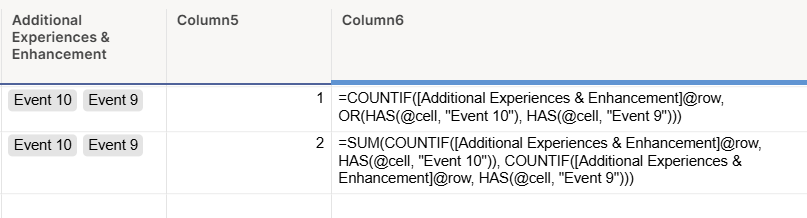
So, to count the four events in Group 3, the formula would look like this (with "event n" replaced with the value in your drop down).
=SUM(COUNTIF([Additional Experiences & Enhancement]@row , HAS(@cell , "Event 10")), COUNTIF([Additional Experiences & Enhancement]@row , HAS(@cell , "Event 9")), COUNTIF([Additional Experiences & Enhancement]@row , HAS(@cell , "Event 8")), COUNTIF([Additional Experiences & Enhancement]@row , HAS(@cell , "Event 7")))
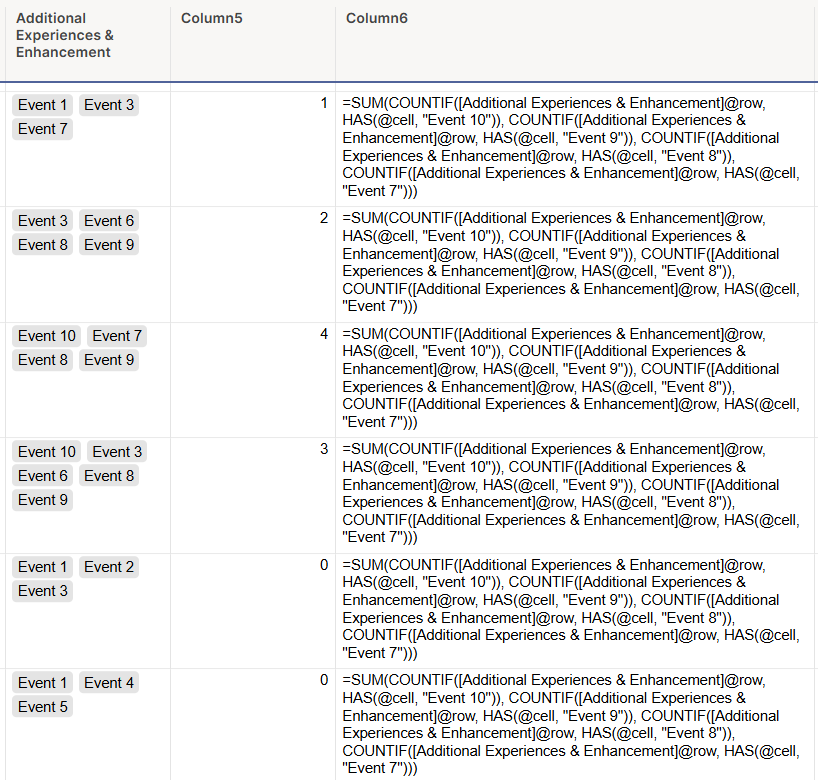
You would then multiply this by the number of attendees to get the value.
That formula would then be:
=(SUM(COUNTIF([Additional Experiences & Enhancement]@row , HAS(@cell , "Event 10")), COUNTIF([Additional Experiences & Enhancement]@row , HAS(@cell , "Event 9")), COUNTIF([Additional Experiences & Enhancement]@row , HAS(@cell , "Event 8")), COUNTIF([Additional Experiences & Enhancement]@row , HAS(@cell , "Event 7")))) * Attendees@row
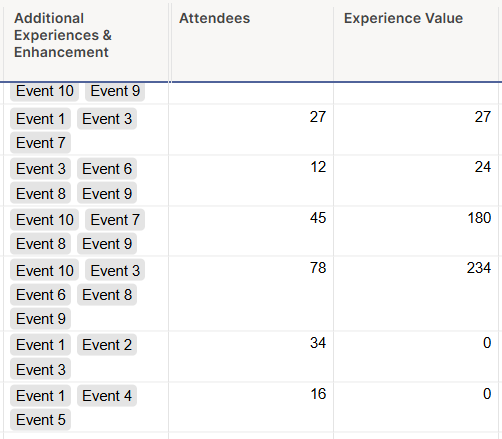
You can then repeat this for group 2, multiplying that total by the two columns.
I hope this is helpful.
 KPH
KPH
Re: Community Corner Newsletter [August 2025]
Happy Birthday @Georgie ! This is also my birthday month!
dlowery1554
