Best Of
Re: Sumifs total from two sheets - Errors
Hey Hudson.
You cracked it mate - thanks for that.
 Jason P
Re: Project Metadata Sheet Not Correctly Indexing the Project Intake Sheet
I found a solution from another community post. The problem is not with the formula; however, it is with the references. Hover over the Project Name cell in the Project Metadata sheet and you will see a formula (fx) appear in a semitransparent rectangle below the cell. In the rectangle, you will see the following:
Edit Reference: {Portfolio Summary Data}, {Project ID} and {Portfolio Summary Header Row}
Click on {Portfolio Summary Data} and follow these steps:
In the Project Metadata sheet, modify the formula references as follows; references should be to the Project Intake Sheet. If you get any error messages or pop-ups, you may close them to continue.
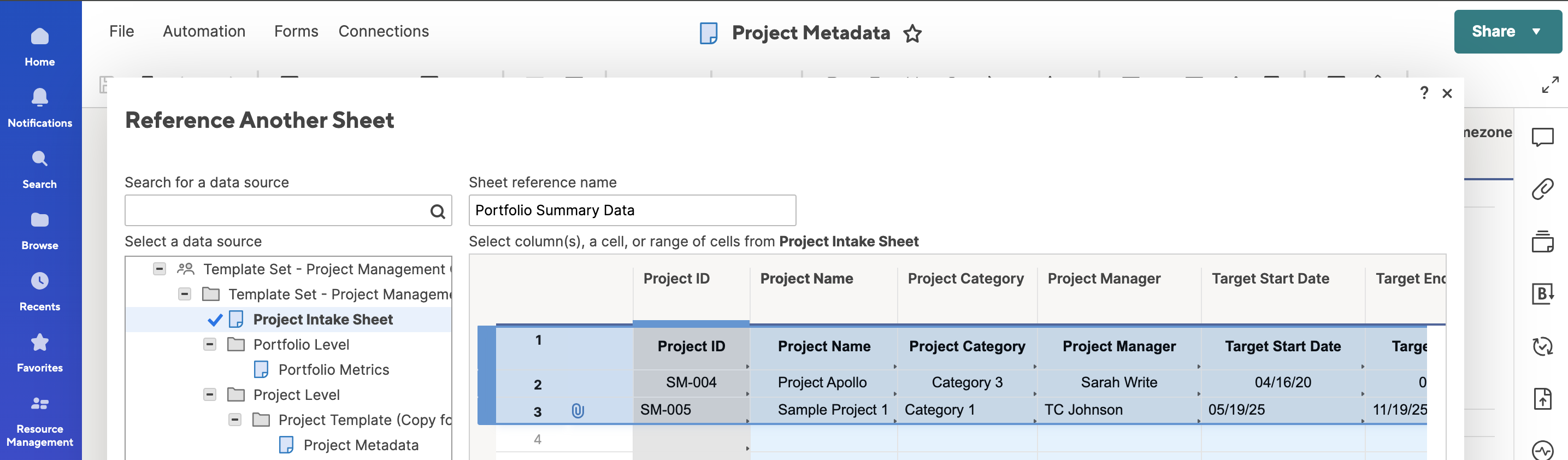
- {Portfolio Summary Data}, - SELECT THE ENTIRE SHEET as the reference. You can do this by selecting all columns.
- {Project ID}, - Select the entire Project ID column as Reference.
- {Portfolio Summary Header Row} - YOU MUST HAVE A HEADER ROW - (Row 1) - that exactly matches the column names in both sheets.
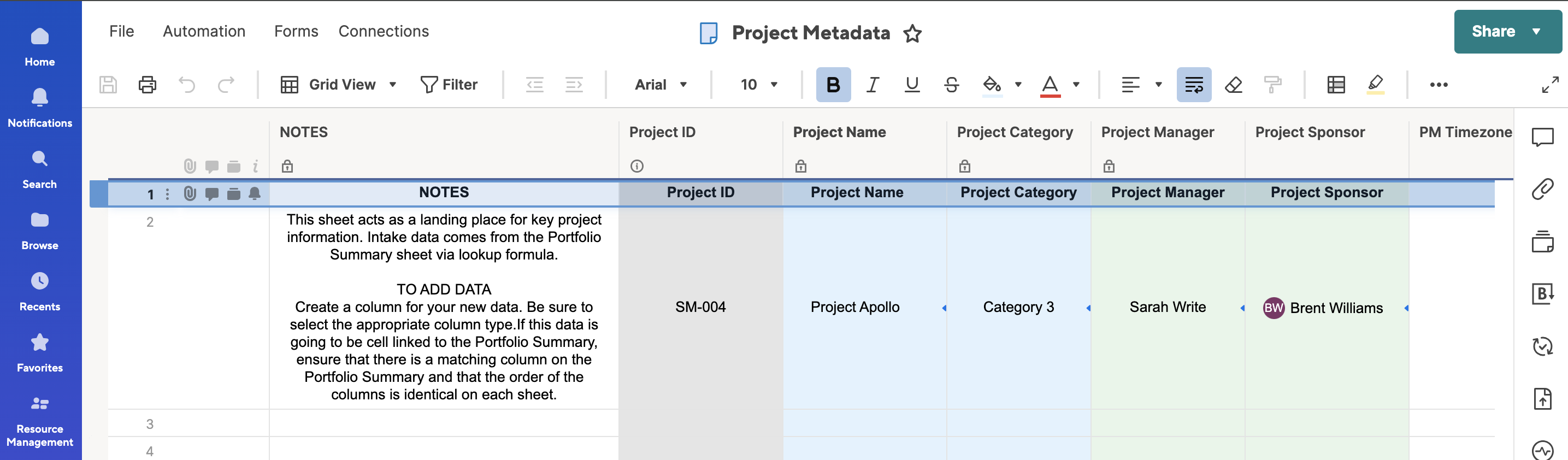
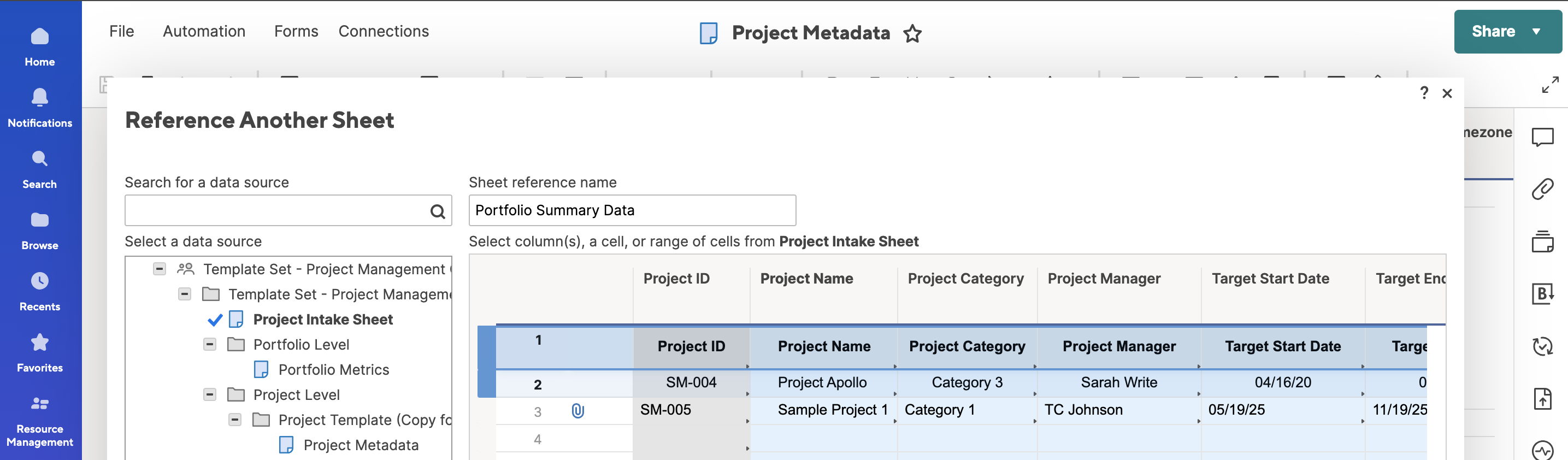
Save these updates to the Template Set so that you don't have to do it on every project that is created from the Template Set.
I hope this helps.
 DL Milton
Help Article updates May 2025
Hello Community,
We’ve published the following new content:
To view the entire catalog of help articles, visit the Help and Learning Center.
Were the articles helpful?
Let us know by providing feedback for each article.
 Trelawney
Re: Help with "INDEX MATCH"
Hi @AP8331
First, I recommend using the "sheet name & column name" convention like {data (3) - TEST : actuals}, to make your formula easy to understand, later. (See the image below.)

Then, there are a couple of points I want to fix.
Your formula
=INDEX(COLLECT({{data (3) - TEST Range 5}}, {{data (3) - TEST Range 2}}, "[Property]@row", {{data (3) - TEST Range 3}}, "[Property]@row", {{data (3) - TEST Range 4}}, "[January]"), 1)
You do not have to quote like "[Property]@row".
The second condition should be [GL Combined]@row, supposing {data (3) - TEST Range 3} refers to the GL column.
Lastly, "[January]" needs to be simply "January" or "March", in my example.
I added IFERROR( , "No Match"), in case there is no matching date, to avoid errors.
=IFERROR(INDEX(COLLECT(, {data (3) - TEST : Sub Property Name}, Property@row, {data (3) - TEST : GL}, [GL Combined]@row, {data (3) - TEST : Month - Month}, "March"), 1), "No Match")


Re: Sharing reports with data without even view access to the source sheet
Instead of Smartsheet making a money grab with Dynamic View starting at $125/month (yes, you read that right a month, which is more than the ANNUAL cost of a Business Plan with 3 licenses) why can't a report be shared to give a licensed user edit access without having to share other confidential info from the source sheet by also making them an editor of the sheet? That really defeats alot of the purpose of creating a report in the first place, which is to query data from a source sheet or multiple source sheets.
What's the rationale beyond Smartsheet forcing this? As greedy as they've become with this disaster of a new subscriber model, it's not a stretch to think they want you to spend wheelbarrows full of money to accomplish what should otherwise be a simple task. As it is, without being able to share a report with an editor w/o also sharing the sheet, the data has to be managed in a totally separate sheet and then added to another sheet where it lives when it could just otherwise be updated automatically in the original source sheet. Stupid!
 ljgrissom
Re: Activity Log should reflect all changes made to a sheet (in detail) including Workflows
Hello @jmyzk_cloudsmart_jp Thanks for your note. I worked with them troubleshooting my issue the other day and the person said everything is logged. It's just that not everything is release to front end to see. So if it's just a metter to categorize that action i think it would help a bunch of people to track those automated emails. And I am not asking to validate wether the recipient received the message cause I understand that's another story but just making sure Smartsheet is performing properly in dispatching those emails out. :) Thanks again for your very detailed message.
 fcooke
Re: Ideas on how to effectively create a new sheet that collects information to update status on another
To achieve this, you can set up where the status of equipment in the original sheet is automatically updated when a corresponding entry is submitted in the second sheet (the removal log). Since you're using a unique identifier for each piece of equipment, that makes this process much easier.
1: Ensure Both Sheets Have the Unique Identifier
- Original Equipment Sheet: Include a column like Equipment ID.
- Removal Log Sheet: Include the same Equipment ID column submitted via the form.
2: Use a Cross-Sheet Formula to Update Status
In the Original Equipment Sheet, add a column called Status (or similar), and use a cross-sheet formula to check if the equipment ID exists in the Removal Log.
Example (in the Status column of the Original Sheet):
=IF(COUNTIF({Removal Log Equipment ID}, [Equipment ID]@row) > 0, "Removed", "Active")
- {Removal Log Equipment ID} is a cross-sheet reference to the Equipment ID column in the Removal Log Sheet.
- [Equipment ID]@row refers to the current row’s equipment ID in the Original Sheet.
This formula checks if the equipment ID exists in the removal log. If it does, it marks the status as "Removed", otherwise "Active".
3: Set Up the Cross-Sheet Reference
To create {Removal Log Equipment ID}:
Click into the formula cell.
When prompted to select a range, choose the Equipment ID column in the Removal Log Sheet.
Name the reference something like Removal Log Equipment ID.
If you want then you can also pull in other data from the Removal Log (like removal date, reason, etc.) using INDEX(MATCH(...)) formulas.
I know this was a little long but hope it helps!
 Ape_Man819
Re: Global Update - Find/Replace on Multi-Select Field
Hello all - Today I discovered that this is supported, but requires a formula using the ascii char(10) function. First, here is the link to the documentation that says it IS supported, but does not describe how to do it:
Control Center Global Updates: Find / Replace | Smartsheet Learning Center
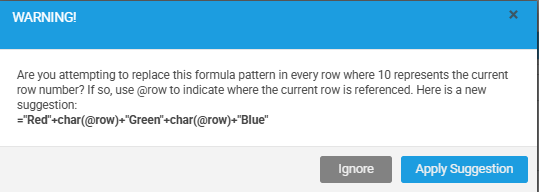
Second, my example is to update a blank field in a multi-select column with a specific sub-set of values. Let's say you have a multi-select column to pick the colors of a product you are selling. Maybe there are 10 colors to choose from, but you want to find/replace and set a value to Red, Green, and Blue. Global Update would look like this:
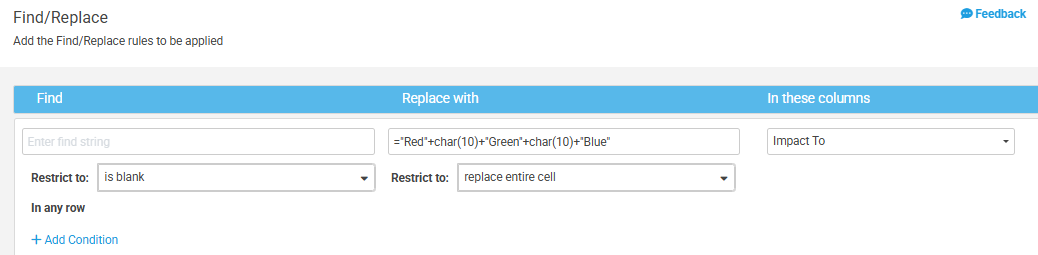
Next, you will be prompted with an error. Control Center is trying to help, but you will want to IGNORE this error:
I hope this helps someone, it definitely saved me from manually updating a lot of individual sheets
 Scott Peters