Best Of
Re: Introduce yourself & get to know your peers!
Hi y'all!
I'm Andrew, also go by Drew. I work in training and development and have really come to take advantage of all the offerings from Smartsheet in the last year as I switched work projects. I would have to say Dashboards are my favorite function because it helps you really gain a visual understanding of your forms and reports.
I am based out of Southern California and am in fact a Disneyland lover. In my role I have the luxury of working remote with my project based out of the east coast, so I get to have the majority of the afternoon off which allows for easy trips after work.

 Andrew_SmiRod273
Re: No Dropdown for the 'Enter Value' cell in my report filter/s listing "Current User"
Hi @ASU Admin,
Try setting the filter operator to "Has any of" or "Has all of". Then you should see a dropdown, for example:
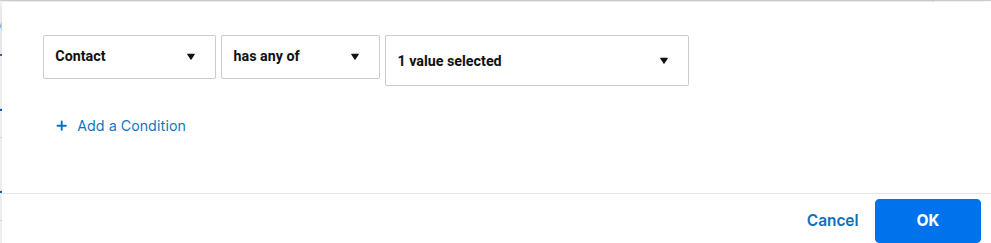
I was able to select "Current User" in the dropdown.
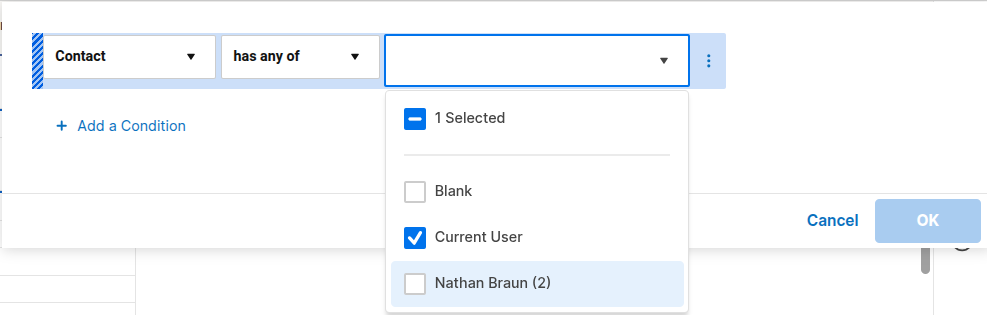
Hope this helps!
 SSFeatures
Re: 📚 New Onboarding Resource: The Smartsheet Essentials Glossary
This will come in handy. Love how everything is on a single page!
SSFeatures
Re: Hidden Columns List
I love this suggestion and have suggested it to Smartsheet for years! To expand on it further, I would love for there to not only be a multi-select option for columns that are hidden, but one that allows a selection of which columns to print/export. The print functionality hasn't improved in years. I understand that this is meant to be an online collaboration tool and don't expect significant print export functionality, but we often need to export data in a physical form and don't want to have to create a separate report every time we need to "hide" columns just to print/export.
 Joe C.
Re: Forms - link a document
Hi,
I hope you're well and safe!
Select the text, click here, and then paste the link to the Smartsheet asset.

Make sense? Did it work/help?
I hope that helps!
Be safe, and have a fantastic day!
Best,
Andrée Starå | Smartsheet Expert Consultant & Partner / CEO @ WORK BOLD
✅ Did I help answer your question/solve the problem? Please support with💡 ⬆️ ❤️, and/or ✅ Answer. This will make it easier for others to find a solution/help to answer! I appreciate it, thank you! 🙏
 Andrée Starå
Re: Introducing the Smartsheet Unlocked podcast...
Love the idea and episode! You're passion for Smartsheet is contagious! And so is Willl's!
 Tim C
Tim C
Re: Introducing the Smartsheet Unlocked podcast...
Gotta give a special call out for just how good the editing is in this first episode.
Love how you do things like showing the Smartsheet User Groups page right as you an Will start talking about user groups. It'll make it way easier for people who are new to Smartsheet to be able to follow along with the podcast! Same thing with the Overachievers page.
SSFeatures
Re: How do I update a status based on 3 different approvals.
hi @HRR
try this:
=IF(AND([Approver 1]@row = "Approved", [Approver 2]@row = "Approved", [Approver 3]@row = "Approved"),"Approved", "Not Approved")
shall work now.
 kowal
kowal
Re: Created Date Column Background behaviour
Try getting rid of the TIME function and just keeping the RIGHT function.
 Paul Newcome
Re: COUNTIFS between dates & criteria.
@veidelis Try this:
=COUNTIFS({Range}, IFERROR(YEAR(@cell), 0) = 2024)
Paul Newcome