Best Of
Re: How do I update a status based on 3 different approvals.
I had a typo, it is working now. Thank you for the assistance.
 HRR
HRR

Re: Function() or @argument for "currently logged in user" for use in Sheet formulas
This seems like a great idea!
 SSFeatures
Re: What view are you? Share your story and claim your badge
My mother use to laugh at my jokes and say "Michael is such a card!"
I don't like the Gantt view. I gantt do this, I gantt do that! I personally try to have a more positive. perspective.
Don't get board yet, my jokes only get more Grid-dy.
Sorry for my "dad jokes". Let's table this for now!
so yes, I'm a card. :-)
 Michael Drayton
Re: Introduce yourself & get to know your peers!
Hi y'all!
I'm Andrew, also go by Drew. I work in training and development and have really come to take advantage of all the offerings from Smartsheet in the last year as I switched work projects. I would have to say Dashboards are my favorite function because it helps you really gain a visual understanding of your forms and reports.
I am based out of Southern California and am in fact a Disneyland lover. In my role I have the luxury of working remote with my project based out of the east coast, so I get to have the majority of the afternoon off which allows for easy trips after work.

 Andrew_SmiRod273
Re: No Dropdown for the 'Enter Value' cell in my report filter/s listing "Current User"
Hi @ASU Admin,
Try setting the filter operator to "Has any of" or "Has all of". Then you should see a dropdown, for example:
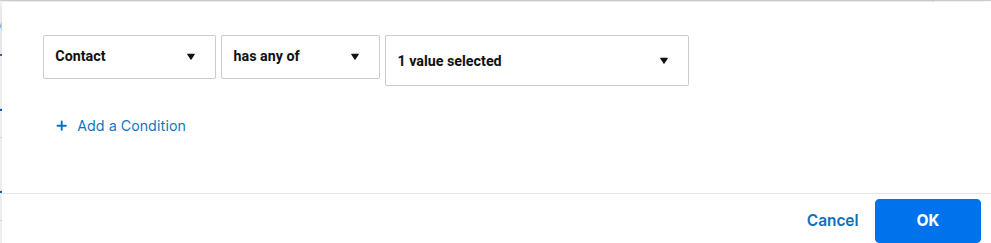
I was able to select "Current User" in the dropdown.
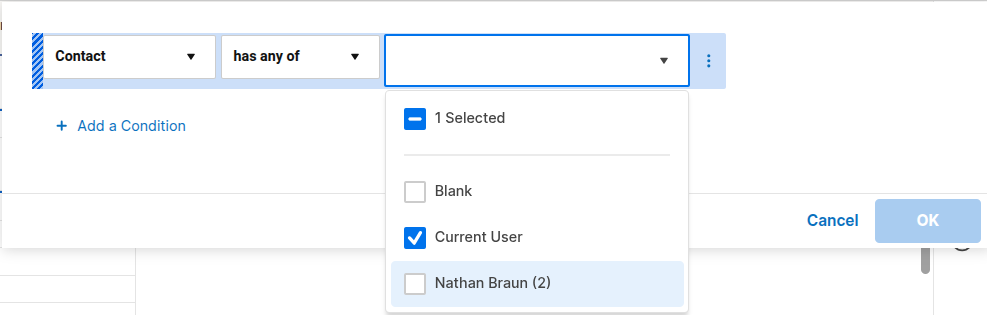
Hope this helps!
SSFeatures
Re: 📚 New Onboarding Resource: The Smartsheet Essentials Glossary
This will come in handy. Love how everything is on a single page!
SSFeatures
Re: Hidden Columns List
I love this suggestion and have suggested it to Smartsheet for years! To expand on it further, I would love for there to not only be a multi-select option for columns that are hidden, but one that allows a selection of which columns to print/export. The print functionality hasn't improved in years. I understand that this is meant to be an online collaboration tool and don't expect significant print export functionality, but we often need to export data in a physical form and don't want to have to create a separate report every time we need to "hide" columns just to print/export.
 Joe C.
Re: Forms - link a document
Hi,
I hope you're well and safe!
Select the text, click here, and then paste the link to the Smartsheet asset.

Make sense? Did it work/help?
I hope that helps!
Be safe, and have a fantastic day!
Best,
Andrée Starå | Smartsheet Expert Consultant & Partner / CEO @ WORK BOLD
✅ Did I help answer your question/solve the problem? Please support with💡 ⬆️ ❤️, and/or ✅ Answer. This will make it easier for others to find a solution/help to answer! I appreciate it, thank you! 🙏
 Andrée Starå
Re: Introducing the Smartsheet Unlocked podcast...
Love the idea and episode! You're passion for Smartsheet is contagious! And so is Willl's!
 Tim C
Tim C