Best Of
Re: Why is % Complete not the same between Smartsheet and Microsoft Projects
@Katie White - thank you!! That article makes so much sense (or at least makes the issue clearer) - I don't use Gantt view much, so I haven't seen that setting. @Aubrey Ferreira , my apologies for misunderstanding; and hope you both have a great rest of the week!
 jjg279
Re: I am an Admin, but I cannot edit the workspace
Its not a bug, this is the behaviour from the new User Subscription licensing model. A System Admin on your plan has downgraded your share to this sheet to that of a Viewer. You will need to contact your system admin person within your organisation for them to restore your permissions, but they will have to buy/allocate you a license (now called a Seat) to do it.
 Debbie Sawyer
Re: Re: Document Builder - Generate 1 PDF Document w/ Multiple Rows
This cade is a game changer for a program I'm supporting! My sheet needed to calculate totals across various programs at different campuses. This then needed to be generated into a PDF.
In case it might save anyone else some head scratching, to identify the next child to copy over, you just change the final number
Child 1: =IF((COUNT(CHILDREN([Subcontractor Name]@row))) > 0, INDEX(CHILDREN([Subcontractor Name]@row), 1), "")
Child 2: =IF((COUNT(CHILDREN([Subcontractor Name]@row))) > 0, INDEX(CHILDREN([Subcontractor Name]@row), 2), "")
You can also change out the Index column's name to copy over data from a different column, change the Index column.
 VictoriaD
Re: Unparsable formula; Sheet summary SUMIF formula
Hi @Bkb,
When a column has a space in the name, it needs to be enclosed in brackets when being referred to.
=SUMIF(Status:Status,"Quoted",[EST. GP]:[EST. GP])
Hope this helps,
Dave
 DKazatsky2
Re: Offloading PDF Attachments from Smartsheet to OneDrive or Box for Email Automation
Hi @Frank_2820
Short answer: Yes—have Smartsheet email you when a PDF is attached, let Power Automate (Outlook trigger) read that HTML email, extract the PDF link and PDF filename, drop the file into OneDrive, and then use the standard “When a file is created” template to send your templated email.
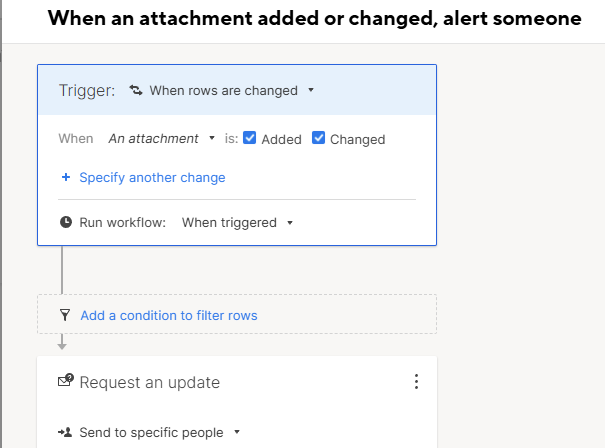
Key point: Smartsheet alert emails are HTML-only (no real email attachments). The email body contains a link (often https://click.smartsheet.com/...). Your flow should pull the URL and the human-readable filename from that HTML.
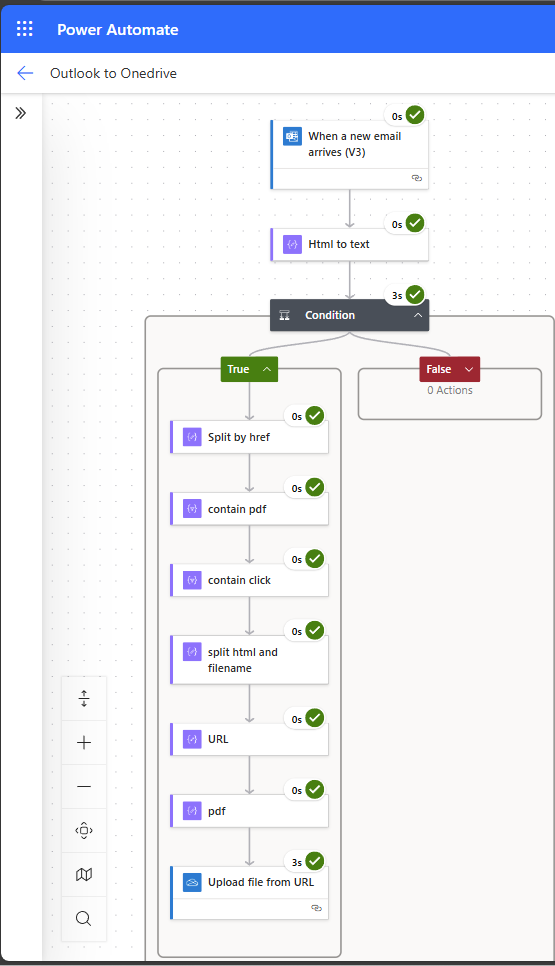
How I do it (using the same pattern you described)
- Smartsheet Automation
- Workflow: When an attachment is added or changed, alert someone → send to an Outlook mailbox you control.
- Power Automate – Outlook trigger
- When a new email arrives (V3)
- Optional filters: From = automation@app.smartsheet.com, Subject contains “attachment”.
- Parse the HTML body (no custom code)
- Work with the HTML body. (option: HTML to Text)
- Checks if 'click.smartsheet.com' and 'pdf' are contained.
- Split on
href="to get anchor chunks. - Filter chunks that contain
.pdf(case-insensitive) and, if you want,click.smartsheet.com. - From the first matching chunk:
- URL: take the text up to the next
"(that’s your PDF link). - PDF name: take the anchor inner text (between
>and</a>), and remove the trailing size like(369k).
- URL: take the text up to the next
- Save to OneDrive/Box
- Use your existing “save to OneDrive/Box” step with the URL and PDF name you extracted.
- (You already have this in your flow: URL goes to the “source” field; filename becomes the destination name.)
- Send the templated email.
- Separate flow (or downstream): When a file is created in your OneDrive/Box folder → Send an email (Outlook) using your template and attach the file.
Send an email when a file is created in a folder of OneDrive for Business | Power Automate
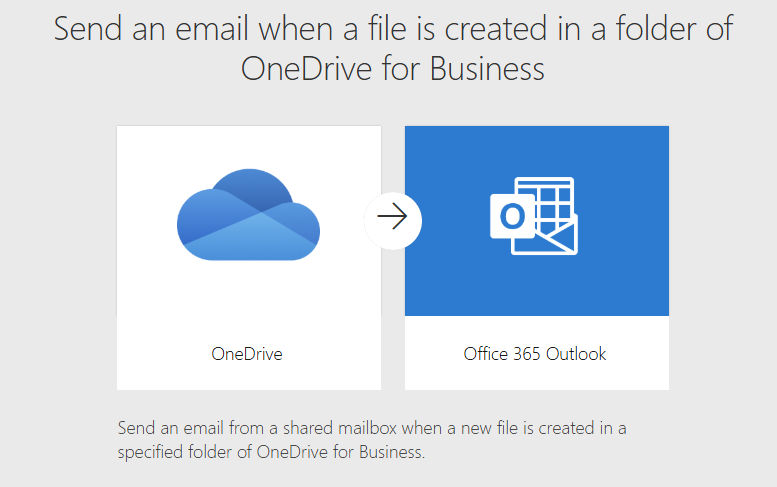
The following template will not work as the message from Smartsheet does not contain a real attachment, but a download URL instead.
Note: Extracting the URL and PDF name from raw HTML isn’t always obvious—especially if you’re “not a developer” and don’t want to write code. If you need help wiring up the Outlook + OneDrive flow and the few expressions, feel free to reach out to me.



Re: Attach/upload Document files to Dashboard
I completely agree there should be a way to attach a document onto a Dashboard
 Elizzj4
Re: [GIVEAWAY] Celebrate 20 Years of Smartsheet!
Question 1: I'll say 2017
Question 2: UK and Japan
Question 3: 150? Maybe I can be next haha
 ebecker
Re: File Library - thoughts
Thank you Ward! Appreciate this video response. I do think it's worth some restructuring of the workspaces to accomodate the benefits of File Library. I will work on this to make sense for our departments. :)
 Kelly Kenney
Re: [GIVEAWAY] Ready for ENGAGE? Win a Conference Pass!
Let's do this using alliteration:
Espresso shots (because the best ideas need caffeine)
Notebooks (for jotting down every brilliant session nugget)
Good reads (because I refuse to travel without a book)
All the questions (I plan to ask every presenter)
Grateful vibes (for the opportunity to learn from amazing people)
Enough snacks to outlast a flight delay and a keynote (travel = snacking)
 Ryan Holguin