Best Of
Enhancing guest passkey security in Brandfolder
September, 19, 2025
At Brandfolder, protecting your assets is our top priority. We’re excited to announce significant upgrades to our guest passkey feature, providing you with more security and control over how guests access your protected Brandfolders and Collections.
What’s Changing?
This release introduces a more secure passkey system with new powerful admin controls. To make this change as seamless as possible, we are phasing the rollout over the next 90 days.
- Removal of URL-embedded passkeys: After December 17, 2025, all guests will be required to manually enter a passkey to access private Brandfolders or collections. After this period, guests will no longer be able to access protected content automatically via old share links with URL-embedded passkeys. Any legacy passkeys that are not manually updated within 90 days of this release (on December 17, 2025) will be automatically expired.
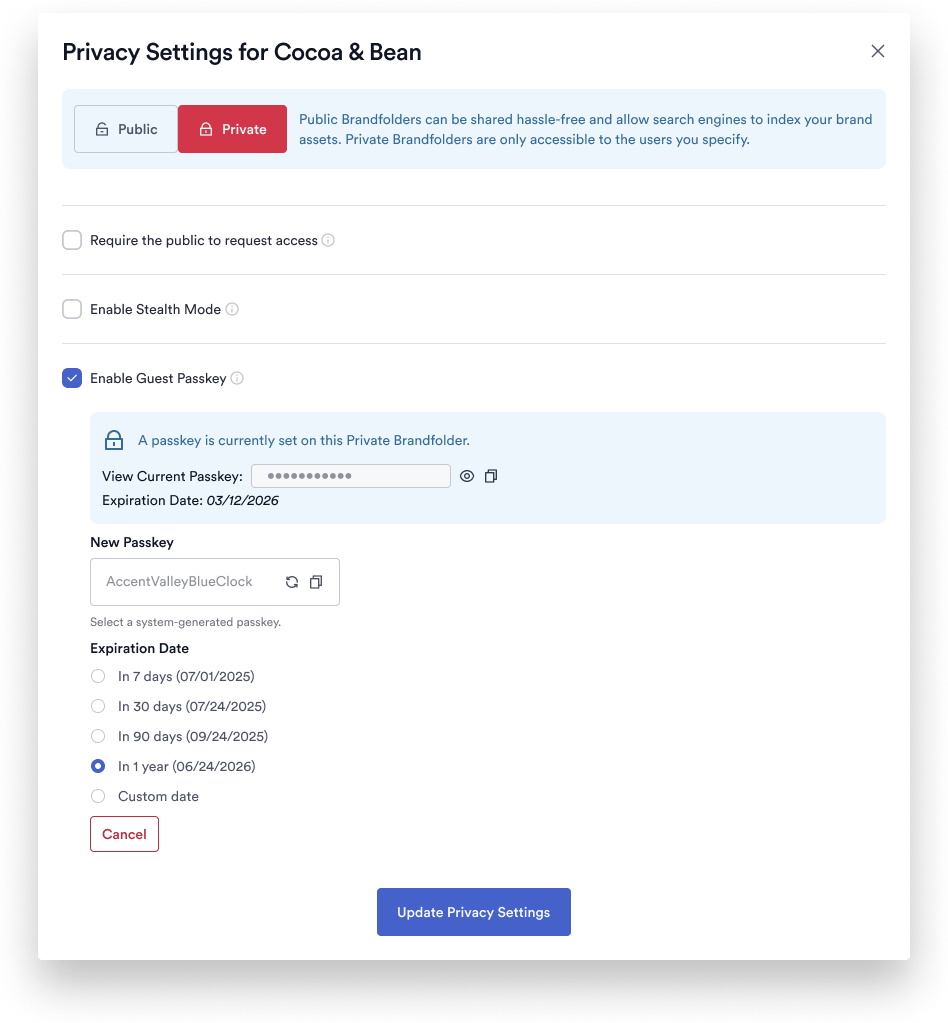
- New! Guest passkey expiration: Admins and owners can now set a configurable expiration date for guest passkeys. By default, new guest passkeys will be set to expire after one year, but you can configure a custom duration of up to ten years.
- New! System-generated passkeys: Brandfolder will now generate strong, memorable passkeys for you, improving security and removing the need for you to manage complexity requirements.
- New! View & share passkeys with ease: You can now view and copy the current Guest Passkey directly within your Brandfolder's privacy settings. This makes it simple to securely share the new passkey with your guests via email, text, or other channels
What You Need to Do
To ensure uninterrupted access for your guests, we ask that you take the following steps:
- Update your legacy guest passkeys. Begin updating your existing passkeys to the new, more secure system.
- Inform your guests. Please notify any guests who use your passkey-protected links about this change. Let them know they will soon need to manually enter the passkey you share with them to access content.
- Note the deadline. Any legacy passkeys that are not manually updated within 90 days of this release (on December 17, 2025) will be automatically expired to ensure your assets remain secure.
We are confident these enhancements will provide a more secure and manageable system for sharing your brand assets. If you have any questions, please don't hesitate to reach out to our support team. Learn more.
Environments availability: Brandfolder
Plan availability: All Brandfolder Plans
Subscription Model Availability: N/A
 Karin Maltrud
How to bulk create cross sheet references using Python and Smartsheet API
Hello,
This post provides a solution for quickly adding cross sheet references to a large number of sheets. The cross sheet reference refers to a single column.
Caution
The API code can update any sheet where you have permission to create cross sheet references. There is no way to automatically remove or edit cross sheet references. To be really safe, create a temporary user that only has access to the sheets you want to update. Create an API access token for that user. Using the temporary user lowers the risk of accidentally creating unintended cross sheet references.
My se case
I needed to add a cross sheet reference to a specific sheet in every project connected to a Control Center blue print. There were a large number of projects and sheets and manually creating the cross sheet references would have taken a lot of time.
To use the cross sheet references after I created them, I ran a Global Update across all projects to update a formula in the sheets and added the new cross sheet reference to the formula.
What you need
Consult an AI to detail how to do each step.
- Python.
- Visual Studio Code.
- You could run it other ways but I used this.
- String you want to search for in the name of the sheets.
- NB - This searches ALL sheets visible to the user whose token you use.
- ID of the the source sheet for the cross sheet reference.
- ID of the source column on the source sheet for the cross sheet reference.
- This code only references a single column.
Code
#Creates Smartsheet Cross Sheet References

#There is API method to edit or delete cross sheet references

#Removing the cross sheet references is manual work so use this code carefully

#By Neil Egsgard, Business Solutions Architect, SAIT

#Created Sep 19, 2025


import smartsheet


#Token to allow API Smartsheet access. Do not share this token!


ACCESS_TOKEN = 'YOUR ACCESS TOKEN'

smartsheet_client = smartsheet.Smartsheet(ACCESS_TOKEN)


#Variables you need to edit

SOURCE_SHEET_ID = YourSheetID

SOURCE_COLUMN_ID = YourColumnID

NAME_FILTER = "STRING IN SHEET NAME YOU WANT TO LOOK FOR"

CROSS_SHEET_REFERENCE_NAME = "NAME YOU WANT FOR THE CROSS SHEET REFERENCE"


#Defines a function that will get the list of sheets that have a string match in the name

def get_matching_sheets(name_filter):

    matching_sheets = []

    response = smartsheet_client.Sheets.list_sheets(include_all=True)

    for sheet in response.result:

        if name_filter.lower() in sheet.name.lower():

            matching_sheets.append(sheet)

    return matching_sheets


#Defines a function that will create the cross sheet reference

def create_cross_sheet_reference(target_sheet_id, source_sheet_id, column_id):

    xref = smartsheet.models.CrossSheetReference({

        'name': CROSS_SHEET_REFERENCE_NAME,

        'source_sheet_id': source_sheet_id,

        'start_column_id': column_id,

        'end_column_id': column_id

    })


    result = smartsheet_client.Sheets.create_cross_sheet_reference(target_sheet_id, xref)

    return result


# Get matching sheets

target_sheets = get_matching_sheets(NAME_FILTER)


# Create references for all matching sheets

for sheet in target_sheets:

    print(f"Creating reference in sheet: {sheet.name}")

    try:

        response = create_cross_sheet_reference(sheet.id, SOURCE_SHEET_ID, SOURCE_COLUMN_ID)

        print(f"✅ Success: Reference created in '{sheet.name}'")

    except Exception as e:

        print(f"❌ Failure: Could not create reference in '{sheet.name}' — {e}")
I hope this helps.
Neil Egsgard
Business Solutions Architect
Southern Alberta Institute of Technology
 Neil Egsgard
Smartsheet Link Previews now available in MS Teams!
September, 19, 2025
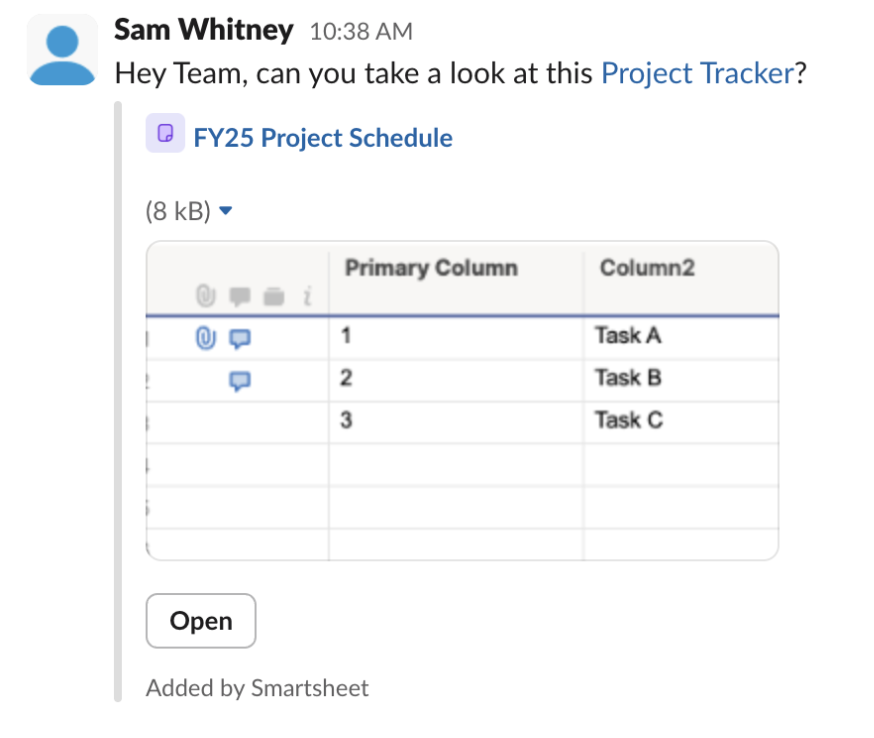
Smartsheet URLs just got smarter in MS Teams—users will now see instant link previews that provide visual context at a glance, making collaboration faster, clearer, and more connected than ever. Try it out now with Smartsheet links in Microsoft Teams!
Environment Availability: All
Plan Availability: All
Subscription Model Availability: Legacy and USM
 Haley Patrone
Re: [GIVEAWAY] Celebrate 20 Years of Smartsheet!
Ohhh! This is fun!! Wow, 20years! That's amazing
- In what year was the very first ENGAGE conference held? September 18-20, 2017
- Name two countries outside of the US where Smartsheet has an office - UK/Australia
- How many Overachievers have been part of the program since it was created? Started in 2020, and there is a max of 25 every 1 years sooo, im saying ~125 (active & alumni) — im not the greatest when it comes to math, hence why i use Smartsheet formulas haha
🤞
 Cayla Davis
Re: [GIVEAWAY] Celebrate 20 Years of Smartsheet!
20 years already… wow. Hope we celebrate again in let's say 10 years :-)
Regarding 2) I'd say UK and Australia, but recently I believe I saw that Smartsheet is also registered in Costa Rica
8:-)
First Engage in 2017 was at that time desired destination, but impossible
Greetings
Stefan
 Stefan
Re: [GIVEAWAY] Celebrate 20 Years of Smartsheet!
Name two countries outside of the US where Smartsheet has an office.
Australia and the UK
 Isis Taylor
Re: [GIVEAWAY] Celebrate 20 Years of Smartsheet!
I always read the previous comments before me, so now I feel like I'm cheating….
I'll at least say my guess for Overachievers was going to be over 100.

Re: [GIVEAWAY] Celebrate 20 Years of Smartsheet!
- My best guesses:
- In what year was the very first ENGAGE conference held? - 2017 (September 18-20 in Bellevue WA)
- Name two countries outside of the US where Smartsheet has an office. - London 🇬🇧 and Sydney 🇻🇬.
- How many Overachievers have been part of the program since it was created? ~150 since 2020 (active & alumni).
 Peggy Parchert
Re: How to share WorkApps with view only colleagues on an enterprise plan?
@Emily Miller and @Leslie Manley
I haven't heard back from Smartsheet, but so far internal users without a membership can view and edit WorkApps without becoming provisional members. We do seem to have a collaborator pack though, so it looks like they are still a thing.
I imagine they will be made redundant once the transfer to collections has completed.
 AliceVBH
Re: Custom Colors for Sheets
I would love to have the ability to choose/create custom colors, similar to Google Sheets, rather than being stuck to the same color palette!
this:

vs. this:


 Nastya Kline