Best Of
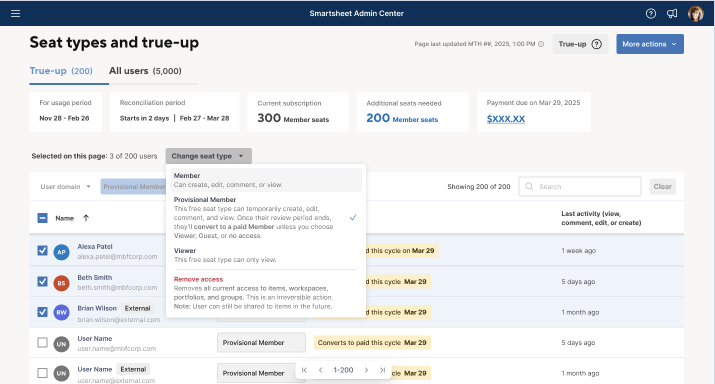
We've added bulk seat upgrades to the 'Seat types and true-up' screen
July, 15, 2025
We've added the ability to upgrade seats to Member on the 'Seat types and true-up' screen for more scalable and systematic management. Learn More
Environment Availability: Commercial US, Commercial EU, Commercial AU
Plan Availability: Pro, Business, Enterprise
Subscription Model Availability: User Subscription Model
Stay informed by Subscribing to receive product release updates for curated news of recently released product capabilities and enhancements for the platform of your choosing, delivered to your inbox. As new releases occur, you will receive a weekly email with news of what's released every Tuesday.
 Ryan Dougal
Re: Additional tool tips on Dashboard Widgets
I just saw this very interesting post from @vatsal.shah on using conversations on Dashboards.
This got me thinking of other uses that Dashboards generally miss to inform stakeholders. It would be great to be able to add Widget Descriptions for additional context.
As a partner, I get this question a lot, as people want to know how charts are generated, what data entries are used, or where to look for more context on this.
I think having it work similar to column descriptions would be great way to address this.
Seeing the annotation option, I feel it should be possible to add a description option that can be updated much like a title in the Widget Editor?
 Antonie B
Re: How do I get the licenses provisioned to our account?
Hi @ICRM_Admin and @Antonie B
You have great timing for this question! A new update was released this week - you can now directly change a Provisional Member or Viewer to be a Member directly, without waiting for the True Up period.
Here's the announcement post with more information: We've added bulk seat upgrades to the 'Seat types and true-up' screen
Cheers,
Genevieve
 Genevieve P.
Re: Dynamic Reminder Notification
Hi @zen1024
Quick thoughts on overcoming the challenges to what I believe you are trying to achieve:
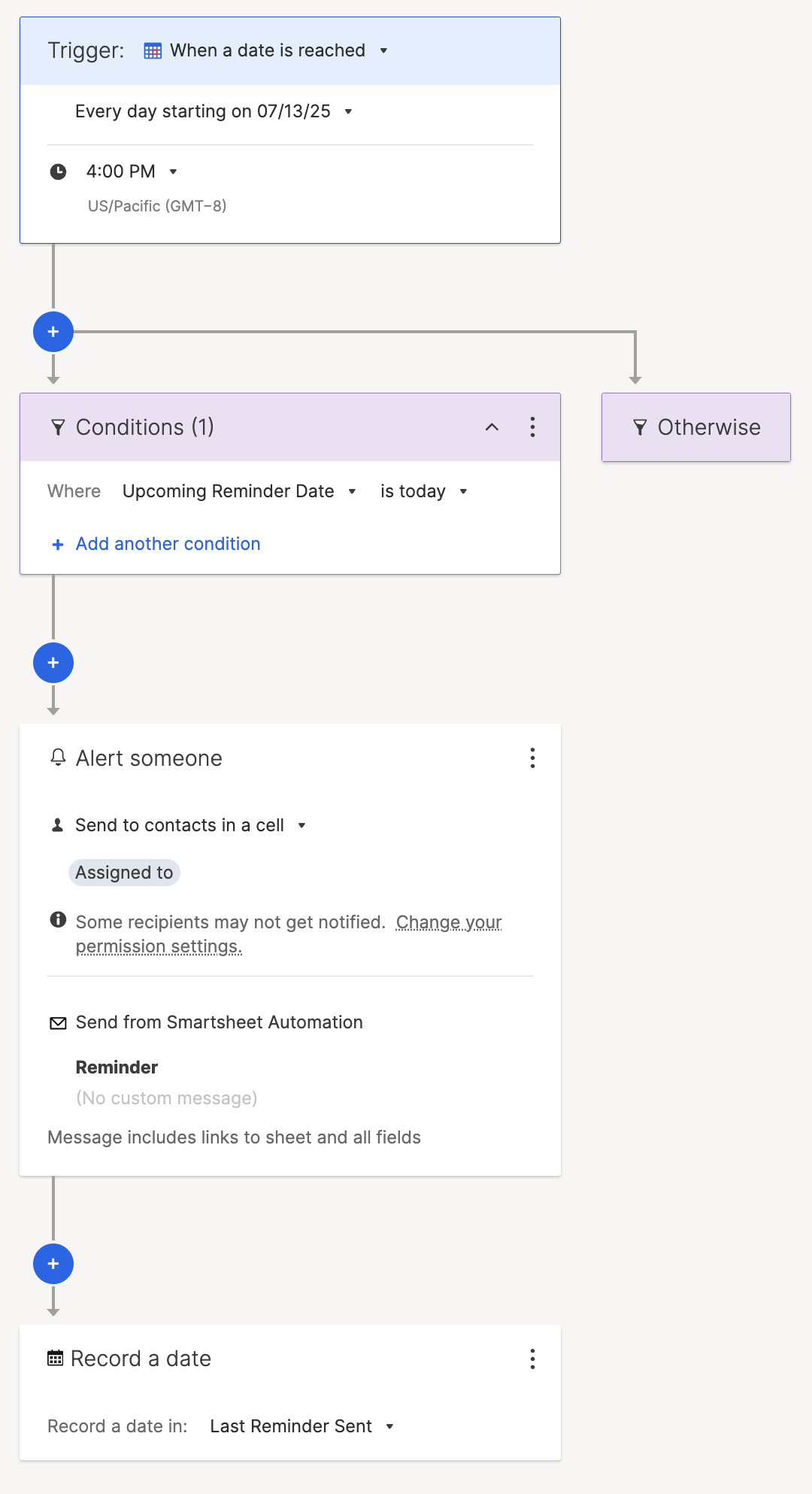
- How about an automation that runs each day (Custom Recurrence) and sends a reminder to those where the date the reminder is due is the current day.
- The final step of the automation is to record the date that the automation ran.
- Use a formula to update the reminder date based on the date the automation last ran and the interval.
To get it started, instead of populating the reminder date column you will need to populate the date the automation last ran column with the reminder date minus the interval and have the formula create the reminder date.
The automation would look like this:
Hope that helps.
 KPH
KPH
🚨 [Feedback Requested] Would commenting directly on Dashboards help your team? 🚨
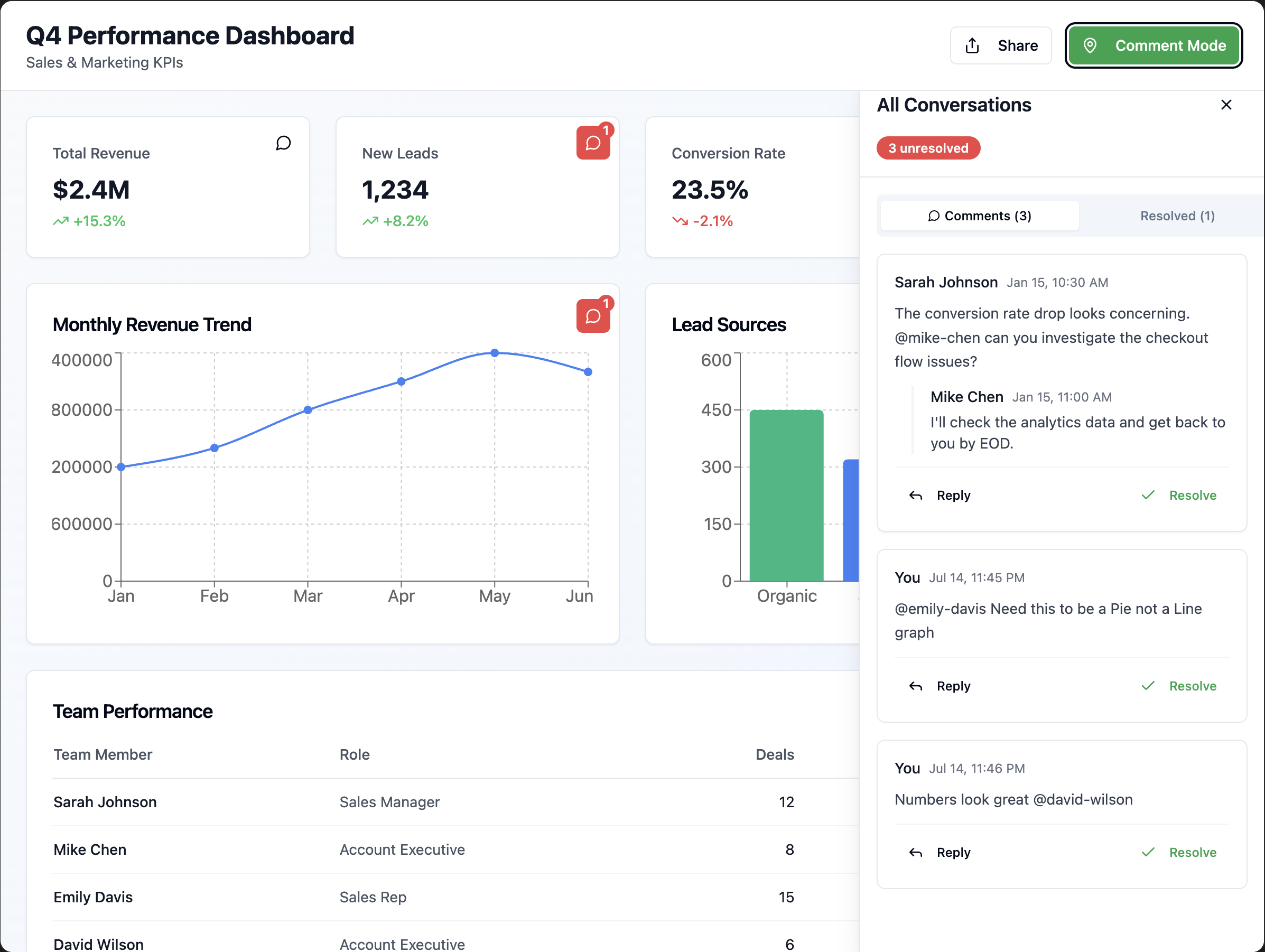
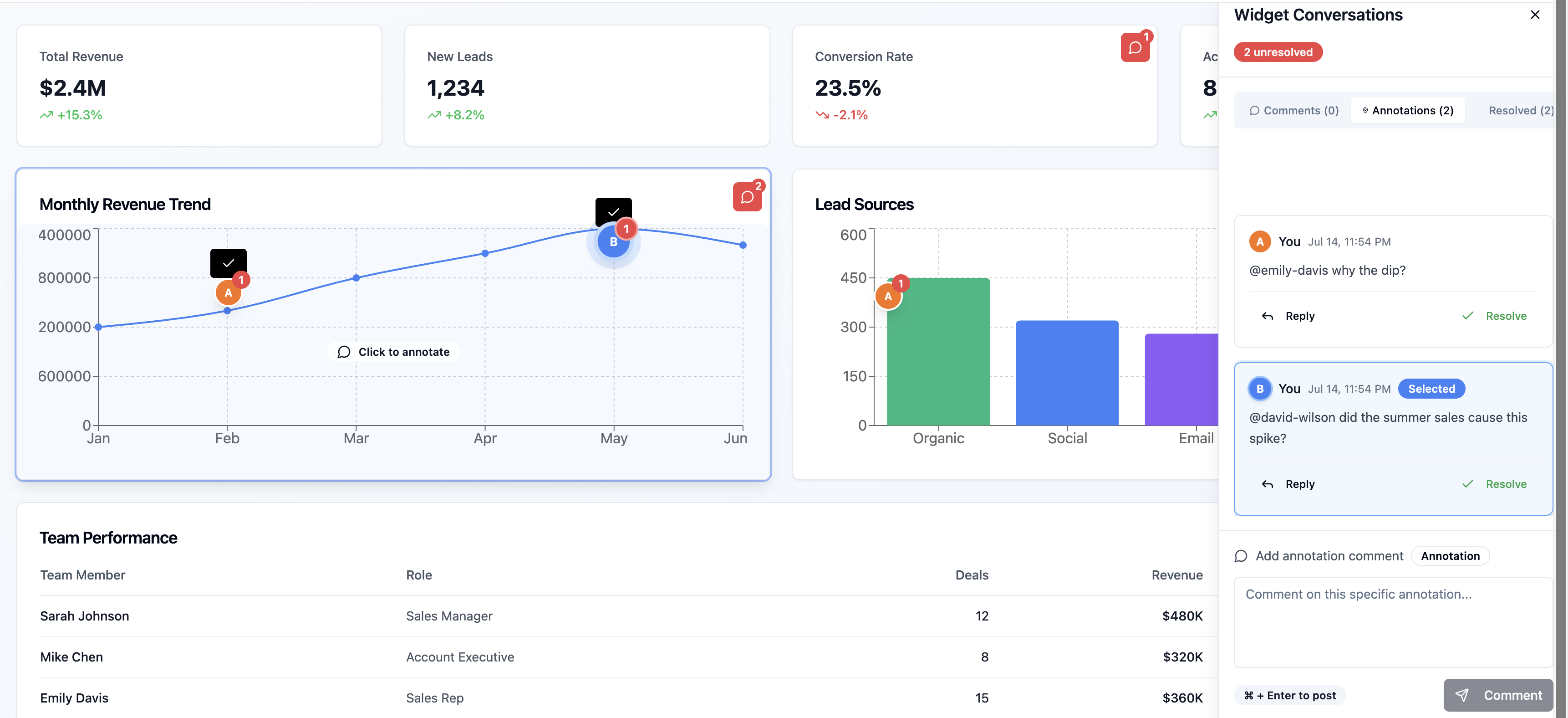
Hi all! I'm the PM for Dashboards and I'm exploring adding some Conversations capability to the canvas. This would include -
- Letting users leave comments on widgets in a dashboard
- Adding an “annotation mode” where you can highlight or draw attention to specific areas of a graph
- Possibly enabling approvals right on the dashboard for exec workflows
We noticed that you love commenting on Sheets and Reports, but will it be a useful feature to have on Dashboards?
So I’m asking the community:
- Have you ever wished you could comment directly on a dashboard?
- Do you take screenshots or write long Slack/Email messages instead?
- Would annotations make this better — or just add noise?
- Do you feel the need to have a light weight approval mechanism built in to Dashboards to get sign-off from your stakeholders?
No pitch, just trying to validate the need for Conversations on Dashboards. Would love any honest feedback!!
 vatsal.shah
Re: Smartsheet recognized as a Customers' Choice in the Gartner® Peer Insights™ + Giveaway
One fun and unique way I’ve used Smartsheet was to build an employee recognition program. When someone gets recognized as a “Rock Star,” they automatically receive a personalized certificate. I also created visual dashboards as landing pages to make it easier (and more fun) for the team to navigate Smartsheet. It’s been a great way to celebrate wins and keep things user-friendly at the same time.
 mcullen

Re: July Question of the Month - Join the conversation and receive a badge
One of my goals this year was to roll out a scalable Smartsheet solution for use within my organization. Earlier this month I was able to fully implement the solution in a real world context. It's a great feeling when you can see a project come together and take on a life of its own!
 Andy_B
Re: IFERROR Formula Not Working
The error is caused by the COUNT being 0 and there is no row 0 so the INDEX can't return a value. You could add an IF to the start to check the COUNT is greater than 0. Something like this:
=IF(COUNT(CHILDREN()) > 0, INDEX(CHILDREN(), COUNT(CHILDREN())), "0")
KPH
Re: July Question of the Month - Join the conversation and receive a badge
My goal this year was to complete my MBA, and I just graduated on 7/2/25! I am very proud of my accomplishment.
 Amanda Winter