Best Of
Re: Welcome to the new AI Community!
Hi Smartsheet Ai Community. I’m Gina based in the Washington DC area. I’ve been using Smartsheet for over a year and currently support a nonprofit international church. I’m excited to see AI functionality starting to emerge in Smartsheet and am looking to explore how it can enhance our business processes. I’m also interested in learning from the community—sharing tips and discovering how others are leveraging AI to better support their organizations.
 Gina T
Re: Need to remove decimals from my Dashboard pie Charts. Please help.
Hello everyone, thank you for your feedback and patience! I wanted to share a few updates that we have made:
- On pie and donut charts, labels that are %s have been reset to show whole numbers.
- Legends no longer display the value. This should help with the other issue of legend items being truncated behind "+N more", but we're also thinking about a more direct solution for that issue.
- Custom font size setting now works with multi-widget editing. You can select multiple widgets at a time and set the font size (found in Series).
I hope this helps. I'll keep you all posted as more updates go out.
-Rashmi
 Rashmi Shekhar
Re: Data table/sheet connection error notification
Thank you, Georgie, for getting back to me on this post, our TAM support confirmed the same. All but one of the sheets has since refreshed with no issue, I suspect the last one will when there is updated data related to that sheet.
 Adam_C
Re: 🚨 [Feedback Requested] Would commenting directly on Dashboards help your team? 🚨
LOVE the idea of annotations on a dashboard, and I think it would go a long way to getting executives to use dashboards if they could comment directly there!

Re: Automations
hi @cleopatra
Are you aware of Data Shuttle? I think the most optimal would be to create a connection between the excel generated by ECLIPS with smartsheet so the data would update itself automatically but for that you need DataShuttle.
 kowal
kowal
Re: Automations
Hi @cleopatra ,
In this case, I would argue that using DataShuttle as @kowal suggested is the best way to achieve this.
It mainly has to do with the fact that importing data will always create a new sheet where the connections are not set for a VLOOKUP formula (I would suggest using an Index Match formula, as this will not break when you change the sheet column order).
A more manual suggestion would be this:
1- Create a template set where you have all the connections set via formulas on what you want to check
2- Import the latest update as a new sheet
3- Select all these rows, and use the "Move rows to another sheet" to move the data into the sheet where you preset the formulas
4- The formulas will then pull the data from the other sheets
From there you would then be able to work with the data, use "Save as New" to create a working copy where you can delete the information on the Template sheet for the next entry in 2 months.
It will be more manual but based on the frequency, I think this will be workable? You can read more on moving rows to other sheets here:
 Antonie B
Re: Automations
Happy to help!
I recommend one of the following because Data Shuttle isn't an option.
1️⃣ - Use a helper sheet that would contain all the data, and copy/paste into it. (If possible)
2️⃣ - Same as above, but import the new information to a new sheet and then move it to the helper sheet.
3️⃣ - Use the fantastic add-on, which makes this possible (+ many other features). SSFeatures from the excellent Nathan.
More info.
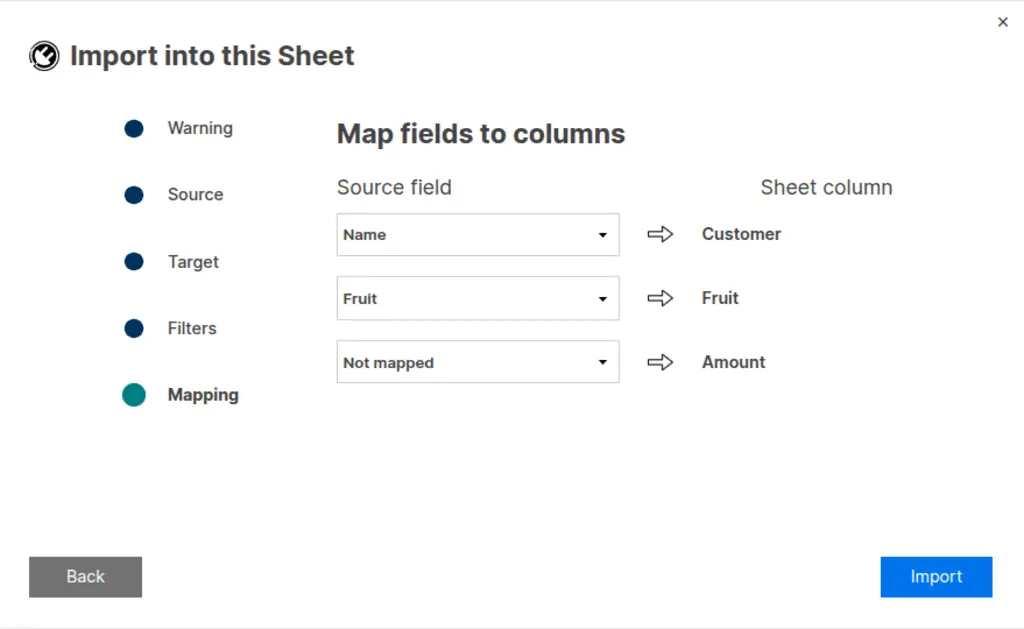
Import Data Into an Existing Sheet
✅ Allows you to import data directly into your sheet
✅ Supports Excel, OpenDocument, CSV, and TXT files
✅ Provides different import options, such as merging, replacing, appending, and filters
✅ Remember! Did I help answer your question/solve the problem? Please support with💡 ⬆️ ❤️, and/or ✅ Answer. This will make it easier for others to find a solution or help answer! I appreciate it, thank you! 🙏
 Andrée Starå
Re: duplicate entry checking 2 sheets
Hi,
I hope you're well and safe!
You can use a COUNTIFS structure to check for a match, or you can use an INDEX/MATCH combination.
Make sense?
Would that work/help?
I hope that helps!
Be safe, and have a fantastic day!
Best,
Andrée Starå | Smartsheet Expert Consultant & Partner / CEO @ WORK BOLD
✅ Did I help answer your question/solve the problem? Please support with💡 ⬆️ ❤️, and/or ✅ Answer. This will make it easier for others to find a solution or help answer! I appreciate it, thank you! 🙏
Andrée Starå
Re: NEW! Modern forms submission experience with accessibility enhancements
We are currently working on a fix for the mobile browser issue. Expect a release early next week and we'll follow up. Thank you!
Cole Dryden
Re: Seat Type Report to show Owner Status
I agree, this needs to be changed. If the Seat Type report is the one we are being told to use, it needs to accurately reflect the highest permission of Owner. If you are able to put "Owner" in the Sheet Access report, you can put it in Seat Type as well. There is no logical reason to have it set up this way.
 cnikkih