Best Of
Re: Meet Dan Palenchar, our July Member Spotlight! 🎉
Thanks so much @Alison C. for the post and everything you do for the community!
I'm looking forward to connecting with more of the community, my line is always open for any reason.

Meet Dan Palenchar, our July Member Spotlight! 🎉
Hip, hip, hooray! 🙌🏻 That’s what we say when we get to introduce you to amazing Community Members each month - and this time, we’d like you to meet @SoS | Dan Palenchar.
Dan is the founder and CEO of School of Sheets Solutions Consulting, a Smartsheet Aligned Solutions Partner, and lives in California. With a background in scientific research, Dan initially used his advanced Excel training to take on Smartsheet architecture work at a healthcare agency. He quickly fell in love with the balance of art and science required, finding great satisfaction in solving complex technical challenges. This is what ultimately led him to dedicate his career to Smartsheet Solution Architecture.
“I really love the core platform. It’s extensive and robust by itself, and the more you know how to use it, the more remarkable it becomes. I appreciate how other tools like Control Center, Data Mesh, and Dynamic View solve the inevitable challenges with operating at scale, but they have to rely on a solid foundation.”
His favorite solutions include Dynamic Dashboards, Automatic Duplicate Removal, Multi Colored Bar Charts, and what he deems as the “People’s Choice”: Automatic Document Generation Workflow. Click above to watch Dan’s demo to get your own personalized walkthrough!
When asked about the Smartsheet Partner Program, Dan says he’s proud to have been a partner for over the last 5 years, and feels that it’s allowed him to not only run his own business but to grow and go after bigger and bigger problems. “For anyone who is offering Smartsheet Professional Services, not being a partner is like being on hard mode,” he says. “The program gives you credibility, recognition, access to customers, training and incentive to do the work you already do.”
Community has also played a role in Dan’s growth, and he says he’s learned from it throughout each chapter of his Smartsheet story - from newbie to expert. “As I’ve moved from a ‘student’ to an ‘educator,’ I continue to learn from the Community by answering questions which keeps me sharp both technically and by understanding what people want out of Smartsheet,” he says. He also recognizes @Paul Newcome's efforts on the platform, finding his support incredibly helpful.
Looking ahead, Dan hopes that School of Sheets continues to grow and help others, and has found making YouTube videos about Smartsheet to be an effective way of reaching a broader audience. “I have always loved to help others…I hope over time and with enough dedication, the School of Sheets YouTube channel will delight millions of people,” he says.
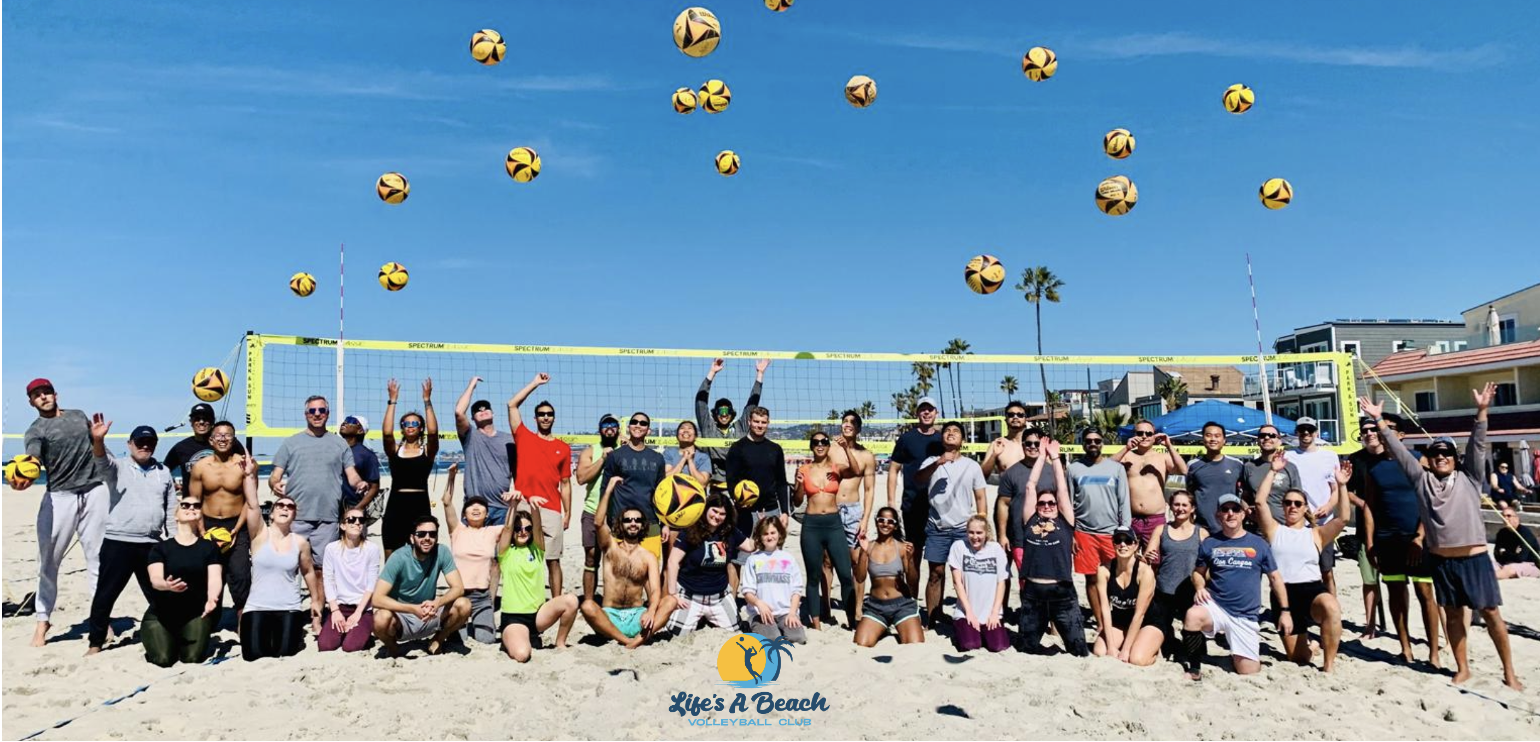

Dan says he doesn’t do well sitting in one place for long, and spent eight months in Africa last year! When he’s in California, he’s an avid beach volleyball player and the proud founder of the Life’s A Beach Volleyball Club, providing training programs, games, leagues and tournaments with a focus on inclusivity, community engagement and fun. He also loves music, and plays several instruments.

Thank you Dan for all that you do!
—
👉🏻 Do you know someone in the Community who should be next month's Member Spotlight? Nominate them here. (NOTE: Any Community member can nominate someone else in the Community).
 Alison C.
Re: Provide users with the ability to Print a Grouped Report
I agree, and I know it was planned. I think it will come when we've transitioned to the new framework more completely.
✅ Remember! Did I help answer your question/solve the problem? Please support with💡 ⬆️ ❤️, and/or ✅ Answer. This will make it easier for others to find a solution or help answer. I appreciate it, thank you! 🙏
 Andrée Starå
Re: Provide users with the ability to Print a Grouped Report
Happy to help!
Yes, it's an extra cost, but, in my opinion, it's very affordable.
✅ Remember! Did I help answer your question/solve the problem? Please support with💡 ⬆️ ❤️, and/or ✅ Answer. This will make it easier for others to find a solution or help answer. I appreciate it, thank you! 🙏
Andrée Starå
Re: Provide users with the ability to Print a Grouped Report
Hi @coffeelover42 @Eric.ProductionLens ,
I hope you're well and safe!
I agree, and in the meantime, here's a possible workaround.
I'd recommend the fantastic add-on, which makes this possible (+ many other features).
SSFeatures from the brilliant Nathan. @SSFeatures
Would that work/help?
I hope that helps!
Be safe, and have a fantastic day!
Best,
Andrée Starå | Smartsheet Expert Consultant & Partner / CEO @ WORK BOLD
✅ Did I help answer your question/solve the problem? Please support with💡 ⬆️ ❤️, and/or ✅ Answer. This will make it easier for others to find a solution or help answer. I appreciate it, thank you! 🙏
Andrée Starå
Re: Smartsheet / Supademo Integration
Hi @Kacy Cox,
I didn't realize there were restrictions on embedding. Guess we both learned something today.
Thanks for the update!
All the best,
-Ray
 Ray Lindstrom
Re: Pulling data from another sheet based on two criteria
@Soumitra Bhowmick I strongly recommend against creating a special key and then using the VLOOKUP function. The VLOOKUP is very rigid and easy to break. If you really want to use the combined key in a helper column method for a lookup, I suggest an INDEX/MATCH instead of the VLOOKUP.
But in this case, INDEX/COLLECT allows for a lookup using multiple matches so long as you use the "row #" portion of the INDEX function and does not require a helper column.
 Paul Newcome
Re: Maintain delimiters in a join() column when exporting to excel.
You need to wrap your join in a substitute and replace CHAR(10) with " ;"
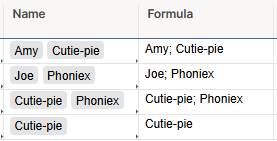
Formula:
=SUBSTITUTE(JOIN(Name1, ""), CHAR(10), "; ")
 jjg279
Help Article updates July 2025
Hello Community,
We’ve published the following new content.
New videos on these topics:
- Smartsheet Permissions and Sharing in Sharing permission levels and tasks
- How to create a Sheet Summary Report in Create a sheet summary report
- How to create a Row Report in Build a row report
And these new best practices:
To view the entire catalog of help articles, visit the Help and Learning Center.
Were the articles helpful?
Let us know by providing feedback for each article.
 Trelawney
Re: Issue with Cell Linking Automations
@John_Foster I have a ticketing system that needed to record the date the ticket was completed so I am sharing my process.
We wanted the date to be specific to the Status column so a modified system column wouldn't work and we didn't want anyone to be able to edit the date so a automated "record a date" wouldn't work either.
We settled on automation to copy the row to another sheet each time the status changed. In that change log sheet we have a date created system column, so that date will be the date/time when the automation ran and copied the row, which is also when the status changed.
Then we INDEX/MATCH these dates back into the ticketing sheet. We also use them to feed into metrics sheets for dashboards and such.
If you have access to Datamesh, that could also help tie your sheets together w/o using functions.
Hopefully this gives your some ideas for your use case.
Corey W.