Best Of
Re: Dynamic Filter on Dashboards
If the dropdown list is introduced to Smartsheet dashboard to select to desired projects to show in a dashboard will save the time for creating dashboard for multiple projects. So one dashboard can be used for Multiple projects by simply selecting desired projects using Dropdown list option.
 manjunathyr
Re: Community Corner Newsletter [August 2025]
Happy birthday @Georgie! My birthday is on the 13th!!
 LancyW
Re: Community Corner Newsletter [August 2025]
Happy birthday month @Georgie - mine is on the 24th! 🎂
 Cayla Davis
Re: Using HAS/CONTAINS functions with multiple choices
Hi @Beth Keane
As I understand it, a cell could include up to 10 events, and they fall into 3 categories:
- Group 1 ignore (in my example these are events 1-3)
- Group 2 multiply by 2 other columns (in my example these are events 4-6)
- Group 3 multiply by 1 other column (in my example these are events 7-10)
If a cell has 2 events (say event 9 and event 10) and you use a COUNTIF with an OR, that formula will return 1. The cell contains either event 9 or event 10.
If you want this to return 2 (the total number of events in the group), then you need to count each separately and add them together.
Here column 5 shows the result of the formula in column 6.
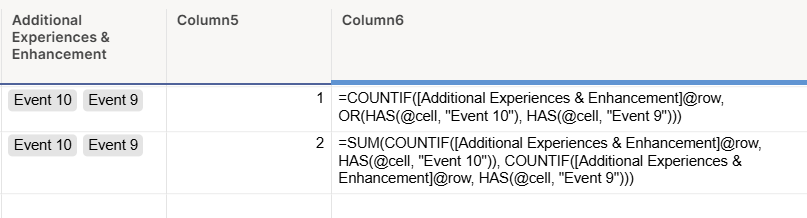
So, to count the four events in Group 3, the formula would look like this (with "event n" replaced with the value in your drop down).
=SUM(COUNTIF([Additional Experiences & Enhancement]@row , HAS(@cell , "Event 10")), COUNTIF([Additional Experiences & Enhancement]@row , HAS(@cell , "Event 9")), COUNTIF([Additional Experiences & Enhancement]@row , HAS(@cell , "Event 8")), COUNTIF([Additional Experiences & Enhancement]@row , HAS(@cell , "Event 7")))
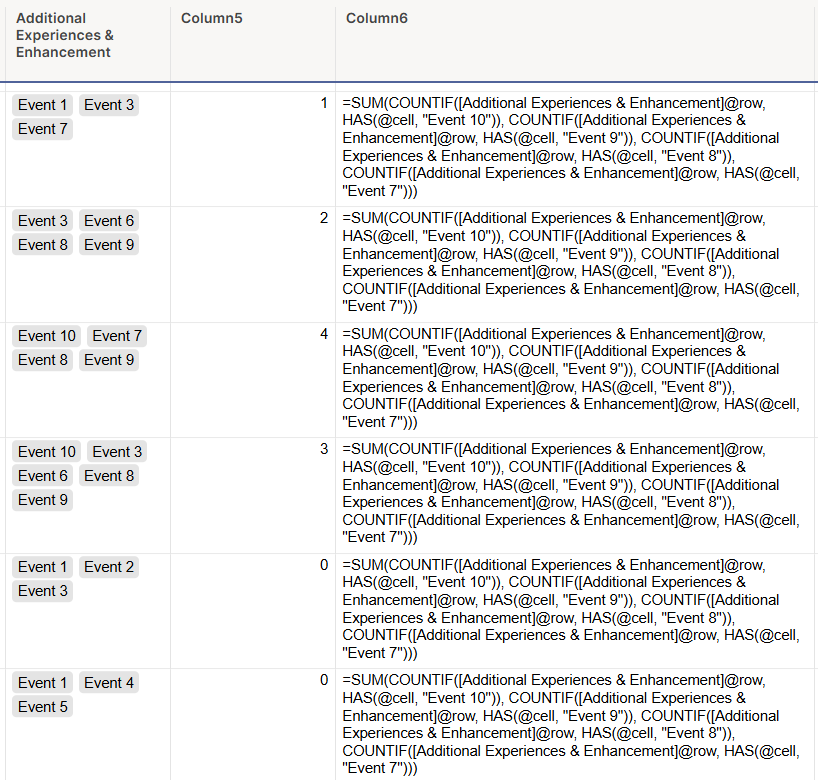
You would then multiply this by the number of attendees to get the value.
That formula would then be:
=(SUM(COUNTIF([Additional Experiences & Enhancement]@row , HAS(@cell , "Event 10")), COUNTIF([Additional Experiences & Enhancement]@row , HAS(@cell , "Event 9")), COUNTIF([Additional Experiences & Enhancement]@row , HAS(@cell , "Event 8")), COUNTIF([Additional Experiences & Enhancement]@row , HAS(@cell , "Event 7")))) * Attendees@row
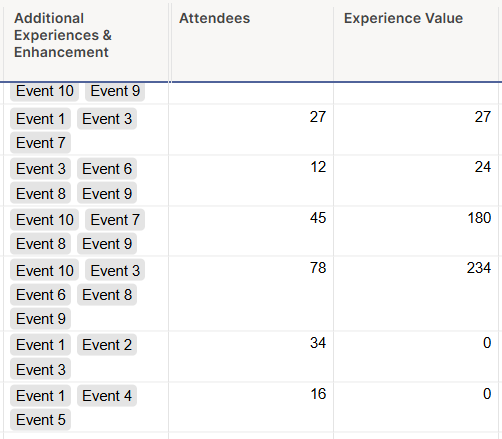
You can then repeat this for group 2, multiplying that total by the two columns.
I hope this is helpful.
 KPH
KPH
Re: Community Corner Newsletter [August 2025]
Happy Birthday @Georgie ! This is also my birthday month!
dlowery1554

Re: Community Corner Newsletter [August 2025]
New bucket list item: Go to Wimbledon with Georgie. ☑️
 Alison C.
Re: Place to download Smartsheet friendly icons/picture
@Peter Rousseau - When things are too good to be true, i make copies that very min (or download) just in case my instincts were right, and once again they were.
Here is a link to the Media Kit: Smartsheet Media Kit
If you want me to send you a link to download a zip file to those icons from that library, and many others icons/symbols/clipart/images i use throughout my sheets/dashboards that you can access to download.
If your interested, send me a request for the link to the icons folder to my personal email since my government email will most likely block them 😒
——> beckersbeachlife@outlook .com
 Julie Becker
Hi Everyone, I am Audrey :)
I work as Operations Coordinator at an International Education company in Australia. I have used Smartsheet for a number of years now and slowly became the go-to person for anything Smartsheet at my work. I have attended the Smartsheet summit in June, got the Core Product Badge and am constantly seeking to upgrading my knowledge on the new tools. Currently loving the AI and its functionality.
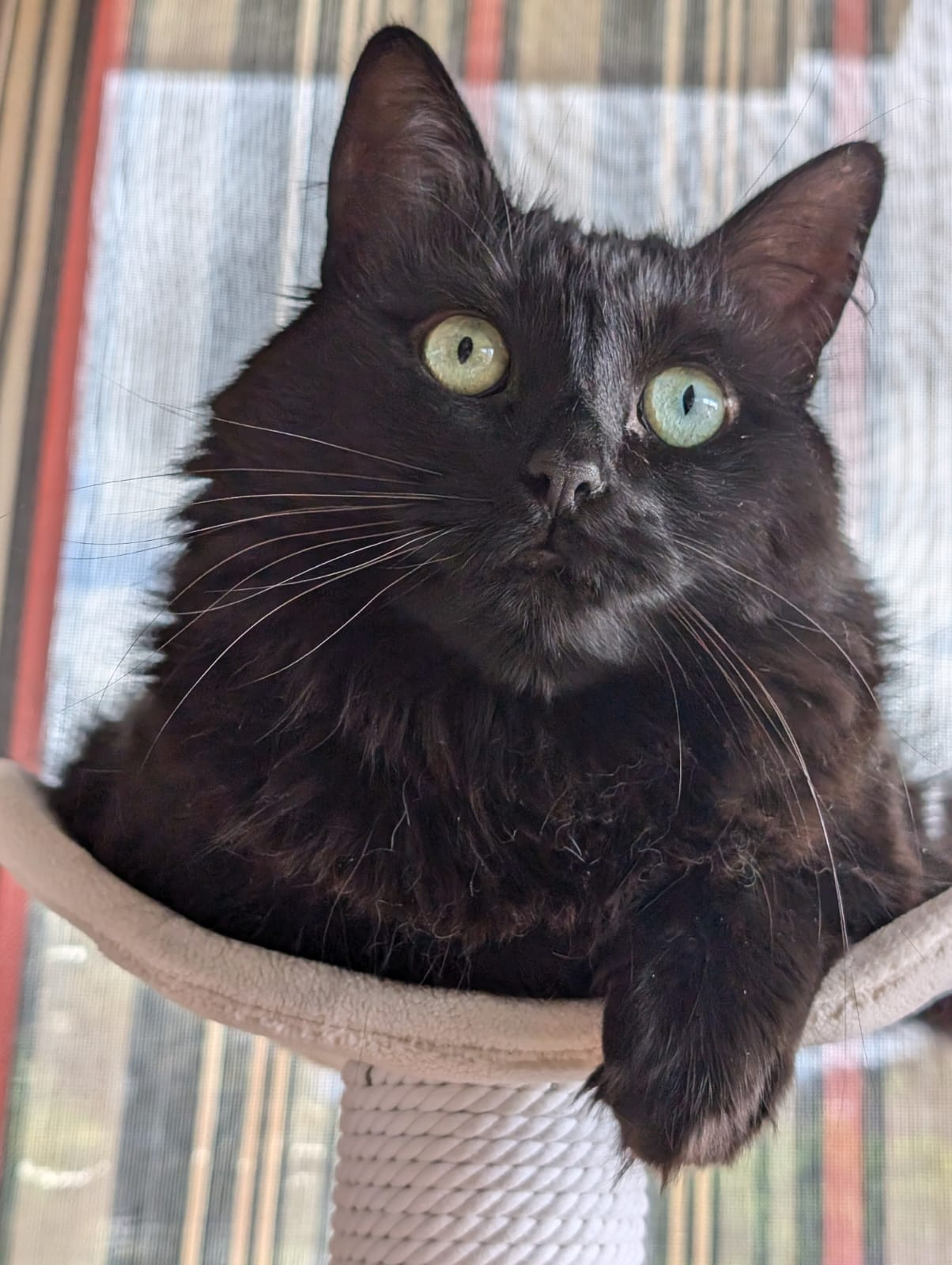
Outside of work, I have a cat and a kiddo. They are my world!
Here is a picture of Preta. It means black in Portuguese.
 AudreyT
Re: Work with Flow - A Space Story
When I started my current job, my first priority was to re(learn) Smartsheet and take the project management process to a whole new level. They were using Smartsheet but in a very basic way. My manager knew improvements were needed but, when running a small business, it can be tough to find the time to put backend structure in place. That's where I came in. I looked at several solutions with my manager and the PMO template was the best option. Again, being a small business limited us in several areas. After several months of drafting, testing, and implementing we are now successfully using our PMO workspaces for our clients. We now have separate schedules for all components within a client's project (instead of the all-on-one schedule they were using before) which allows us to better track baseline and variance, informative internal & external dashboards, and multiple reports that are reviewed weekly. It's definitely improved our PM process and engagement and awareness within the team.
 melissalk