Best Of
Expanded row details, attachments, and conversations in table view, now generally available
May, 28, 2025
Users can now quickly and simultaneously view details, conversations, and attachments for any row in table view. Simply double-click on the row number and see this information load in a new right panel experience. Learn More
Environments availability: Commercial US, Commercial EU
Plan availability: Pro, Business, Enterprise, Advanced Work Management
Subscription Model Availability: Legacy Collaborator Model, User Subscription Model

Stay informed by subscribing to receive product release updates for curated news of recently released product capabilities and enhancements for the platform of your choosing, delivered to your inbox. As new releases occur, you will receive a weekly email with news of what's released every Tuesday.
 Lekshmi Unnithan
🚨 Upcoming Event for Boston-area Smartsheet users! 🚨
We’re hosting an in-person User Group in Waltham, MA—and still have a few spots left!
📅 When: Wednesday, June 5 (1–4:30 PM ET)
📍 Where: Waltham Woods Conference Center, 860 Winter St, Waltham, MA 02451
Join us for an energizing afternoon of insights, networking, and hands-on learning:
• Get Inspired: See how local users are streamlining work and driving impact
• Connect: Share tips and stories with fellow Smartsheet pros—plus enjoy snacks and drinks
• Ask the Experts: Bring your questions to our interactive workshop
🎟️ Free to attend—space is limited. Save your seat today!
We’d love to see you there!
 Kelsey Hayden
Re: Dynamic Filter on Dashboards
Wouldn't it be great to have one single dynamic filter for the dashboard feature!!!! This idea includes having one filter at the top of the dashboard that updates all related data. For example, in university recruitment, I want to view metrics for one university at a time. Ideally, I’d select the university from a top-level filter, and all charts below would update accordingly. Currently, I have to create a separate dashboard per university and manually filter each report/chart—so many clicks! A single dynamic filter would make this process much more efficient.
 Caroline L.
Re: Conditional Formating
@mahoward I believe if I'm reading this correctly the simple solution is just to reorder your rules list for your conditional formatting. The order in which they are listed under the conditional formatting menu is the order in which the rule will be applied to a column. I also think you'll have to change your logic so instead of "blacking out a column" your B rule references keeping a column "white". So you put your most limiting rule first followed by the least. In your case it would look something like:
Rule 1 - if "B" is selected, White Formatting for A and B only.
Rule 2 - if "A" is selected, black out Columns, A, B, C and D.
In this case if you only chose A, then all columns A thru E would be blacked out. But if you went back and added B, it would first apply conditional formatting to the B rows you want to preserve. See below as an example:

Please let me know if you have any questions.
-Brian
Brian Wilson DC
Re: Parsing Multi Picklist through API
Hi @maxibenner, can you show us what your code looks like right now?
In your example screenshot, it looks like you're trying to pass in 3 values, as an array, which is correct. However, Smartsheet is interpreting the array as a string.
For example, this would be incorrect:
"objectValue": {

  "objectType": "MULTI_PICKLIST",

  "values": "["Option A", "Option C"]"

}
Whereas this would be correct:
"objectValue": {
  "objectType": "MULTI_PICKLIST",
  "values": ["Option A", "Option C"]
}
The first one has an extra set of parenthesis around the array, which is incorrect because Smartsheet will interpret the whole thing as a JSON string.
The second one is correct because Smartsheet will interpret it as a JSON string array.
Best!
 SSFeatures
Re: Counting Multi Select drop downs
=LEN([Dropdown Column]@row) - LEN(SUBSTITUTE([Dropdown Column]@row, CHAR(10), "")) + 1
 Naeem Ejaz
Re: SUMIFS error with Multiple Criteria - Invalid Operation?
SUMIFS has a different syntax. The range to sum should be the first range in that function.
=SUMIFS(EstIAJobs:EstIAJobs, JobDelDate:JobDelDate, @cell = SchDates@row, PrintTech:PrintTech, @cell = "Flexo")
 Paul Newcome
Re: Creating a Report that ONLY shows rows with Attachments
I believe @Andrée Starå it talking about setting up a workflow to trigger when an attachment is added, with the Action block of the workflow being an Approval block (see here).
Then go to the Advanced Options:

And in the Advanced Options you can customize the message that this workflow provides automatically in a column whenever an attachment is added:
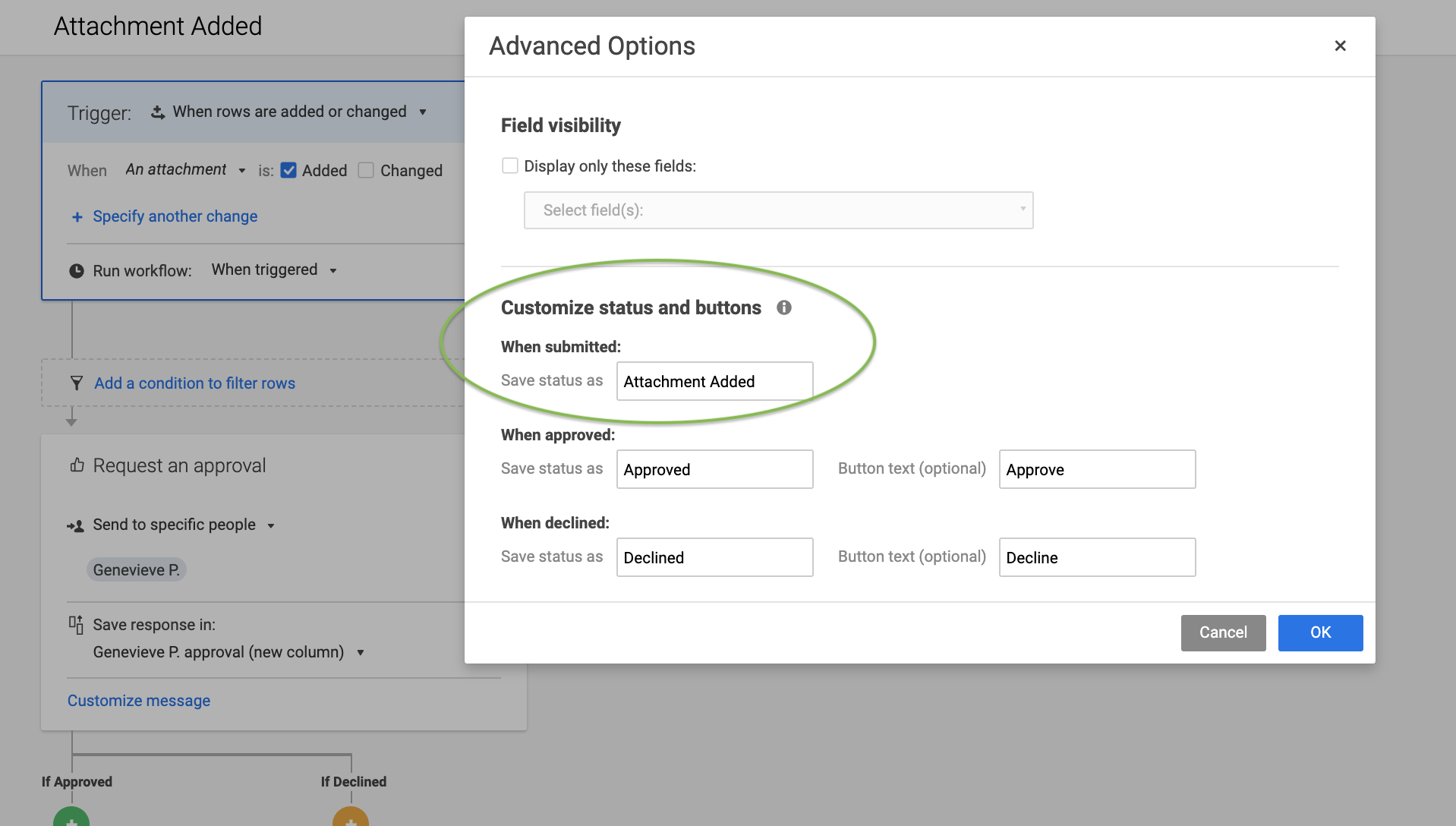
Let me know if this makes sense or if you'd like further clarification!
Cheers,
Genevieve
 Genevieve P.
Re: May Question of the Month - Join the conversation and receive a badge
I get to play everyday on a computer :)
 Joe Goetschel
Re: Having problems figuring out how to get a view like this.
What Nathan said! 😉
✅ Remember! Did I help answer your question/solve the problem? Please support with💡 ⬆️ ❤️, and/or ✅ Answer. This will make it easier for others to find a solution or help answer! I appreciate it, thank you! 🙏
 Andrée Starå