Best Of
Re: Introduce yourself & get to know your peers!

Hello, my name is August,
I’m new to Smartsheet’s but a veteran in project management and all that encompasses PMing. I enjoy my time in the office and will use Smartsheet’s daily. In addition, I enjoy my weekends and holidays. When I have time off I travel with friends and family, I’m into sports, riding horses and doing my time in the gym.
I look forward to getting to know all of you and getting up to speed using Smartsheet’s.
 Augie
Augie
SmartStories - Celebrating 10 Years of the Smartsheet Community
Hello Community,
Remember back in February when we celebrated the Community’s 10 year anniversary? You shared such beautiful comments, that we decided to dedicate our latest SmartStories episode to highlighting some of our favorites.
Big shout out to the Community members featured in this edition, including some that have been here since the beginning: @JLC, @Shaffi Mithwani, @jmyzk_cloudsmart_jp, @Yvonne Smythe, @Tabitha Hunter, and @Loann McGee 🤩
To everyone who joined in the 10 year celebration, whether you see your name here or not — Your contributions are what make the Community the amazing place it is!
More SmartStories
➡️ Catch up on previous editions here.
🌎 Want to watch or share in your language? Head over to the Global Discussions for translated versions.
👀 What stories would you love to see us highlight next? Let us know in the comments below!
 Rebeca S.
Re: Certificación en español
Muchas gracias Tomas, vamos a iniciar revisando el material de preparación para posteriormente agendar el examen, actualmente ya contamos con 5 licencias de Smartsheet y requerimos construir un Dashboard de proyectos personalizado a nuestra Dirección.
En lo personal nos alivia saber que existe una comunidad en nuestro idioma.
Muchas gracias.
 Edgar Balam
Re: SmartStories - Celebrating 10 Years of the Smartsheet Community
This community really is a bountiful resource! Thanks for the reflection video.
 Loann McGee
Re: Activity Log should reflect all changes made to a sheet (in detail) including Workflows
I checked the Activity Log and confirmed that actions like "Send Row" or "Send Sheet as Attachment" are not recorded. Even though there's an "Automation" filter, it only captures automation rule creation or updates—not actual executions such as “Request Approval” or “Alert Someone.”

From what I see, Smartsheet doesn’t seem to log these email-triggering activities at all, except for "Approval Requests," which do have a menu to view their history. I’ve also checked the Smartsheet API and could not find any method that exposes the history of emails sent through automations.
So when the original post says “this data is already in the back end of the system,” I’d really appreciate clarification from a Smartsheet employee.
Additionally, in the Admin Center, there is a control under
Security & Controls > Permissions > Notifications and Requests
that allows admins to manage who can receive notifications and requests from people in your organization. However, in practice, organizations often need to allow these actions to ensure workflows function—particularly automations like “Request Update,” “Request Approval,” “Send Row,” or “Alert Someone.”
This introduces a security gap: even if an organization restricts sheet sharing, disables external publishing, or limits report/dashboard access, users can still use Smartsheet’s system-generated email functions to send sensitive row data externally. This effectively bypasses administrative controls meant to contain data within approved boundaries.
Because of this, it’s critically important for admins to have audit visibility into all outbound emails, whether system-generated through automations or manually sent (such as using “Send Row,” or “Send as Attachment”). Both types of emails can include sensitive row-level data, and the security risk is the same—data can be leaked, intentionally or unintentionally, outside the organization’s controlled environment. Visibility into what was sent, when, and to whom is essential for maintaining data governance.

Re: Which Keyboard Symbols are sorted FIRST in Workspace List?
Great question, @NeilKY !
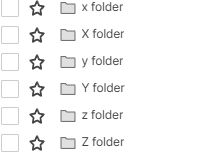
I ran a test by programmatically creating folders with various keyboard symbols followed by " folder" (e.g., ! folder, @ folder , etc.) inside a single workspace. I chose folders instead of workspaces to avoid cluttering my account with many new workspaces — but I suspect the same sorting rules apply to workspace names as well, since the UI behavior appears consistent.
Smartsheet does not sort folders by ASCII order.
Here’s the observed sort order of some common keyboard symbols in Smartsheet:

Key Observations:
- _ folder does sort first, as expected.
- Characters like -, ,, and ; appear before !, which does not follow ASCII order.
- Smartsheet likely applies a custom internal sort order for symbols, unrelated to standard character codes.
_ - , ; ! ? . ' ( ) [ ] { } @ * / \ & # ` ^ + < = > | ~ $
Tip:
If you want a folder or workspace to appear at the top of the list, try prefixes like _, -, ., or , — they reliably come first based on my test.
Hope this helps others who are fine-tuning their folder/workspace naming conventions!
Sample test code

Detailed Observations:
- Underscore
_sorts first – this is common in many systems and intentional to allow "top-sorting". - Dash
-, comma,, semicolon;come early, which is unusual (ASCII-wise,!has a lower value than,). - Paired brackets/quotes are grouped somewhat logically:
' ( ) [ ] { }
- Math symbols and separators tend to follow:
- @ * / \ & #
- Tilde
~and dollar$come last, despite$being ASCII 36 and~being 126.
Possible Explanation:
Smartsheet may be using an internal sorting mechanism that:
- Groups characters by type (e.g., punctuation, math, brackets).
- Applies a custom priority table for UI consistency.
- Might ignore ASCII/Unicode and instead flatten non-alphanumerics into a hand-tuned order.
This behavior is not documented publicly, so the only reliable method is empirical testing like the one above.
BTW, the last character is Z.
Re: Metric Widget without Summary Sheet Report?
jmyzk_cloudsmart_jp @Rebecca BdR That's great, thank you! I'll send each of you a DM to set up time.
Rashmi Shekhar
Re: Did Shortcut Widget Loose the Ability to link Dashboards?
@Georgie Looks good to me! Thanks for the heads-up
celtics345
Re: Did Shortcut Widget Loose the Ability to link Dashboards?
Hi @Lynn U, @kowal and @celtics345,
I'm jumping in here as I've tested this and it's working on my end. This is also discussed in this related thread: Adding a dashboard link to a different dashboard, where @cg80 has suggested the feature is now working again. It therefore looks like this may have been a temporary issue which is now resolved.
Could you all take a look again and see if you're still experiencing the issue? If you are, I'd recommend submitting a support ticket so the team can investigate.
Thanks!
Georgie
 Georgie
Re: Rich Text Widget Scroll Bar Change
Hi Genevieve, thanks for the quick response in addressing this bug.
I completely echo Kyle’s point above - this has been a long-standing frustration for our team when working with Smartsheet. We're happy to provide further feedback on the user experience around issue and bug reporting if that would be helpful.
As early users of Smartsheet, we’ve been alongside the platform through many of its structural evolutions. This particular issue has become one of our main pain points, and it would be fantastic to see improvements in this area.
 B.Wats