Best Of
Re: Rolling Negative Status Up Hierarchy from Children
@Jarret.Birdwell Great job laying all this out, but a quick question to simplify my understanding:
Are you also saying that if Item 1 has ANY late items/children, it should show late, if none are late but ANY are at risk, then the parent is as risk etc etc? So worse case to best case, and the threshold for each stage is any? IF so.. I've done this many times….
Here's what you need:
1.) Add two hidden helper columns. (I do this on EVERY sheet). One is named "A", and the other is "C". They should have these formulas: =count(ancestors()) in "A" and =count(children()) in "C". These are column formulas. (This formula doesn't use the C… I just always include it)
2.) Change your status column formula to:
=IF(A@row = 0, IF(COUNTIF(DESCENDANTS(), "Late") > 0, "Late", IF(COUNTIF(DESCENDANTS(), "At Risk") > 0, "At Risk", IF(COUNTIF(DESCENDANTS(), "In Progress") > 0, "In Progress", IF(COUNTIF(DESCENDANTS(), "Complete") > 0, "Complete")))), IF(OR(AND([% Complete]@row = 0, NETWORKDAY(TODAY(), [End Date]@row) > 0, NETWORKDAY(TODAY(), [End Date]@row) < 30), AND([% Complete]@row > 0, [% Complete]@row < 1, NETWORKDAY(TODAY(), [End Date]@row) > 0, NETWORKDAY(TODAY(), [End Date]@row) < 10)), "At Risk", IF(AND([% Complete]@row < 1, [End Date]@row < TODAY()), "Late", IF([% Complete]@row = 1, "Complete", IF([% Complete]@row > 0, "In Progress", "Not Started")))))
This also works for multi level parent/child setups.
Also… to keep your today formula up to date:
Add a "TodayHelper" hidden helper date column. Then add an automation to record a date in that column every day at 4am or something early.


 Matt Lynn ACT
Re: New streamlined creation experience
This new streamlined creation experience is the worst.🤬. So if we want to test some new ideas before making it live, rather than have it in our private sheets folder, it will now have a new workspace?
If this is your version of streamlining processes, then make it where any new workspace created is automatically given access to all system admins and/or notified via email that a workspace was created in our account by John Smtih, so we can manage the new contents the way we originally intended it to be.
 Julie Becker
Re: New streamlined creation experience
Adding my downvote to this as well. Maybe there is a strong backend reason on Smartsheet's behalf for this change? From a user experience standpoint, I can see no benefit at all. Moving sheets into workspaces was already trivial. I have added a "sheets" workspace that will not be shared with anyone to replace the default sheets location. This isn't a huge inconvenience, but it is a minor inconvenience with no perceivable benefit to the end user.
 Carson Penticuff
Re: New streamlined creation experience
Echoing the comments about how this is counterintuitive for certain work that does not require collaboration. Folders serve a COMPLETELY different functionality than the Workspaces. Many of our users are shared individual sheets for different purposes and folders allow them to keep things organized how they preferred. Having to create a workspace anytime you need to give different permissions will clutter up everything. It absolutely does not do this - "making collaboration more efficient and reducing time spent searching for information"
 XLee
XLee
Conditional Formatting Combined with Dropdowns and Dates
Hello!
I have a user tracking the progression of course development and is asking if there is a way to do some formatting on his sheet.
- The columns shown are set up as dropdowns (there are 8 total columns on this sheet).
- In the yellow row, in the cells where I've drawn a box, he is going to place due dates.
- Is it possible to change cell color based on the dropdown selection AND that due date?
Example: If Not Started is selected in the Initial sweep column AND it's a specific date (which will be in the yellow cell of that column), turn the Not Started cell pink.

My initial solution: Having the column properties be Date columns (instead of dropdowns) and then using conditional formatting to change the cell color based on the text entry does work, but the user entering the text would need to be consistent with their entries. I think it's a possible solution, but I feel I might be missing some other options (formulas, Helper column(s), etc.).
Am I on track or has anyone done anything similar?
Many thanks!
-Melissa
 melissalk
Re: New Membership versus License Model
@swfascetti Hello!
Not sure if this helps but this is the explanation I received when we were looking at how the new model would impact our use:
1. Licensing Requirements for Internal Users:
Under the new User Subscription Model, all internal users who need to create, edit, or comment within Smartsheet are required to have a paid membership. The previous distinction between "licensed users" and "unlicensed users" has been replaced with "Members." Previously licensed users and unlicensed admins and editors would all need to be designated as Members to maintain their current access levels.
2. Definition of Members, Guests, and Viewers:
- Members (Paid Users): Internal users with the ability to create, edit, comment, and view Smartsheet items.
- Guests: External users (those with email domains different from your organization's) who can be granted Editor or Commenter permissions on shared items. Guests do not incur additional costs to your organization.
- Viewers: Internal users with the ability to view Smartsheet items.
melissalk
Re: Update multiple column dropdowns on one sheet, from one source sheet using Bridge
You should be able to do something like this.
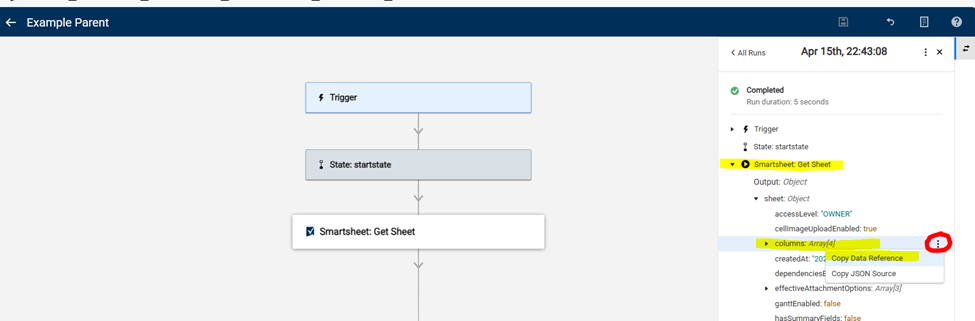
For the Parent:
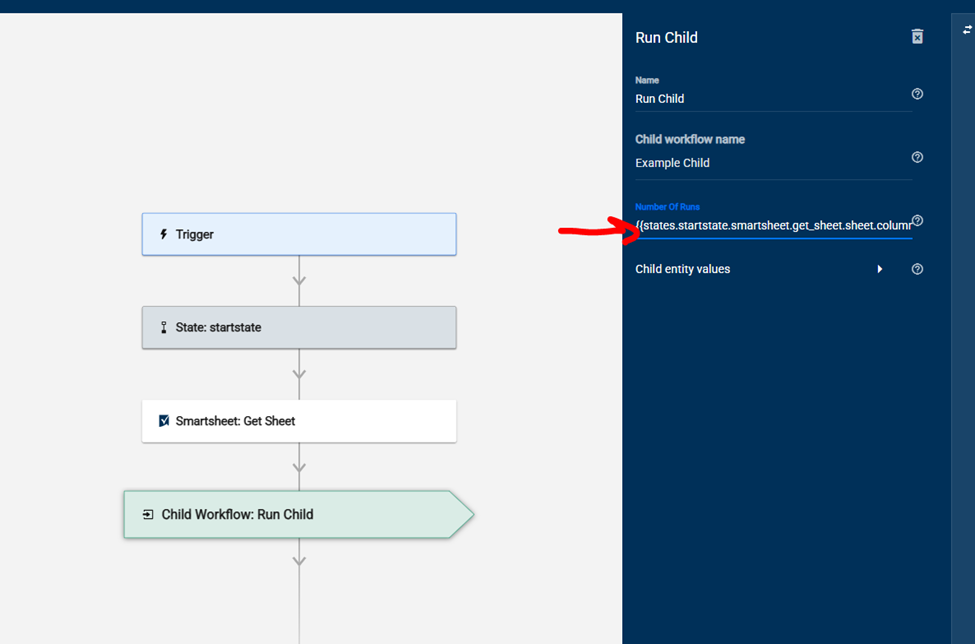
Copy the Data Reference for the column array in the run data and paste it into the "Number of Runs" field on the Run Child config.
IMPORTANT NOTE: When you are first setting this up, have your Get Sheet function only grab 1 column so that you don't trigger the child 250 during set-up and testing. You will remove the column filter before you run the live flow.
For the Child:
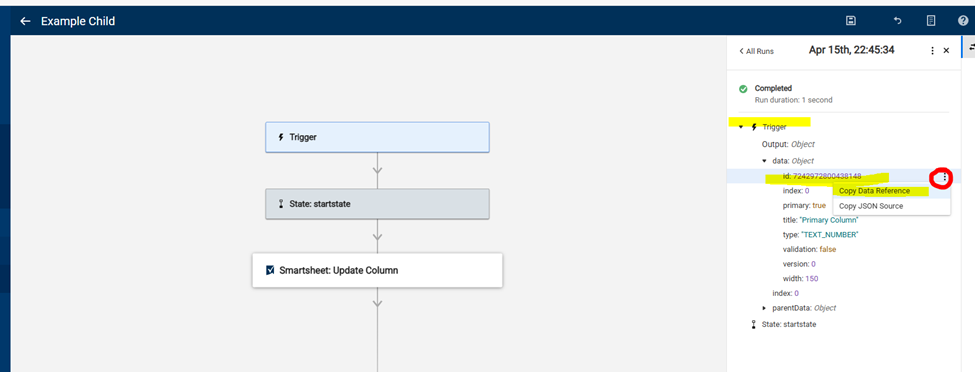
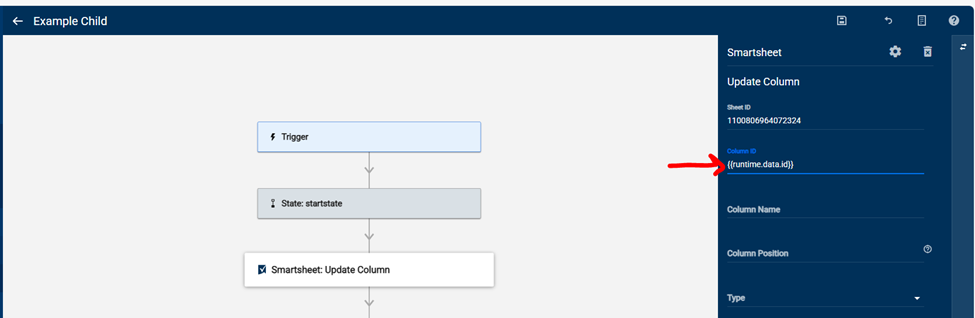
Trigger the child flow from the parent one time so you have some run history. Find the column ID ("Id") under the data and copy the data reference. Paste this into the Column ID field on the Update Column module.
Does that help?
Jess
 jessica.smith
Re: Bridge: Automatically backup a workspace using "Save as New"
Let me amend the above first. When you are building this out, set it to only pull a couple of workspaces. For the "Number of Runs" portion when setting up the child workflow module, set it as the array produced by the API call.
Then your child workflow trigger will contain the workspace data that triggered it which can then be used in the modules of the child workflow to create your copy.


 Paul Newcome
Welcome to the B2B Work Management Community!
This is a space for Smartsheet users that work in B2B Work Management functions to connect, share ideas, challenges, best practices and how you are using Smartsheet to transform your specific use case.
Our Smartsheet team will be sharing helpful resources, upcoming industry events, discussion questions, and more. You’ll see us jumping in from time to time, but first and foremost, this space is yours to connect and collaborate with peers.
We’ve created a unique B2B Work Management badge just for this community to showcase on your profile and use to connect with others. Introduce yourself and start engaging with your peers and the badge will be automatically added to your profile.
Need a little inspiration? Tell us:
- How long have you been using Smartsheet?
- How are you using Smartsheet today or planning to in the future?
- What would you like to learn from your peers using Smartsheet for B2B Work Management?
 Rebeca S.
Updated Sharing Modal
Did you know Smartsheet recently updated how you request and grant access? This new release video shows how much easier it is to give context with your requests, and for admins to manage them!
 Marie F.