Best Of
Re: I am an Admin, but I cannot edit the workspace
Its not a bug, this is the behaviour from the new User Subscription licensing model. A System Admin on your plan has downgraded your share to this sheet to that of a Viewer. You will need to contact your system admin person within your organisation for them to restore your permissions, but they will have to buy/allocate you a license (now called a Seat) to do it.
 Debbie Sawyer
Re: Re: Document Builder - Generate 1 PDF Document w/ Multiple Rows
This cade is a game changer for a program I'm supporting! My sheet needed to calculate totals across various programs at different campuses. This then needed to be generated into a PDF.
In case it might save anyone else some head scratching, to identify the next child to copy over, you just change the final number
Child 1: =IF((COUNT(CHILDREN([Subcontractor Name]@row))) > 0, INDEX(CHILDREN([Subcontractor Name]@row), 1), "")
Child 2: =IF((COUNT(CHILDREN([Subcontractor Name]@row))) > 0, INDEX(CHILDREN([Subcontractor Name]@row), 2), "")
You can also change out the Index column's name to copy over data from a different column, change the Index column.
 VictoriaD
Re: Unparsable formula; Sheet summary SUMIF formula
Hi @Bkb,
When a column has a space in the name, it needs to be enclosed in brackets when being referred to.
=SUMIF(Status:Status,"Quoted",[EST. GP]:[EST. GP])
Hope this helps,
Dave
 DKazatsky2
Re: Offloading PDF Attachments from Smartsheet to OneDrive or Box for Email Automation
Hi @Frank_2820
Short answer: Yes—have Smartsheet email you when a PDF is attached, let Power Automate (Outlook trigger) read that HTML email, extract the PDF link and PDF filename, drop the file into OneDrive, and then use the standard “When a file is created” template to send your templated email.
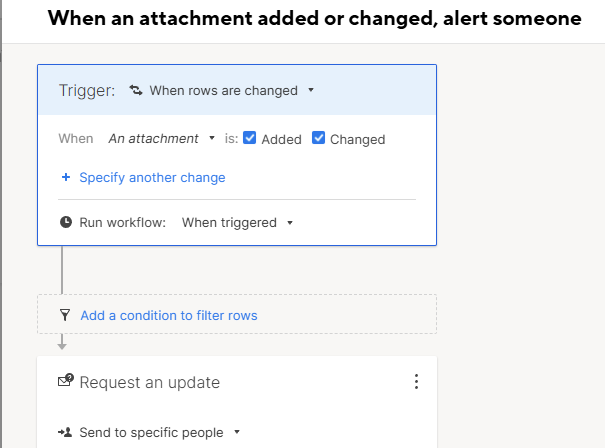
Key point: Smartsheet alert emails are HTML-only (no real email attachments). The email body contains a link (often https://click.smartsheet.com/...). Your flow should pull the URL and the human-readable filename from that HTML.
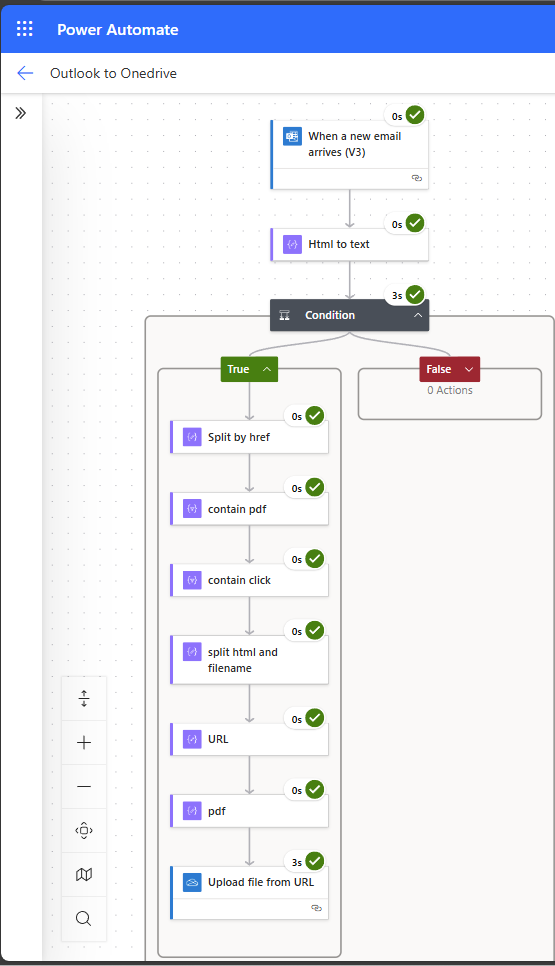
How I do it (using the same pattern you described)
- Smartsheet Automation
- Workflow: When an attachment is added or changed, alert someone → send to an Outlook mailbox you control.
- Power Automate – Outlook trigger
- When a new email arrives (V3)
- Optional filters: From = automation@app.smartsheet.com, Subject contains “attachment”.
- Parse the HTML body (no custom code)
- Work with the HTML body. (option: HTML to Text)
- Checks if 'click.smartsheet.com' and 'pdf' are contained.
- Split on
href="to get anchor chunks. - Filter chunks that contain
.pdf(case-insensitive) and, if you want,click.smartsheet.com. - From the first matching chunk:
- URL: take the text up to the next
"(that’s your PDF link). - PDF name: take the anchor inner text (between
>and</a>), and remove the trailing size like(369k).
- URL: take the text up to the next
- Save to OneDrive/Box
- Use your existing “save to OneDrive/Box” step with the URL and PDF name you extracted.
- (You already have this in your flow: URL goes to the “source” field; filename becomes the destination name.)
- Send the templated email.
- Separate flow (or downstream): When a file is created in your OneDrive/Box folder → Send an email (Outlook) using your template and attach the file.
Send an email when a file is created in a folder of OneDrive for Business | Power Automate
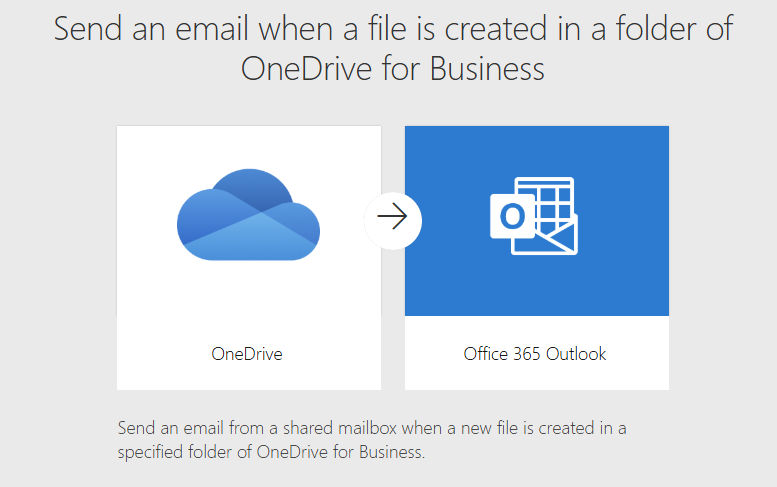
The following template will not work as the message from Smartsheet does not contain a real attachment, but a download URL instead.
Note: Extracting the URL and PDF name from raw HTML isn’t always obvious—especially if you’re “not a developer” and don’t want to write code. If you need help wiring up the Outlook + OneDrive flow and the few expressions, feel free to reach out to me.



Re: Attach/upload Document files to Dashboard
I completely agree there should be a way to attach a document onto a Dashboard
 Elizzj4
Re: [GIVEAWAY] Celebrate 20 Years of Smartsheet!
Question 1: I'll say 2017
Question 2: UK and Japan
Question 3: 150? Maybe I can be next haha
 ebecker
Re: File Library - thoughts
Thank you Ward! Appreciate this video response. I do think it's worth some restructuring of the workspaces to accomodate the benefits of File Library. I will work on this to make sense for our departments. :)
 Kelly Kenney
Re: [GIVEAWAY] Ready for ENGAGE? Win a Conference Pass!
Let's do this using alliteration:
Espresso shots (because the best ideas need caffeine)
Notebooks (for jotting down every brilliant session nugget)
Good reads (because I refuse to travel without a book)
All the questions (I plan to ask every presenter)
Grateful vibes (for the opportunity to learn from amazing people)
Enough snacks to outlast a flight delay and a keynote (travel = snacking)
 Ryan Holguin
Re: FAQs and Guidelines for posting Product Feedback Ideas
Hi @Tim Starkey
Great question! You're welcome to use either-or. The Enhancement Form you've linked is still active and available for you to submit your ideas directly to the Product team.
Personally, I'm partial to using the Idea space in the Community as it allows other members to see your idea and join in with their votes. You can also keep track of your previous submissions, and you'll receive a notification if the Product team updates a status on an Idea you've either created or voted on.
That said, if you would prefer that your feedback remain a bit more private, you're still welcome to use the form. Content submitted from either option goes to the same place.
Cheers,
Genevieve
 Genevieve P.