Best Of
Column Links Now Generally Available!
Hi Community,
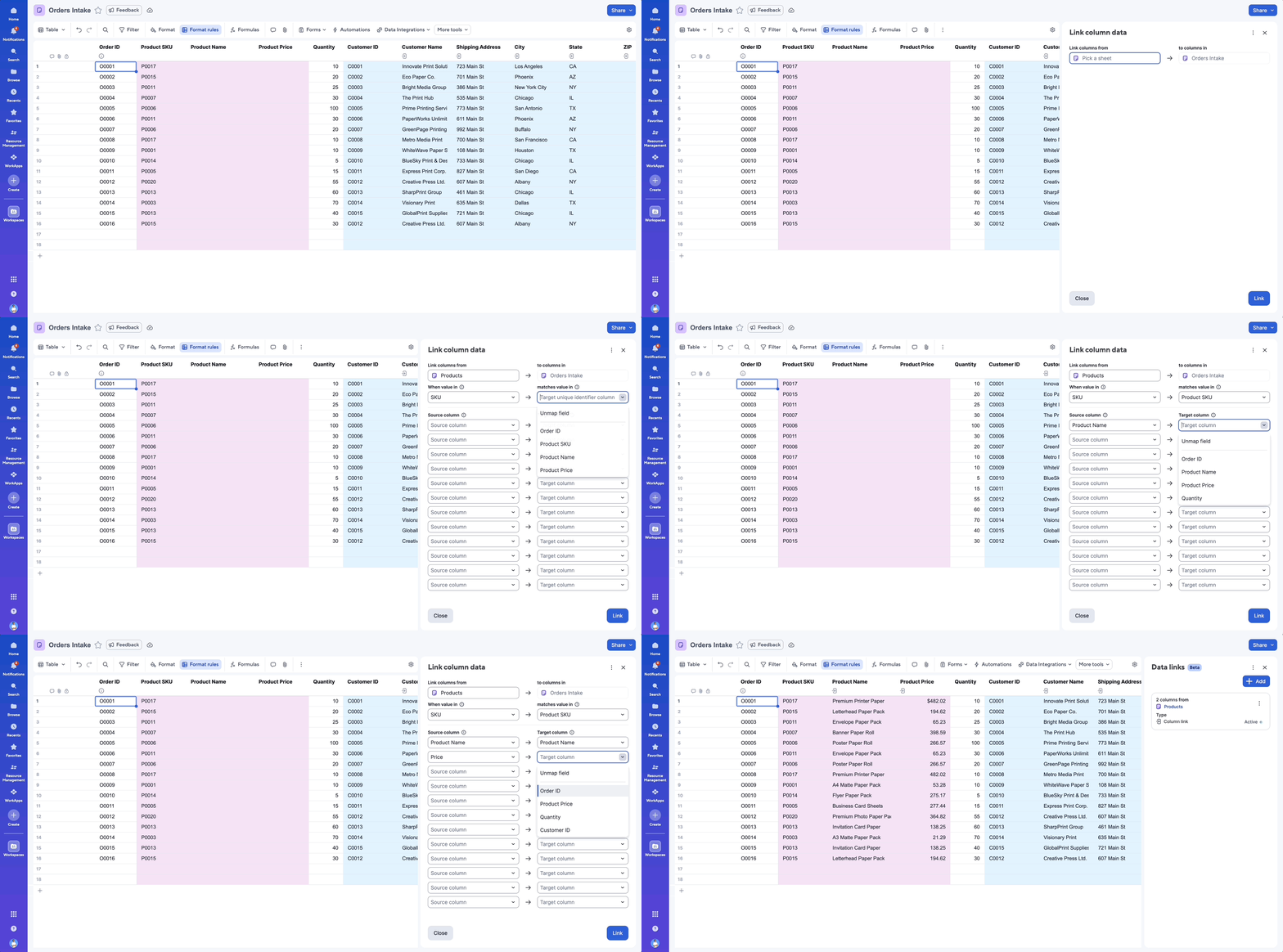
Column links, accessible through the “More Tools”->”Link column data” toolbar option in table view, allows users to reference data across sheets, without needing to write formulas.
With column links, you can reference data within columns in other sheets based on a unique identifier, to create flexible cross-sheet lookups. This is instrumental when referencing data sources like a Product Catalog, Employee Directory, or Billing Rates across other sheets to ensure your data is always up-to-date.
This release represents the first phase of column links — future releases will include advanced features to provide enterprise grade flexibility for more complex processes and solutions.
Licensed users on Pro, Business, and Enterprise plans (Legacy & User Subscription Model) are able to use this new feature. You must have admin permissions on the target sheet and viewer permissions or higher on the source sheet.
You can find some help articles to get you started with column links here:
You can also stay informed by subscribing to receive product release updates for curated news of recently released product capabilities and enhancements for the platform of your choosing, delivered to your inbox. As new releases occur, you will receive a weekly email with news of what's released every Tuesday.
Danielle Wilson
Product Marketing Manager
 Danielle Wilson
Re: Trying to add form submissions onto a Spreadsheet that has a column of unique randomized numbers
Hi @JonathanMDLG ! If I'm understanding correctly, you have existing rows with coupon codes in one column and you're wanting a form submission to populate the existing row to "assign" it a coupon code?? Is that right? If so, then that will not work. Form submission will also generate a new row, it cannot add to an existing row.
If you're wanting to assign a coupon code, you could store the coupon codes in something like a "master coupon code" sheet and then when a new form entry is submitted, it populates/pulls the coupon code from the "master coupon code" sheet. You could do something like auto number the form submissions so they match a numbering scheme assigned to the coupon code (an ID). Does that make sense? Would something like that work for you?
 Victoria_Indimar
Re: grey out specific number of days in calendar booking form
ok, that's a good idea. wasn't aware of this section. thanks again!
divelocker
Re: How to transfer a user account with the same email address
Thanks Tomasz, that sounds like it should work. We'll give it a go.
NigelS
Re: Smartsheet & Outlook Invites for meetings
Thanks, @Lindsay Whitbread! I've been in touch with Antonio.
 mhint2005
Re: Issue with task health formula
Looks like you're missing () after the first use of TODAY in the second section.
 Nic Larsen

Re: Formula to find most recent duplicate
@Heidi Truitt, thank you very, very much. It appears to be working exactly as I hoped it would. I greatly appreciate your help.
 Zach_
Zach_
Re: COUNTIF/COUNTIFS Formula Help
hi @Bert Guymer,
Countif and Countifs are pretty straight forward formulas.
I would use the Sheet Summary fields to calculate it or create extra sheet for calculations where you can reference another sheet. anyway if you want to check how many Complete projects are assigned to Thomas you shall use countifis and it shall be like: =countifs(Assigned:Assigned, "Thomas", Status:Status, "Complete") - assigned is the name of the column you keep the name of PM and status is the column where you keep their status of project.
 kowal
kowal