Best Of
Re: Can I link a cell to a folder on my hard drive?
Hi,
I hope you're well and safe!
Unfortunately, as far as I know, it's not possible now, but it's an excellent idea!
Please submit this as a Product Feedback or Idea (If it hasn't been added already) when you have a moment.
Here's a possible workaround or workarounds
1️⃣ If you have the files in an online service, you could add the link.
Would that work/help?
I hope that helps!
Be safe, and have a fantastic day!
Best,
Andrée Starå | Smartsheet Expert Consultant & Partner / CEO @ WORK BOLD
✅ Did my comment(s) help/answer your question or solve your problem? Please support the Community and me by marking it - Insightful 💡- Vote Up ⬆️ - Awesome ❤️ - or/and as the accepted answer. It will make it easier for others to find a solution or help to answer! I appreciate it, thanks!
 Andrée Starå
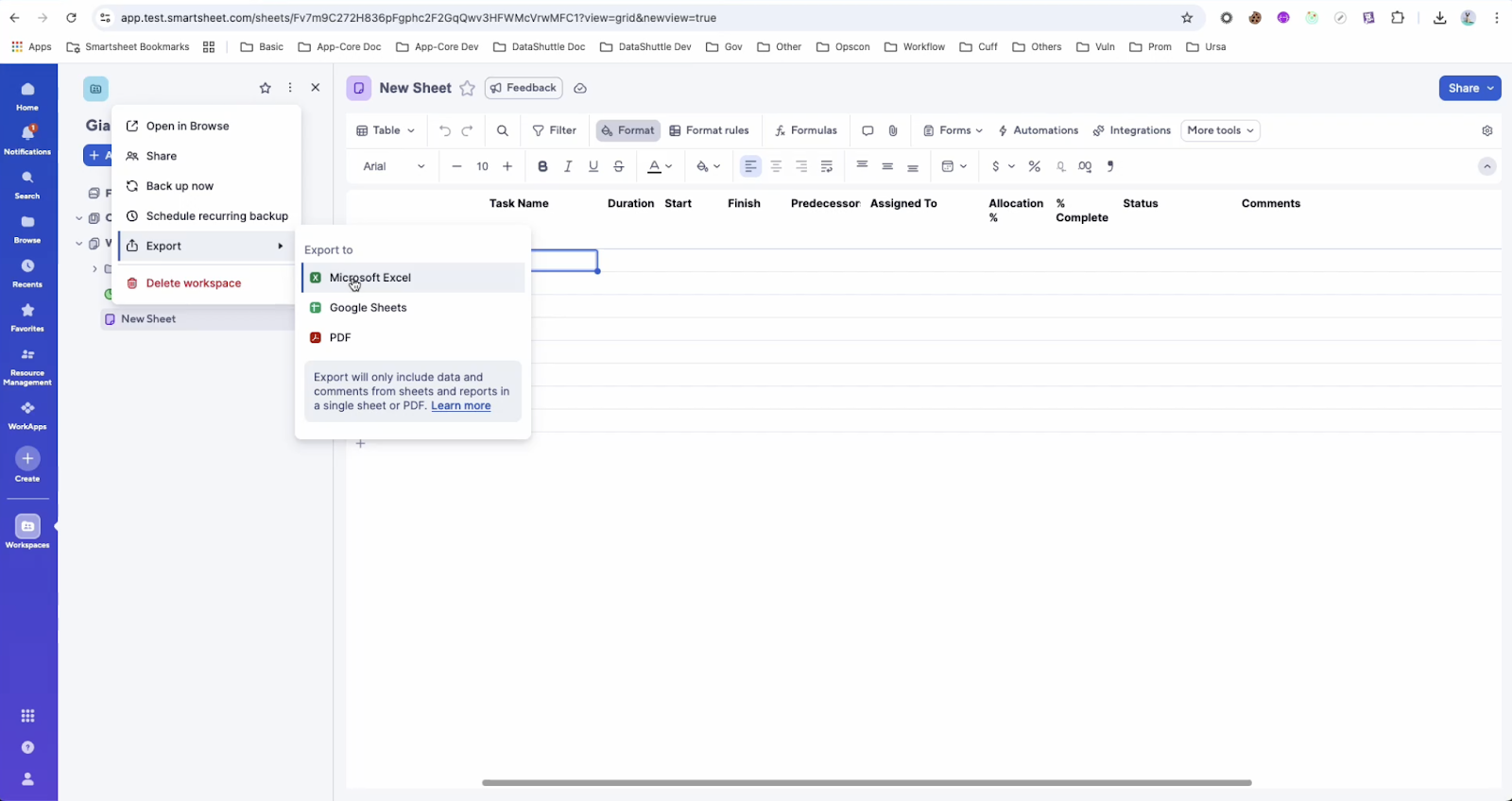
Export in Workspace Panel
May 13, 2025
You can now initiate one-time exports of sheets, reports, folders, and workspaces from the Workspace Panel. These options were previously only available in Browse.
This release impacts these three export options:
- Export to MS Excel
- Export to PDF
- Export to GSheets
Environments availability: Commercial US, Commercial EU, Smartsheet Gov
Plan availability: Pro, Business, Enterprise
Subscription Model Availability: Legacy Collaborator Model and User Subscription Model
Stay informed by Subscribing to receive product release updates for curated news of recently released product capabilities and enhancements for the platform of your choosing, delivered to your inbox. As new releases occur, you will receive a weekly email with news of what's released every Tuesday.
 Danielle Wilson
Re: New True-Up Steering Us Away from Smartsheet FAST
@Vuckecucke To my knowledge, anyone who edits any part of a sheet will be given a Provisional-Membership license, which needs to be kept or removed before the True Up period ends or they will upgrade to full Membership with their Membership costs being prorated to your bill. This would mean that setting a sheet to allow "Edit by All" would make it so any viewer who edited any fields in that sheet would be given a Provisional-Memberhsip.
Your Administrator must go through True-Up before each new billing cycle or risk having Provisional-Members be upgraded to full Memberships on your bill.
RWil
Re: Form's Created By
@mjoubert - I've encountered the same issue, and I don't think there is a way to change this without Smartsheet enhancing the product. I'd suggest submitting an enhancement request through the Product form.
Here's the link:
 MedaUser
Re: Destination sheet not appearing
Hi @Robin V.,
I assume you are trying to copy or move a row to another sheet in automation? If so, are you searching for the title of the sheet in the search bar when adding the sheet? Opening the window to connect a sheet will not automatically display a list of your available sheets as you have to enter something in the search bar.
MedaUser
Re: Will the old tagging ability on import ever return??
I have an email stating they are rolling back the upgrade. So glad to hear this news.
FGT Amanda
Re: Index Max / Children
Hi all, I found a work around in the end and did it this way. Maybe slightly long winded but helped me ensure that even if the nature of issue max score was equal to another score in the same group, I could join them in the metrics sheet. Step 1-3 are in the source sheet. Step 4 in the metrics sheet.
Step 1 - Nature of Issue Count
=COUNTIFS([Nature of Issue]:[Nature of Issue], [Nature of Issue]@row, [Site Name Helper]:[Site Name Helper], [Site Name Helper]@row)
Step 2 - Max Count for Group
=MAX(COLLECT([Nature of Issue Count]:[Nature of Issue Count], [Site Name Helper]:[Site Name Helper], [Site Name Helper]@row))
Step 3 - Most Common Nature of Issue
=IF([Nature of Issue Count]@row = [Max Count per group]@row, [Nature of Issue]@row)
Step 4 (in Metrics sheet) - Most Common Issue
=JOIN(DISTINCT(COLLECT({Most Common NoI}, {Site Name Helper}, Site@row)), " || ")
Sam Swain
Re: Rich Text Formatting in email notifications (and Update Requests)
Almost three years after the original post, four pages of comments and still no action on this? Pulleeeezzzz pulleeezzzz can you do something about this? Gravity Forms, Airtable, perhaps Monday, they all have this ability baked in.
I appreciate the boldtext.io suggestion that was sent in (page 2 of comments I think), but that's pretty hacky and forces me outside the application to make the fix.
Luke L
Re: Moving rows from one sheet to another where both have different auto numbering conventions?
@Darren Mullen I think that could work! I practiced a bit with using SUBSTITUTE() and it seems to be working as expected. Thank you!
J. Morrish
Re: May Question of the Month - Join the conversation and receive a badge
I would describe my job to a 5-year old as:
I put pictures, words, numbers, and graphs on slides. Leaders at my company want to see big line go up, or big line go down, depending on the situation. It's my job to help them understand why the line is going up or down, so we can make adjustments as a company.
 Will Duplex