Best Of
AI-Powered Document Analysis – Turning PDF Documents into Smartsheet Workflows
Dear All,
We recently hosted our live webinar:
“AI-Powered Document Analysis – Turning PDF Documents into Smartsheet Workflows” – and we had a great turnout with nearly 300 Smartsheet users joining us.
The feedback has been overwhelmingly positive – especially on the live demos, which showed how much time and effort this solution can save. If you missed it, no worries:
👉 Watch the full webinar recording here
📎 Plus, you’ll find the slide deck attached to this email.
🔍 Why You Should Watch the Recording:
Attendees were especially impressed by how seamlessly our Azure OpenAI integration enhances Smartsheet to automate what was previously manual, time-consuming work. In under 10 minutes, we showed how you can:
- ✅ Extract key data from safety data sheets and create structured Smartsheet rows for compliance and hazard handling
- ✅ Turn incoming PDF invoices in any language into usable accounting data and live dashboards
- ✅ Convert a purchase agreement into a complete project timeline with Gantt charts and task owners — all powered by AI
- ✅ Maintain data privacy and security by running everything inside your Azure environment, fully GDPR-compliant
📬 Want to Learn More?
If you’d like to explore how this could work for your organization:
- ✉️ Reply to this post to request a 1:1 consultation
- 🔗 Follow us on LinkedIn for more use cases, dashboards, and upcoming events: Follow MASA Consult
We’d be happy to walk you through your own use case or share what others are already implementing.
 kowal
kowal
Community Category: Best Practice
Welcome to the Best Practice Category in Community!
With so many great discussions happening we see incredible solutions being built out by our members. This category is a place to find creative solutions, tips and tricks, and best practices. The Smartsheet Community Team will collect nominated posts and put them here in Best Practice so you can easily access this content.
Nominate a Post
Have you come across a post with a helpful solution? Nominate it to be reviewed as a Best Practice!
Here’s how to do that:
- From the post, click the Flag icon in the upper-right corner of the post.
- In the pop-up window, choose Other.
- Leave a note for the Community Team to clarify why you think this should be a Best Practice.
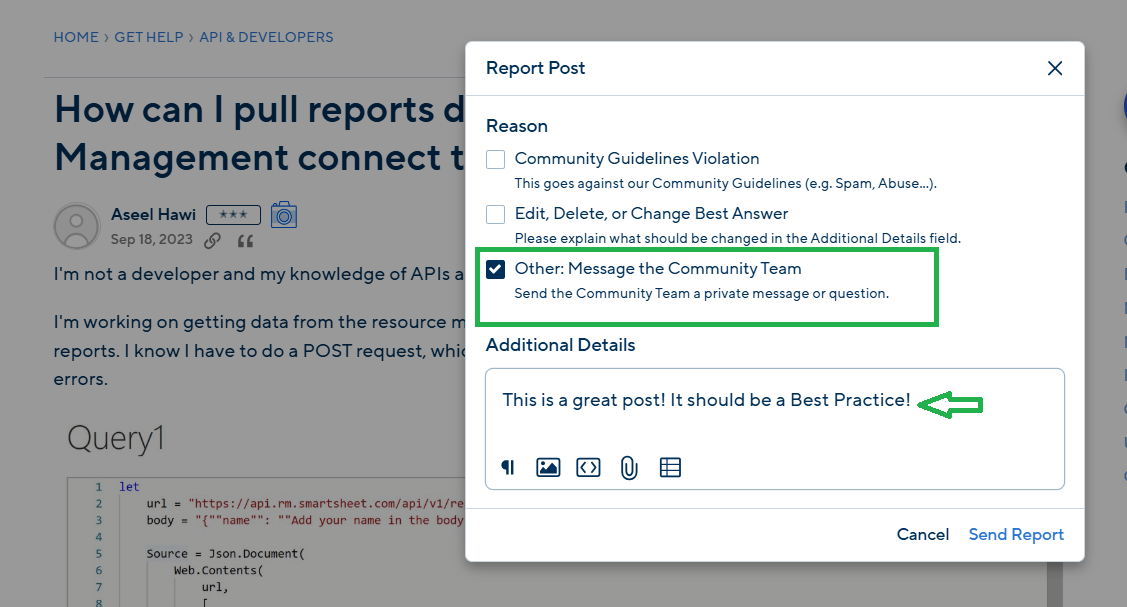
Our Community Team will review the post and move it to this category, and the member who came up with the solution will receive extra points for their great contribution. Don’t forget to use the Vote Up button or mark the post as Insightful as well!
Cheers,
Smartsheet Community Team
 Genevieve P.
Re: Cross sheet references not updating
Hello,
So sorry I never responded with my resolution!
It ended up just being the fact that the today() formula does not update automatically on another sheet, so I just set up an automation to basically refresh the page at the top of the day.
This fact about Today() is explained in the Smartsheet reference page, I just had skimmed over it and didn't realize it was the case.
Thank you,
Spencer
 Spencer_W
Re: Smartsheet London Conference 2025?
Hi all,
I have more information for you regarding the London event:
Building on the success of ENGAGE London last year, we’re excited to deepen our connection with customers and prospects across Europe. We’re launching a series of three tailored events for the UK, Germany, and France.
These will be free, one-day events will feature localised content designed to align with the specific maturity and dynamics of each market, ensuring a valuable and relevant experience for all attendees.
London is confirmed for 3rd June. We will post more information when we have dates confirmed for Germany and France.
Cheers,
Genevieve
Genevieve P.
Re: INDEX and MATCH across two sheets: a detailed explanation
@Kayleigh Colon That means your {Cross Sheet Reference} wasn't properly created.
This article should help you get the rest of the way there…
.
 Paul Newcome
Re: Creating an automation workflow with multiple conditions to populate Size column
Well after a few more tests with formula I removed @cell and it now works.
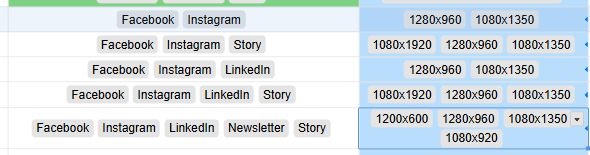
=JOIN(COLLECT({Table Sheet Size Column}, {Table Sheet Outlet Column}, HAS([Social Outlet(s)]@row, @cell), CHAR(10))
 PDunn
PDunn
Is this a SPAM or Phishing Email from Smartsheet?
I received an email titled: Enjoy a gift from Smartsheet from Rebeca Sanchez (via Reachdesk) gifts@reachdesk-mail.com, but the body of the email says
Hi,
Arsineh from the Smartsheet Community team would like to send you a little something in appreciation of your positive contributions to the Community and in celebration of you achieving the Leader rank - the 2nd highest rank within the Smartsheet Community.
This link will expire May 28th 2025
Is this legit or spam/phishing?

Re: Count Function and Symbols
Thank you! That worked!
Here is the nested IF statement that I used in case anyone else wants the answer to it:
=IF(COUNTM([Alert Contacts]@row, [Assigned To]@row) = 0, "Empty", IF(COUNTM([Alert Contacts]@row, [Assigned To]@row) = 1, "One", IF(COUNTM([Alert Contacts]@row, [Assigned To]@row) = 2, "Two", IF(COUNTM([Alert Contacts]@row, [Assigned To]@row) = 3, "Three", IF(COUNTM([Alert Contacts]@row, [Assigned To]@row) = 4, "Four", IF(COUNTM([Alert Contacts]@row, [Assigned To]@row) = 5, "Five", "Five"))))))
My next part of the question is how do I count only unique contacts between both cells? The "Alert Contact" and the "Assigned to" columns have overlapping contacts occasionally.
Gianni
Re: Welcome to the Digital and IT Portfolio Management Community!
Hi! I have used Smartsheet since 2019. What I look forward to learning from my peers is how different organizations and industries plan and align their initiatives, projects, and support with the strategic goals roll out/up.
 Yvonne Smythe
Re: May Question of the Month - Join the conversation and receive a badge
I find people who can make better books and fun activities for your school!
 Ryan.Ray