Best Of
Re: New Membership versus License Model
@swfascetti Hello!
Not sure if this helps but this is the explanation I received when we were looking at how the new model would impact our use:
1. Licensing Requirements for Internal Users:
Under the new User Subscription Model, all internal users who need to create, edit, or comment within Smartsheet are required to have a paid membership. The previous distinction between "licensed users" and "unlicensed users" has been replaced with "Members." Previously licensed users and unlicensed admins and editors would all need to be designated as Members to maintain their current access levels.
2. Definition of Members, Guests, and Viewers:
- Members (Paid Users): Internal users with the ability to create, edit, comment, and view Smartsheet items.
- Guests: External users (those with email domains different from your organization's) who can be granted Editor or Commenter permissions on shared items. Guests do not incur additional costs to your organization.
- Viewers: Internal users with the ability to view Smartsheet items.
 melissalk
Re: Update multiple column dropdowns on one sheet, from one source sheet using Bridge
You should be able to do something like this.
For the Parent:
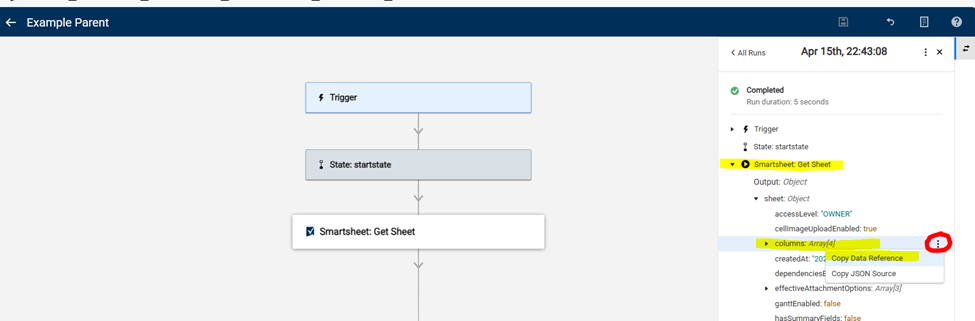
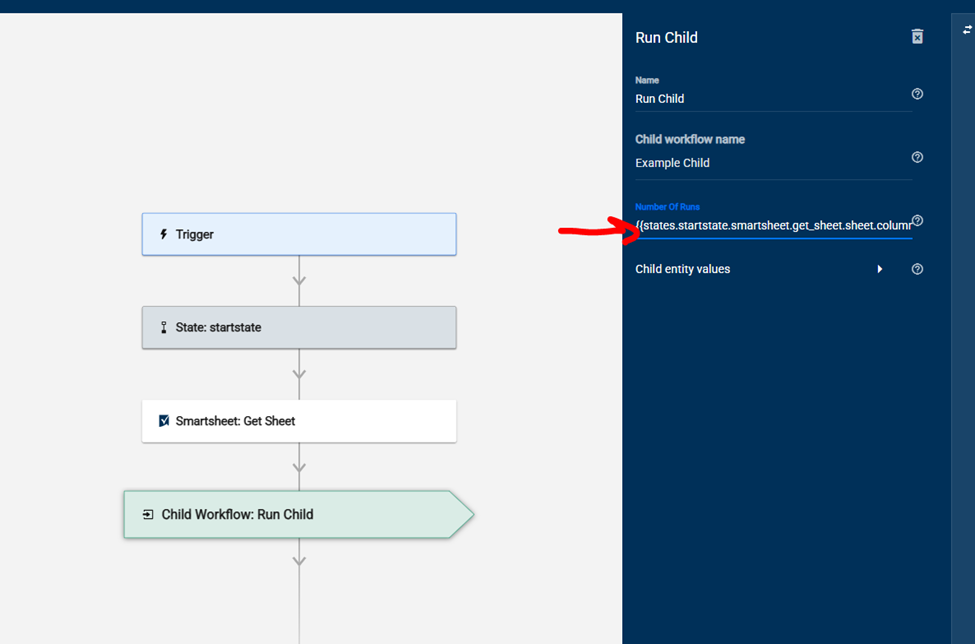
Copy the Data Reference for the column array in the run data and paste it into the "Number of Runs" field on the Run Child config.
IMPORTANT NOTE: When you are first setting this up, have your Get Sheet function only grab 1 column so that you don't trigger the child 250 during set-up and testing. You will remove the column filter before you run the live flow.
For the Child:
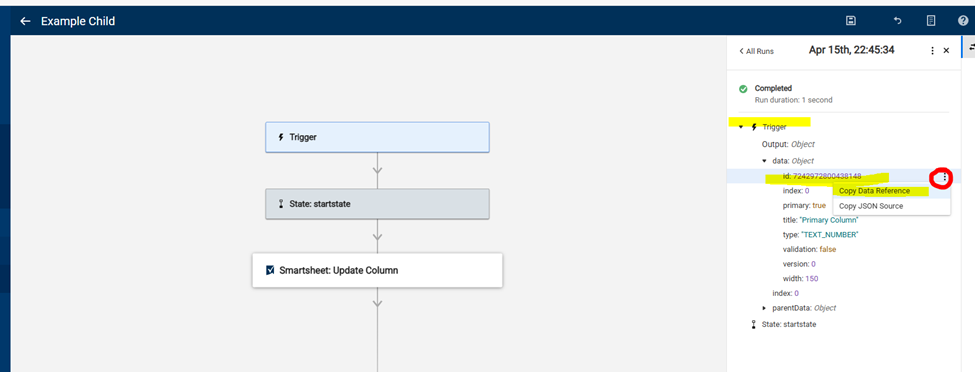
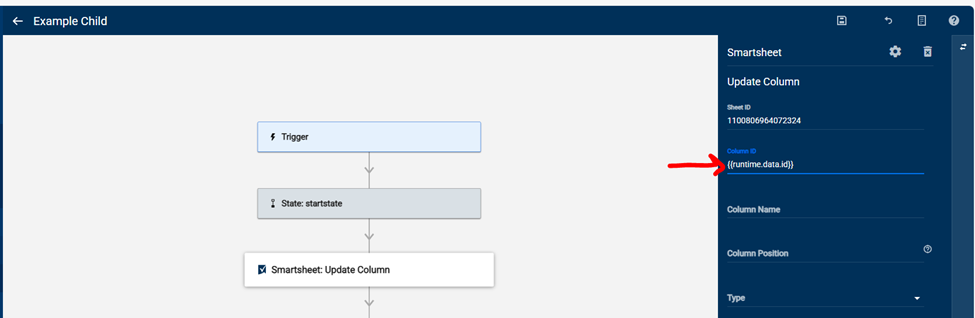
Trigger the child flow from the parent one time so you have some run history. Find the column ID ("Id") under the data and copy the data reference. Paste this into the Column ID field on the Update Column module.
Does that help?
Jess
 jessica.smith
Re: Bridge: Automatically backup a workspace using "Save as New"
Let me amend the above first. When you are building this out, set it to only pull a couple of workspaces. For the "Number of Runs" portion when setting up the child workflow module, set it as the array produced by the API call.
Then your child workflow trigger will contain the workspace data that triggered it which can then be used in the modules of the child workflow to create your copy.


 Paul Newcome
Welcome to the B2B Work Management Community!
This is a space for Smartsheet users that work in B2B Work Management functions to connect, share ideas, challenges, best practices and how you are using Smartsheet to transform your specific use case.
Our Smartsheet team will be sharing helpful resources, upcoming industry events, discussion questions, and more. You’ll see us jumping in from time to time, but first and foremost, this space is yours to connect and collaborate with peers.
We’ve created a unique B2B Work Management badge just for this community to showcase on your profile and use to connect with others. Introduce yourself and start engaging with your peers and the badge will be automatically added to your profile.
Need a little inspiration? Tell us:
- How long have you been using Smartsheet?
- How are you using Smartsheet today or planning to in the future?
- What would you like to learn from your peers using Smartsheet for B2B Work Management?
 Rebeca S.
Updated Sharing Modal
Did you know Smartsheet recently updated how you request and grant access? This new release video shows how much easier it is to give context with your requests, and for admins to manage them!
 Marie F.
Re: Request for Rollback - create sheets in Sheets folder
Absolutely agree with you — the new Smartsheet update has made things significantly more difficult for our team as well. The inability to create or manage folders as before has disrupted how we organize and access our work. Forcing the creation of new workspaces for every new sheet, report, or dashboard has not only cluttered our environment but has also added unnecessary steps and confusion to what used to be a straightforward process.
It’s impacted efficiency, collaboration, and the overall user experience in a negative way. A rollback or at least an option to return to the previous structure would go a long way in restoring productivity and clarity. You're definitely not alone in this frustration.
 JoshX095
Re: Conditional formatting - OR condition?
Ah, that makes sense. Creative workaround, John! Nice. Thank you for the tip!
DTPM
Re: Sum values based on corresponding value in second column
TECHNICALLY you can using a SUM and VALUE functions, but it will still require quite a few helper columns as you would have to first wrap each parsing formula in a VALUE function then nest a number of these inside of a SUM function. This provides for a very long and hard to manage formula that will end up hitting limitations very quickly (which is where the helper columns column in). You will also need to wrap each parsing formula in an IFERROR. It would end up looking something like this…
=SUM(VALUE(IFERROR(MID(1st_parsing_solution), 0)), VALUE(IFERROR(MID(2nd_parsing_solution), 0)), VALUE(IFERROR(MID(3rd_parsing_solution), 0)))
As you can see, putting in the actual "guts" for each of the parsing formulas will extend this quite rapidly, and formulas cannot contain more than 4,000 characters including spaces. This means you would need to break this down across multiple helper columns to add up (for example) parts 1 - 15, 16 - 30, 31 - 45, etc..
Then once you do all of those formulas, you would add together all of your helper columns.
@jmyzk_cloudsmart_jp I wish I could take credit for the SUBSTITUTE thing. I can't remember who I originally got this from some years ago, but I'm not the original creator for that method.
Paul Newcome
Re: Smartsheet Intelligent Work Management and McLaren Formula 1
I work with flow any chance I can to build solutions and create efficiencies within them. From requesting updates and alerting people to moving, manipulating, and shuffling data around; my aim is to not only succeed in the development of my solutions, whether simple or complex, but also to ease the administrative burden of others as much as possible.
 Ray Lindstrom
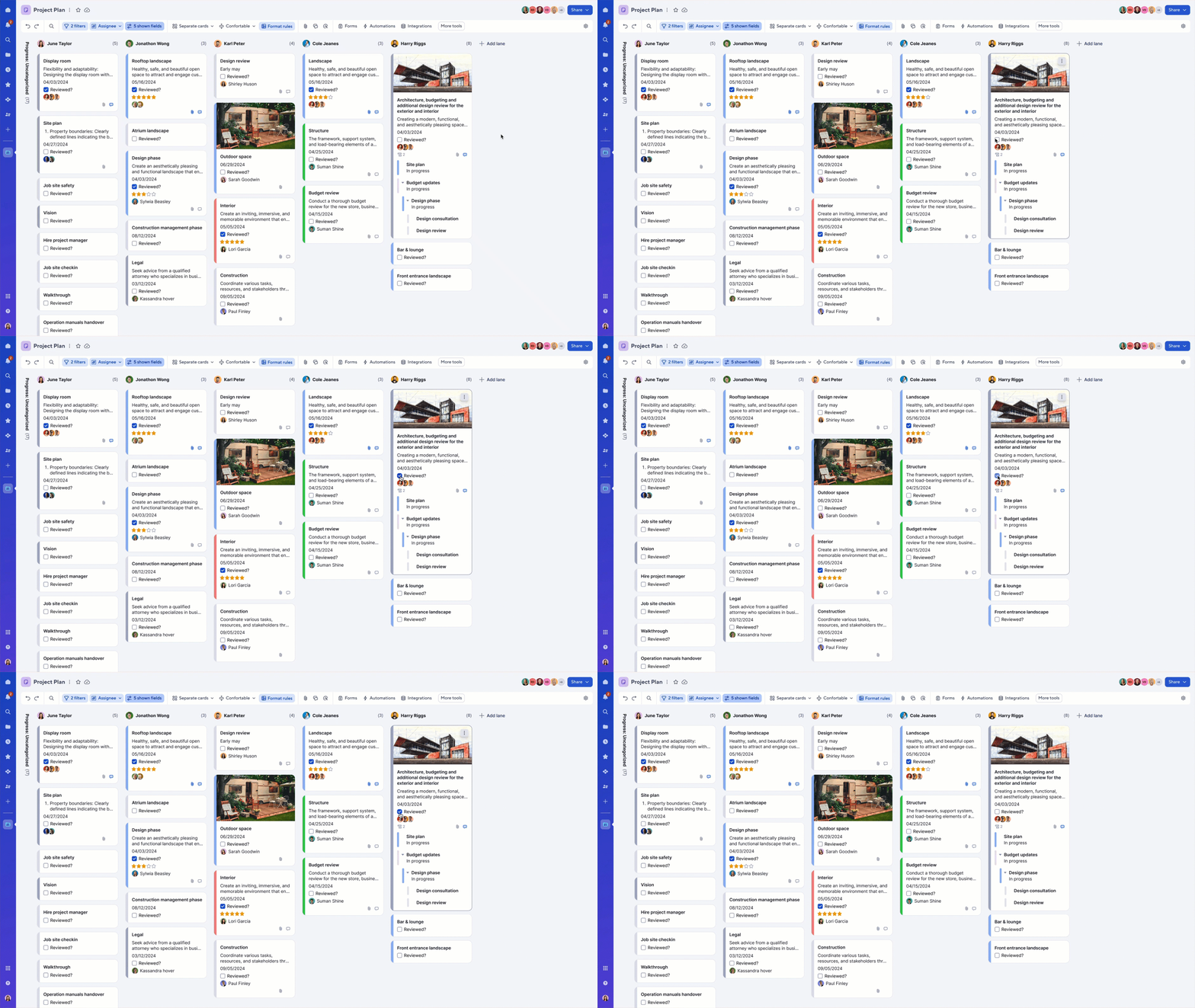
Check the checkbox directly on a card in board view
April, 16, 2025
Previously, making changes to a checkbox field in board view required users to double-click a card to open the record details panel (RDX). Now, you can check or uncheck a checkbox field directly on the card surface—no need to open the panel. This enhancement makes it faster and easier to make quick updates with just one click. Learn More
Environments availability: Commercial US, Commercial EU
Plan availability: Pro, Business, Enterprise, Advanced Work Management
Subscription Model Availability: Legacy Collaborator Model, User Subscription Model
Stay informed by Subscribing to receive product release updates for curated news of recently released product capabilities and enhancements for the platform of your choosing, delivered to your inbox. As new releases occur, you will receive a weekly email with news of what's released every Tuesday.
 Lekshmi Unnithan