Best Of
Re: August Question of the Month - Join the conversation and receive a badge
Seconding Naeem and Rebecca's sentiment about posters commenting that their problems were solved from threads in Community! It's really nice to see the lasting impact of things written here.
 meagans
Re: August Question of the Month - Join the conversation and receive a badge
I agree with this! It is so helpful to go back and see threads on problems that others are working together to solve that I just stumbled into myself.
 rebecca.collins
Re: August Question of the Month - Join the conversation and receive a badge
The best thing I've seen on the Smartsheet Community is not one particular post, but instead a theme of posts. That theme would be the posting of what people are proud of and delighted to share. Whether it be about their kids, pets, success(es), hobbies, traveling, etc.. It brings me joy to see what brings others' joy.
 Ray Lindstrom
Re: August Question of the Month - Join the conversation and receive a badge
I'm adding my vote to "Sense of Community" too!
 Paul Newcome
Re: August Question of the Month - Join the conversation and receive a badge
What’s the best thing you’ve seen on the Smartsheet Community platform?
It's already been mentioned and worth mentioning again - the overall sense of community is incredible, the best I've seen anywhere.
The "cherry on top" is the responsiveness and willingness to lift each other up across the community. While there are periods where I see a few dozen "unanswered questions", it's notable for it's rarity.
Visiting the community is part of my morning routine and end-of-day routine and I'll often take a mental note to respond to a question later in the day and when I get back to it, it's already been answered! Amazing!!
 Sing C
Re: August Question of the Month - Join the conversation and receive a badge
For me, the absolute best part is when a new user posts “This solved my problem!” after the community helps them a real reminder that the platform is about sharing knowledge and lifting each other up.
 Naeem Ejaz
Re: August Question of the Month - Join the conversation and receive a badge
What I appreciate about the community is the diversity of background and use cases. Often times, I got siloed in the industry and area where I work in. However, the Smartsheet community is broader than that and solutions to problems I see in my world can easily come from people who has no clue of my world, but might've faced a similar problem and already resolved it
 AntonioC
Re: August Question of the Month - Join the conversation and receive a badge
My answer is simply the community itself. I used to think I was on an island alone with my enthusiasm for Smartsheet until I learned about the SS Community. Every user is proud and collaborative and its so great to know we are all here for each other to help boost ideas, find solutions, and have nerdy talk with.
I definitely am NOT alone on an island. I found my people. 😊
 Paula Grahame
Re: Automation back and forth
Hi @MWJ
First, the move rows and copy rows automation has this limitation to prevent an endless loop.
To avoid creating endless loops, Smartsheet doesn't initiate the Copy Row action when the trigger cell includes cross-sheet formulas or is linked to other cells. To work around this, use time-based automation or recurrence workflows.
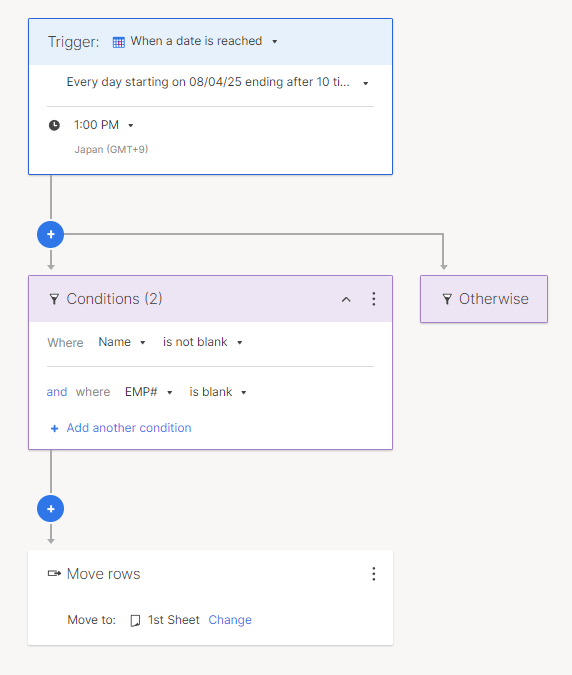
So, I set up the workflow's trigger to be time-based. (See the middle image.)
The image below is before the trigger.
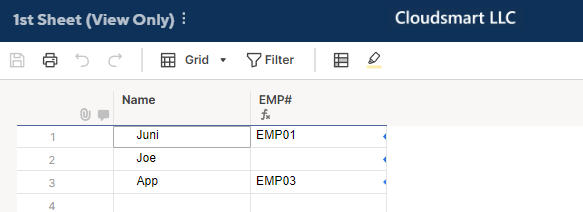
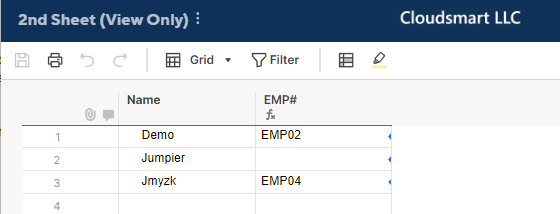
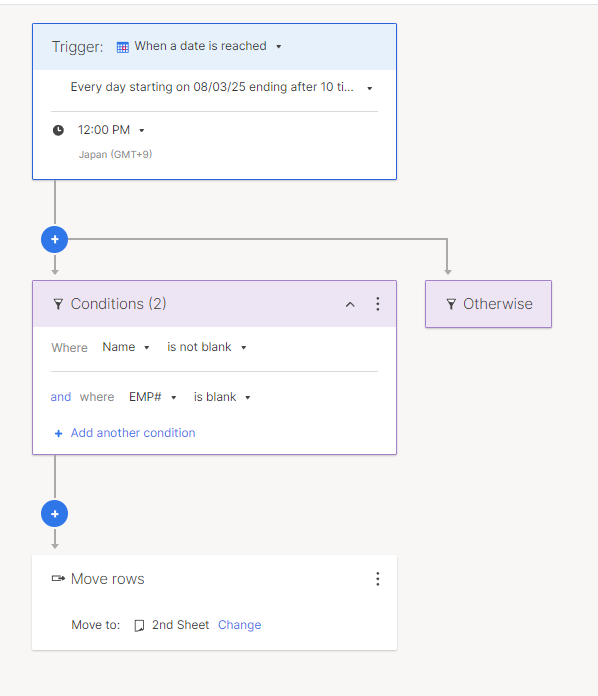
I used Run now, on the 2nd Sheet, and here is what the 1st Sheet gets.
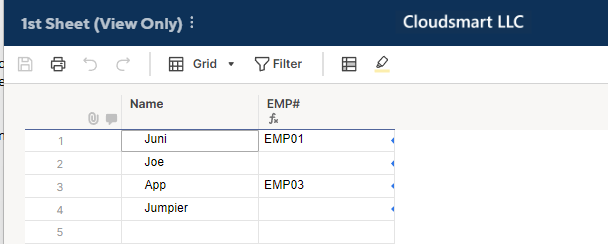
Then, at noon, rows 2 and 4 were moved to the 2nd Sheet.
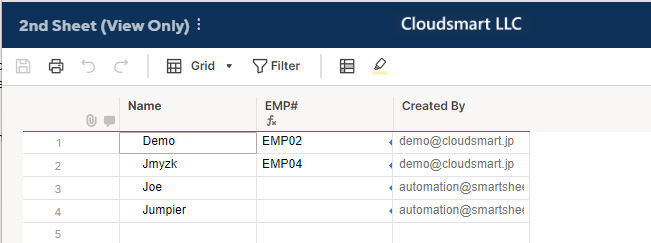
It may be a good idea to change the trigger time on the 2nd Sheet.
By these setups, every day at noon, EMP# blank rows on the 1st sheet move to the 2nd Sheet.
Then, at 1:00 PM, from the 2nd Sheet, all the EMP# blank rows, including the one moved from the 1st Sheet, move to the 1st Sheet.
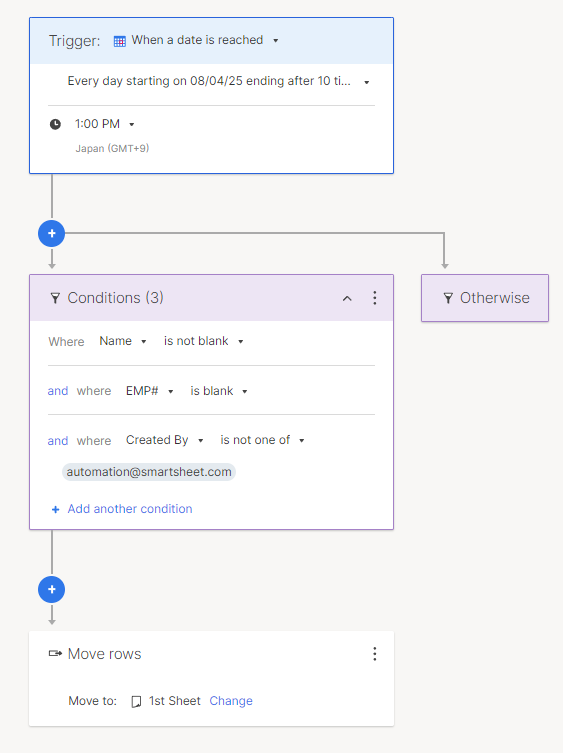
Alternatively, as the updated 2nd Sheet's image shows, if you add the "Created By" column, the rows moved or created by the Smartsheet automation have 'automation@smartsheet.com', we can change the automation to exclude them.
But my question is, why do you want to move the rows back and forth in the first place?
One possible scenario would be that each Sheet has a different reference, so on another sheet, the name may get the EMP#.
P/S
I added a name, Yoshi, in the 5th row of the 2nd Sheet to see what happens at 1:00 PM.
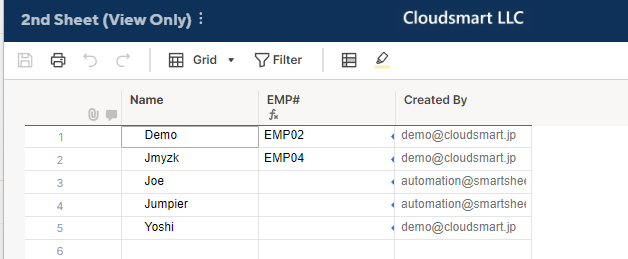
The result
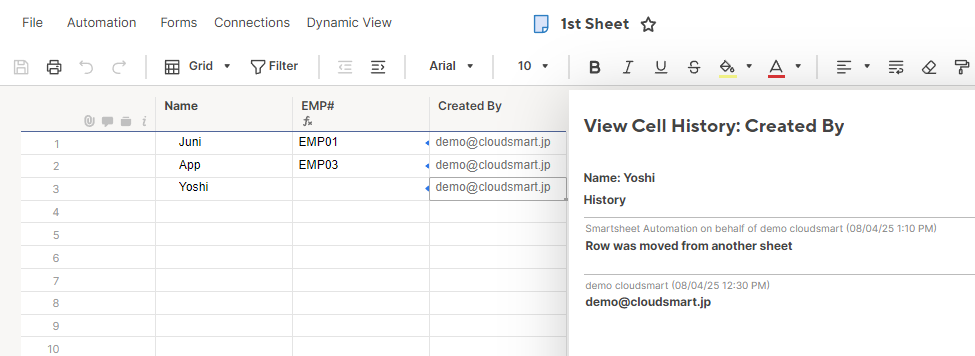
As expected, only the 5th row was moved, but the Created By is not automation@smartsheet.com.
So, the 3rd condition in the above workflow may not be so reliable.

Re: Show tasks that are happening today in a report
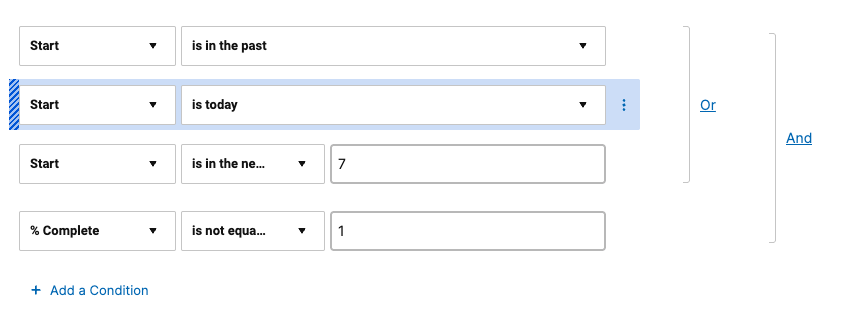
You could skip the extra column and set your report filters like so:
 Paul Newcome